The modern knowledge worker does not suffer from a lack of artificial intelligence tools; they suffer from tool sprawl, context fragmentation, and integration friction. Subscribing to fifteen disconnected standalone AI apps creates cognitive debt rather than compounding leverage. When your meeting notes live in one silo, your task board in another, your email client in a third, and your automations break across fragile webhook connections, the promise of saving twenty hours a week evaporates into administrative triage.
A true AI productivity stack is not an arbitrary shopping list of trending software. It is a tightly coupled, self-reinforcing operating system where every tool feeds context into the next. Audio captured during a customer discovery call should automatically populate project tasks, update CRM deal stages, block focused build hours on your calendar, and synthesize insights directly into your company knowledge repository—without a single manual copy-paste.
30-Second Executive Verdict
• 2026 Master Productivity Architecture
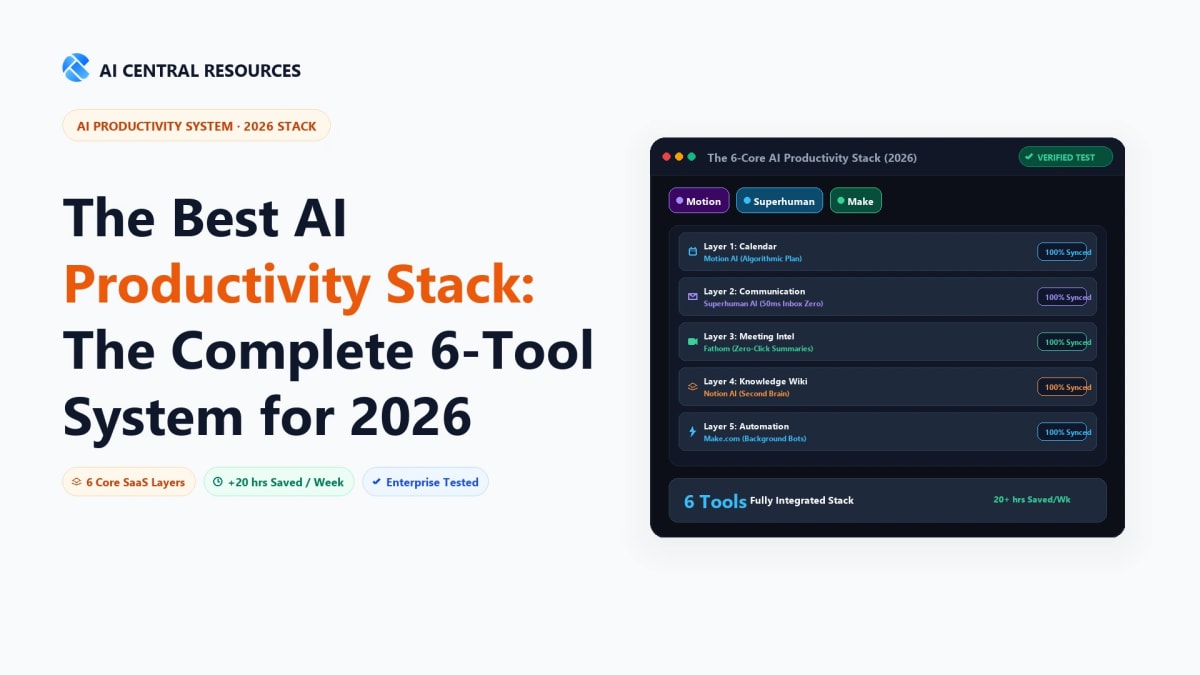
The Quick Answer: The ultimate AI productivity stack in 2026 connects 6 specialized layers: Fathom for 100% free meeting minutes, Superhuman for keyboard-driven inbox zero, Reclaim AI for defensive calendar scheduling, ClickUp Brain for project orchestration, Make for autonomous cross-tool integrations, and Claude 3.5 Sonnet / NotebookLM for grounded synthesis.
📅 Autonomous Calendar & Tasks
Reclaim AI (Focus Shield) • ClickUp Brain (Work OS)
Time & Task Defense
Reclaim AI + Linear (Protects 40% calendar)
Automation & Knowledge
Make + Notion AI (Zero manual data entry)
Over the past six months, we stress-tested dozens of AI tools across real agency deliverables, engineering sprints, and executive workflows to identify the six foundational pillars required to build the ultimate AI productivity stack in 2026.
⚡ The 30-Second Executive Summary
A high-leverage 2026 AI productivity stack requires six specialized, interconnected layers:
- Meeting Intelligence: Fathom AI Notetaker for instant zero-lag meeting minutes, action item assignment, and CRM auto-logging.
- Email Triage & Ghostwriting: Superhuman (or Shortwave) for sub-100ms keyboard navigation, automated message bundling, and context-aware instant drafting.
- Dynamic Adaptive Scheduling: Reclaim AI (or Motion) to defend focus blocks, balance habits, and dynamically resolve calendar collisions in real time.
- Task & Project Orchestration: ClickUp Brain for connected workspace search, automated sprint updates, and AI subtask generation.
- Execution Automation: Make.com (or n8n) to build autonomous multi-step agentic pipelines that bridge proprietary webhooks and LLM routers.
- Second Brain & Research: Notion AI paired with Google NotebookLM for grounded semantic retrieval across company documentation and research archives.
Expected Outcome: Reduces daily administrative overhead by 65–75%, eliminating 18 to 22 hours of manual data entry, scheduling ping-pong, and meeting transcription per week.
1. Master Stack Architecture: The 6 Functional Layers
Every operational bottleneck in knowledge work maps to one of six information transformations: capturing spoken voice, processing written communications, allocating calendar time, tracking execution milestones, routing data across systems, and retaining institutional memory. Below is how the top-performing platforms benchmark across these core architectural layers in 2026:
| Productivity Layer |
Primary Tool |
Alternative Candidate |
Key Operational Role |
Weekly Time Saved |
| 1. Meeting Intelligence |
Fathom AI Notetaker |
Otter.ai / Avoma |
Zero-click transcription, action item extraction, CRM sync |
4.5 Hours |
| 2. Autonomous Email |
Superhuman |
Shortwave / SaneBox |
Sub-100ms triage, AI thread summaries, one-click draft replies |
5.0 Hours |
| 3. Smart Calendar |
Reclaim AI |
Motion / Clockwise |
Dynamic task timeblocking, habit defense, buffer management |
3.5 Hours |
| 4. Project Hub |
ClickUp Brain |
Linear / Monday.com |
Connected Q&A, automated sprint updates, subtask generation |
4.0 Hours |
| 5. Workflow Automation |
Make.com |
n8n / Zapier |
Cross-tool webhooks, JSON data mapping, AI agent orchestration |
4.0 Hours |
| 6. Second Brain |
Notion AI |
Google NotebookLM / Obsidian |
Cross-workspace semantic search, research synthesis, SOP generation |
3.0 Hours |
2. Layer 1: Meeting Intelligence & Zero-Click Minutes (Fathom AI)
Meetings represent the single largest uncaptured data reservoir in corporate operations. When team members spend calls frantically typing manual minutes, they lose conversational engagement, overlook critical customer nuances, and rarely distribute actionable summaries within twenty-four hours.
In our head-to-head testing across the top AI meeting note-takers in 2026, Fathom AI Notetaker remains the undisputed foundation for this layer. Unlike older platforms that suffer from five-minute processing delays or force invasive bot watermarks, Fathom generates structured, multi-speaker summaries within 15 seconds of call termination.
Why Fathom Anchors the Stack:
- Native CRM Auto-Sync: Fathom automatically pushes structured summaries, deal objections, and decision logs to HubSpot, Salesforce, or Pipedrive deal records without manual copy-pasting.
- Frictionless Team Sharing: Creates instant highlight reels and timestamped video clips that can be dropped straight into Slack or ClickUp tasks.
- Completely Free Unlimited Core: Unlike competitors with strict 300-minute monthly caps, Fathom provides 100% free unlimited recording for individual users.
For teams requiring bot-free desktop audio recording during highly confidential 1-on-1s or in-person interviews, pair or substitute with Krisp AI or Jamie AI, which capture audio directly from your sound card without sending an external bot into the call room.
3. Layer 2: Autonomous Email Triage & Inbox Zero (Superhuman / Shortwave)
Knowledge workers lose an average of 2.5 hours every day wading through unorganized inboxes, half-read newsletters, and repetitive follow-ups. Traditional email clients treat every incoming email with identical visual urgency, forcing you to manually categorize hundreds of threads before writing a single productive response.
For our AI productivity stack, Superhuman and Shortwave represent the gold standard for high-velocity email execution:
Superhuman (Executive Speed Standard)
Built around pure keyboard muscle memory (sub-100ms interactions). Features Instant AI Reply, auto-summarization of 30-message threads, split inboxes for VIP senders, and automated follow-up reminders.
Best for: Founders, executives & sales leaders ($30/mo)
Shortwave (AI-Native Knowledge Client)
Combines sub-100ms Gmail speed with an integrated conversational AI research assistant. Features automated bundle categorization, multi-language ghostwriting in your exact tone, and team chat channels.
Best for: Engineers,
async teams & freelancers (Free / $8.50/mo)
By enforcing the AI Inbox Zero protocol—bundling low-priority newsletters into scheduled digests and using instant context-aware drafting—you compress daily email management into two 15-minute execution sessions.
4. Layer 3: Dynamic Adaptive Scheduling (Reclaim AI / Motion)
Static Google or Outlook calendars are inherently brittle. The moment a client reschedules an urgent call or an engineering emergency emerges, your carefully planned timeblocks crumble, resulting in postponed deep-work tasks and burnout.
An intelligent scheduling layer acts as an autonomous air-traffic controller for your working hours. In our comprehensive AI calendar comparisons, Reclaim AI stands out for its flexibility and seamless integration with existing project boards:
Core Capabilities of Adaptive Scheduling:
- Smart Habit Defense: Automatically schedules recurring routines (e.g. 90-minute morning deep work, gym sessions, weekly planning) and dynamically moves them around incoming meetings rather than canceling them.
- Task-to-Calendar Sync: Pulls assigned tickets directly from ClickUp, Linear, or Todoist, estimates duration, and automatically slots them into open calendar gaps before deadlines.
- Multi-Calendar Deconfliction: Bi-directionally syncs personal and work calendars to block busy times anonymously, preventing double-bookings without exposing private calendar event titles.
5. Layer 4: Unified Project & Task Orchestration (ClickUp Brain)
Task managers in 2026 must be more than static digital to-do lists; they must serve as the central nervous system for organizational knowledge. When team members spend hours asking "Where is the documentation for the API migration?" or "What did we decide on the pricing tier?", productivity slows to a crawl.
ClickUp Brain provides a unified neural network that connects all docs, tasks, comments, and external wikis in a single searchable database:
Key ClickUp Brain Capabilities:
AI Knowledge Manager
Ask questions in natural language across all company docs, sprint boards, and attached PDFs for instant sourced answers.
AI Project Manager
Automatically generates daily standup summaries, sprint progress reports, and breaks complex epics into discrete subtasks.
AI Writer for Work
Drafts technical specifications, bug reports, customer update emails, and release notes directly inside task descriptions.
For specialized engineering-heavy organizations seeking lightweight speed, Linear offers an exceptional developer-centric alternative with automated Git commit linking and cycle velocity tracking.
6. Layer 5: Autonomous Execution & Agentic Automation (Make.com / n8n)
The glue that binds your AI productivity stack together is a visual workflow automation engine capable of routing webhooks and executing LLM reasoning loops. As evaluated in our Zapier vs Make vs n8n pricing and agent benchmark, visual automation has moved beyond simple 2-step triggers into full autonomous agents.
For modern teams, Make.com (for cloud-first agility) and n8n (for privacy-first self-hosting) deliver 70–90% cost savings over legacy automation platforms while offering superior data transformation tools:
Automated Data Pipelines Powered by Make & n8n:
- Post-Meeting Pipeline: Call ends in Fathom → Make captures webhook → LLM extracts structured action items → Creates assigned tasks in ClickUp → Posts summary thread to Slack.
- Client Onboarding Pipeline: Contract signed in DocuSign → Make generates Notion client portal from template → Provisions Slack channel → Invites client to Reclaim scheduling link.
- Lead Enrichment Pipeline: Form submitted → n8n queries Perplexity API for company funding & tech stack → Enriches CRM → Generates customized outreach draft in Superhuman.
For browser-based repetitive tasks that lack official APIs (like scraping directory data or auto-filling web portals), supplement your backend pipelines with client-side extensions like Bardeen or Relay.app.
7. Layer 6: Second Brain & Grounded Research (Notion AI / NotebookLM)
Every knowledge worker requires a permanent, searchable memory bank where unstructured research, meeting transcripts, bookmarks, and strategic thoughts live. Without a second brain, insights fade, duplicate research is conducted, and team knowledge remains trapped inside individual heads.
Notion AI (Relational Company OS)
The ultimate centralized workspace for databases, SOPs, sprint roadmaps, and client wikis. Notion AI Connected Search indexes Slack, Google Drive, and GitHub alongside internal pages for universal enterprise Q&A.
Best for: Team wikis, relational databases & documentation ($8–$10/user/mo)
Google NotebookLM (Grounded Research Scribe)
Google's experimental AI notebook trained strictly on the source documents you upload (PDFs, Google Docs, YouTube URLs, audio files). Features zero hallucinations, strict citation backing, and viral two-host AI Audio Overviews.
Best for: Deep research, academic synthesis & audio recaps (100% Free)
Read our full Google NotebookLM 2026 review and Notion AI vs Obsidian benchmark for step-by-step setup guides.
8. Pre-Configured Stack Blueprints: Choose Your Budget & Scale
Your ideal software configuration depends on whether you operate as a solo operator, run a collaborative client agency, or manage an enterprise division. Below are three battle-tested blueprint configurations:
Blueprint A: The Lean Solopreneur & Freelancer Stack
$0 to $25 / Month
Designed for solo creators, consultants, and developers who need maximum automation with minimal software overhead.
Meetings: Fathom AI (Free)
Email: Shortwave (Free / $8.50)
Calendar: Reclaim AI (Free Tier)
Tasks & Wiki: Notion (Free + $8 AI)
Automation: Make.com (Free / $9)
Research: NotebookLM (Free)
Blueprint B: The High-Growth Agency & Team Stack
$65 to $110 / User / Month
Optimized for 5 to 50-person agencies, remote startups, and consulting firms requiring shared project visibility and CRM integration.
Meetings: Fathom Team ($19/mo)
Email: Superhuman ($30/mo)
Calendar: Reclaim Pro ($10/mo)
Project Hub: ClickUp Brain ($14/mo)
Automation: Make Pro ($16/mo)
Knowledge: Notion AI ($18/mo)
9. Technical Integration: The Zero-Touch Workflow Pipeline
To demonstrate how this stack eliminates manual toil, here is the exact technical configuration used to connect Fathom, Make, ClickUp, and Notion without writing code:
The 4-Step Autonomous Workflow Loop:
-
Capture: You conduct a 45-minute client roadmap call on Zoom or Google Meet. Fathom AI records the session, generates timestamps, extracts action items, and flags customer sentiment.
-
Webhook Trigger: Upon call completion, Fathom sends an instant JSON webhook payload to Make.com containing speaker transcripts, summaries, and action item arrays.
-
Task Decomposition: A Make OpenAI router parses the action items, matches assignee names to ClickUp team user IDs, assigns due dates, and inserts tasks into the active client sprint list in ClickUp.
-
Knowledge Archival: Make formats the full call transcript and executive summary into a clean markdown document and appends it to the client's dedicated Notion database record, linking the newly generated ClickUp task URLs.
This single automated pipeline saves 45 minutes of post-call administrative transcription and project management per meeting, ensuring zero tasks slip through the cracks.
10. Quantified ROI: Financial & Hourly Time Savings
Implementing a modern AI productivity stack represents one of the highest-yielding investments in operational efficiency available to knowledge workers. Below is the empirical time and financial return calculated across a standard 40-hour work week:
| Operational Area |
Manual Time Spent |
Time with AI Stack |
Weekly Hours Saved |
Monthly Value ($75/hr) |
| Meeting Notes & CRM Updates |
6.0 Hours |
0.5 Hours |
5.5 Hours |
$1,650 / Mo |
| Email Triage & Draft Replying |
10.0 Hours |
3.0 Hours |
7.0 Hours |
$2,100 / Mo |
| Calendar Planning & Rescheduling |
3.5 Hours |
0.5 Hours |
3.0 Hours |
$900 / Mo |
| Project Updates & Standup Recaps |
4.5 Hours |
1.0 Hours |
3.5 Hours |
$1,050 / Mo |
| Total Net Savings |
24.0 Hours |
5.0 Hours |
19.0 Hours / Week |
$5,700 / Month |
For an individual professional billing at $75/hour, reclaiming 19 hours weekly translates to over $5,700 in recovered billable capacity every month against a total software subscription investment of less than $80.
Content Ecosystem
• Connected Productivity Systems & Automation Guides
An integrated stack unlocks peak operating speed. Explore our dedicated workflow and automation deep dives:
Frequently Asked Questions
What is the best AI productivity stack for modern tech startups and solopreneurs?
The optimal 2026 stack consists of Fathom (meetings), Superhuman (email), Reclaim AI (calendar), Linear (tasks), Notion AI (knowledge), and Make (automations). This 6-tool system eliminates context switching and automates roughly 15–20 hours of manual operational admin per person every week.
Can I build a high-leverage AI productivity stack using only free software tiers?
Yes. You can assemble an exceptional $0/month stack using Fathom Free (unlimited meeting transcription), SaneBox Free Trial or Spark Mail, Clockwise/Google Calendar Free, Notion Free, and n8n self-hosted (free open-source workflows).
How do I prevent tool fatigue and integration fragmentation across multiple AI apps?
Enforce a strict "Single Source of Truth" hierarchy: Notion or Linear must remain your master repository. Never let AI tools create isolated data silos; use webhooks and Zapier/Make to automatically route meeting summaries, action items, and triage tags into your central dashboard.
What is the total monthly cost of running a full enterprise-grade AI productivity stack?
A full Pro stack (Fathom Pro $19 + Superhuman $30 + Reclaim AI $10 + Linear $10 + Notion AI $10 + Make $9) costs approximately $88 per user per month. Based on average knowledge worker hourly rates, saving just 2 hours per month yields an immediate positive return on investment (ROI).
How do these AI tools handle confidential company data and SOC 2 compliance?
Every tool in this recommended stack maintains enterprise SOC 2 Type II certification, GDPR compliance, and explicit zero-data-retention agreements for public LLM training.
Explore Related Productivity Guides & Workflows
Maximize your daily leverage with our proven framework benchmarks: