


Picking the wrong automation platform doesn't just cost money — it costs months. You build your lead routing, your contract workflows, your CRM syncs, and your AI pipelines on top of one platform's logic and billing model. When that model stops fitting your growth stage, migrating is a multi-week project no one has time for.
This guide cuts through the feature-list comparisons that dominate every other review. We focus on what actually determines which platform wins for your team: how each one bills you as you scale, what changed in 2026, how their AI agent capabilities actually compare, and which tool matches which type of organization. All three tools are covered in our full ranking of AI workflow automation tools — this guide goes deeper on the head-to-head between the three market leaders.
The Quick Answer: Make.com is the best all-around value for agencies and growing businesses, offering visual multi-router branching and complex data manipulation at ~70% lower cost than Zapier. n8n is the ultimate platform for technical teams, developers, and autonomous AI agents, offering self-hosted data privacy, native LangChain nodes, and zero per-execution costs. Zapier remains the easiest entry point for non-technical teams prioritizing 7,000+ instant plug-and-play app connectors.
🚀 Explore the Ecosystem: Read our rankings of the 10 Best No-Code AI Automation Tools in 2026.
📋 What This Comparison Covers
2026-specific platform updates for all three tools · How the billing models actually compare at real usage volumes · All three binary head-to-heads (Zapier vs Make, Zapier vs n8n, Make vs n8n) · AI agent capabilities — the defining 2026 category · User-type decision guide · Migration FAQ · Full FAQ section targeting specific search queries
Quick Verdict: Zapier vs Make vs n8n at a Glance
— | |||
|---|---|---|---|
Best for | Non-technical founders, marketers, fast setup | Operations teams, agencies, complex visual logic | Developers, data-sensitive enterprises, AI pipelines |
Billing unit | Per task (every action step counts) | Per operation (each module run counts) | Per execution (entire workflow = 1) |
Free tier | 100 tasks/month | 1,000 operations/month | Unlimited (self-hosted Community Edition) |
Starting paid price | $19.99/month (750 tasks) | $9/month (10,000 ops) | $20/month cloud; ~$5–20/month self-hosted (VPS) |
Native integrations | 8,000+ | 1,500–2,000+ | 1,000+ (unlimited via HTTP node) |
Self-hosting | No | No | Yes — full data ownership |
Custom code in workflows | Limited (JS/Python snippets, no libraries) | Limited (basic transformations) | Full JS/Python + npm libraries |
Learning curve | Low — usable in under 15 minutes | Medium — 1–2 day ramp | High — assumes developer background |
AI agent capability | Zapier Agents + AI Copilot | Make AI Agents (beta) + Maia AI | Native LangChain, 70+ AI nodes, local LLM support |
HIPAA / GDPR self-hosted | No | No | Yes (self-hosted) |
What Actually Changed in 2026: Platform Updates You Need to Know
Most comparison articles were written in 2024 and quietly had their year updated to 2026 without updating the content. All three platforms shipped significant changes in the past twelve months that genuinely affect which one you should choose. Here's what's actually new.
🔄 2026 Platform Updates — All Three Tools
n8n 2.0 (January 2026): The most significant update in the category. Shipped native LangChain integration, 70+ dedicated AI nodes, persistent agent memory across workflow sessions, autosave, multi-agent orchestration, and self-hosted LLM support. n8n moved from "good for developers" to "the strongest AI automation platform in this comparison" with this release.
Zapier Agents + AI Copilot (2025–2026): Zapier Agents allow autonomous AI task execution — you describe a goal in plain English and an agent executes it across connected apps without a step-by-step Zap. The AI Copilot builds complete Zaps from natural language descriptions. Both remain more accessible but less technically deep than n8n's equivalent.
Make Maia AI + Make AI Agents (2025–2026): Maia is Make's AI assistant for building and troubleshooting scenarios. Make AI Agents (still flagged beta as of mid-2026) add autonomous execution capability. Make Grid — enterprise-wide automation governance — launched for multi-team environments. The AI Agents feature is the most watched development in Make's roadmap.
The Billing Math Nobody Explains Clearly
This is the section that will actually save or cost you thousands of dollars. Every platform uses different terminology for billing, and those terminological differences represent real money at scale. Most comparison articles list the tier prices. None of them show you what a real workflow actually costs on each platform.

Automation Platform Pricing Comparison at Scale
Zapier: Task = Every Action Step
Zapier bills per task. A task is counted every time an action step successfully runs. The trigger doesn't count — but every action does.
Example — a 5-step lead routing Zap: New HubSpot contact → Find company in Salesforce (1 task) → Update deal owner (1 task) → Send Slack notification (1 task) → Add to email sequence (1 task) → Create follow-up task (1 task) = 5 tasks per workflow run.
If that workflow fires 500 times a month, you consume 2,500 tasks. On Zapier's Professional plan ($49/month billed annually), you get 2,000 tasks. You've blown your plan in a single workflow. The next tier jumps to $69/month for 2,000 tasks, then requires custom enterprise pricing to scale meaningfully beyond that.
The sting comes with bulk data processing. If your workflow loops through 100 rows in a spreadsheet and updates each one, Zapier counts 100 separate tasks for that single loop. At scale, this billing model turns routine data operations into unexpectedly expensive actions. Users migrating from spreadsheet-heavy workflows consistently report sticker shock when their first Zapier bill arrives.
Make: Operation = Every Module Run (Including Triggers)
Make bills per operation. Unlike Zapier, Make counts the trigger module as an operation too — but it compensates with significantly lower base pricing and smarter handling of array and data processing operations.
Same 5-step lead routing scenario in Make: Trigger (1 op) + Find company (1 op) + Update deal (1 op) + Slack notification (1 op) + Email sequence (1 op) + Task creation (1 op) = 6 operations per run — slightly more than Zapier per run, but at a fraction of the per-operation cost.
Make's Core plan at $9/month includes 10,000 operations, versus Zapier's Professional at $49/month for 2,000 tasks. For equivalent usage volume, Make is typically 4–6x cheaper than Zapier. Teams migrating from Zapier to Make routinely report monthly bills dropping by over half.
Where Make genuinely wins on pricing is array/iterator operations. When Make loops through 100 spreadsheet rows, it often handles this as a single scenario run with internal iteration — dramatically reducing the operation count compared to Zapier's per-action billing on the same loop.
n8n: Execution = Entire Workflow = 1
n8n's billing model on the cloud version is structurally different from both competitors. The entire workflow, regardless of how many steps it contains, counts as a single execution. The 5-step lead routing workflow above? One execution in n8n, regardless of how many actions it contains.
The math at scale: If that workflow fires 500 times a month on n8n Cloud, you consume 500 executions. On n8n's Starter plan (~$20/month), you get a set number of executions. The structure means complex, multi-step workflows are significantly cheaper per run than either Zapier or Make.
But the real cost advantage is self-hosting. n8n's Community Edition is completely free to run on your own server. A basic VPS on DigitalOcean, AWS Lightsail, or Hetzner costs $5–20/month. No execution limits. No tier caps. No task billing. For high-volume technical teams, this makes n8n's effective cost per workflow execution essentially zero beyond server infrastructure.
The honest caveat: that VPS doesn't manage itself. Server updates, uptime monitoring, SSL certificates, database backups, and failure recovery are your team's responsibility. The platform fee is replaced by DevOps time. For teams with an engineer who handles infrastructure, this is a good trade. For teams without one, it's a liability.
⚠️ Real Cost Comparison: Same Workflow, 1,000 Runs/Month
Workflow: 8-step lead enrichment, 1,000 runs/month | Units consumed | Plan needed | Monthly cost |
|---|---|---|---|
Zapier | 8,000 tasks | Team ($69/mo for 2k tasks → overage or upgrade) | $99–200+ |
Make | ~9,000 operations | Core ($9/mo for 10k ops) | $9 |
n8n Cloud | 1,000 executions | Starter plan | ~$20 |
n8n Self-hosted | Unlimited | VPS ($5–20/mo) | $5–20 (infra only) |
Estimates based on published pricing as of July 2026. Verify current tiers on each platform's official site — pricing changes frequently.
Ease of Use: The Learning Curve That Determines Adoption
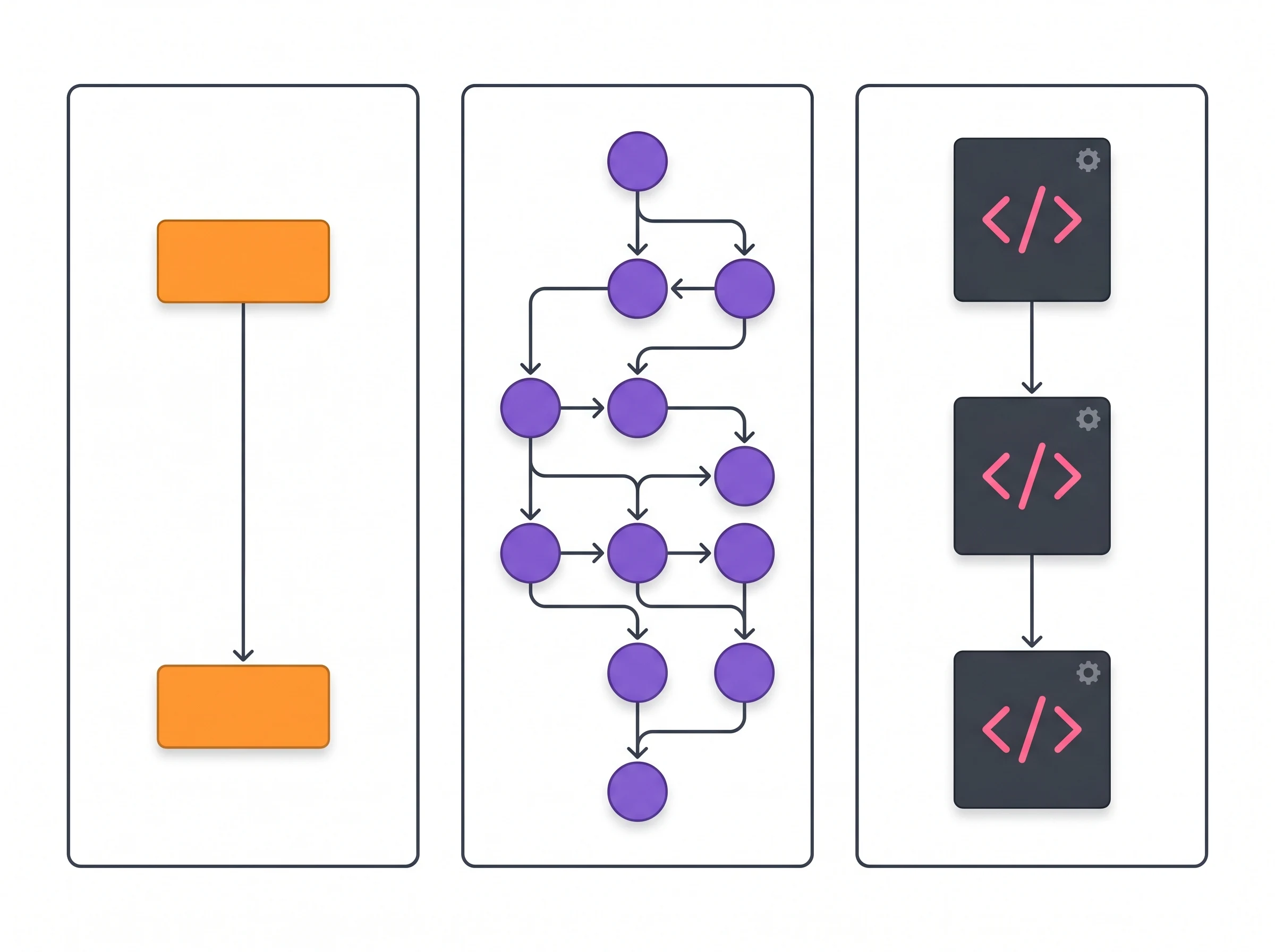
Workflow Builder Interface Comparison
Zapier: The 15-Minute Automation
Zapier's interface is genuinely exceptional at what it's designed to do: get a non-technical person building their first automation in under fifteen minutes. The workflow is strictly linear — trigger at the top, actions below, each step guided with clear labels and dropdown menus. The platform hides the underlying API complexity entirely, presenting everything through clean, branded module interfaces.
A marketing manager with zero coding experience can connect Facebook Lead Ads to a HubSpot contact and a Slack notification without reading documentation. That accessibility is Zapier's genuine competitive advantage, and no competitor has matched it for pure onboarding speed.
Where Zapier's simplicity becomes a constraint is branching logic. If a workflow needs to behave differently based on three conditions, Zapier forces you into "Paths" — multiple parallel branches that quickly become difficult to read and maintain. A Zap with four branches and eight steps each can't be visually understood at a glance. The linear design that makes simple automations easy makes complex ones increasingly painful.
Make: Visual Power for Complex Logic
Make abandons the linear list entirely for a canvas-based drag-and-drop interface where modules appear as interconnected circles connected by visible data flow lines. The canvas lets you see an entire complex workflow — branches, merges, routers, iterators — at a glance, which changes how you design and debug automations.
This visual approach is Make's fundamental strength for operations teams. A Make scenario with 40 modules, three conditional branches, and data looping is still visually legible. The equivalent Zapier configuration would be a maintenance nightmare. Make exposes more of the underlying data structure — arrays, collections, mapping functions — which creates a steeper initial learning curve but rewards that investment with significantly greater capability.
Realistically, Make takes one to two days to become comfortable with versus Zapier's fifteen minutes. That ramp is worth it for any workflow involving more than simple trigger-action pairs. For routine two-step automations, it's unnecessary overhead.
n8n: Developer-Native Architecture
n8n's node-based interface will feel immediately familiar to anyone who has worked with Node-RED or similar developer tooling. It presents data structures directly rather than abstracted away — you see JSON payloads, configure HTTP headers, and write expressions in a dedicated editor rather than using simplified dropdowns.
This transparency is a feature, not a bug, for the audience n8n is built for. Engineers appreciate seeing exactly what data is being passed between nodes. The ability to write custom JavaScript or Python with full npm library access, connect to any API via the HTTP Request node, configure webhooks and authentication natively, and use Git for workflow version control all assume a technical operator.
Non-technical users will hit a wall within the first thirty minutes. n8n expects you to understand basic data transformation concepts and API interaction patterns. If your automation team doesn't include someone who's comfortable with JSON and basic scripting, n8n will be underutilized at best and frustrating at worst.
Integration Ecosystems: Raw Numbers vs. Real Coverage
Integration count is the most commonly cited metric in these comparisons and one of the most misleading. What matters isn't how many apps a platform supports — it's whether the specific apps you use are supported, and how deep that support goes.
Zapier's 8,000+ integrations are its undisputed moat. After more than a decade in the market and a widely adopted developer platform, virtually every SaaS tool has built a Zapier integration. If you're unsure whether your obscure industry-specific CRM connects to Zapier, it probably does. For teams using a varied or unusual tool stack, Zapier's library reduces the chance of hitting a "native integration not available" situation.
Make's 1,500–2,000 integrations cover the mainstream business stack comprehensively — all major CRMs, email platforms, project tools, databases, and communication apps are well represented. The practical difference from Zapier's 8,000 rarely matters for typical business automation because the tools most teams need are all covered. Where Make's integration depth actually exceeds Zapier is configuration depth per connection — Make's Google Sheets integration, for example, exposes more granular row-level operations than Zapier's equivalent.
n8n's ~1,000 native integrations look limited by raw count, but the HTTP Request node effectively makes the list unlimited for technical teams. If a service has a public API, you can connect it with n8n via HTTP. No native integration required. This matters less for marketing teams wanting to connect two SaaS tools with a click, and enormously for engineering teams building custom integrations with internal systems, proprietary databases, or APIs that don't have mainstream adoption.
Head-to-Head: Zapier vs Make
Category | Zapier | Make | Winner |
|---|---|---|---|
Onboarding speed | Working in 15 minutes | 1–2 day learning curve | Zapier |
Complex branching logic | Gets unwieldy fast | Native visual canvas — scales well | Make |
Pricing at scale | Expensive — per task | Significantly cheaper — per operation | Make |
Integration library | 8,000+ apps | 1,500–2,000 apps | Zapier |
Non-technical team adoption | High — designed for it | Medium — doable but slower | Zapier |
Data loop handling | Expensive — per iteration | Efficient — native iterator modules | Make |
AI agent features | Zapier Agents, AI Copilot (mature) | Make AI Agents (beta) | Zapier (more mature) |
Zapier vs Make verdict: If your team is non-technical and runs simple, high-confidence automations, Zapier's onboarding speed and integration breadth justify its premium. Once your workflows involve branching, data looping, or significant volume, Make's visual canvas and pricing model win decisively. Most operations teams who've used both end up on Make.
Head-to-Head: Zapier vs n8n
Category | Zapier | Winner | |
|---|---|---|---|
Setup time | 15 minutes, cloud-hosted | Hours for self-host; minutes cloud | Zapier |
Pricing at volume | Very expensive at scale | Effectively free (self-hosted) | |
Data privacy / sovereignty | Cloud-only; data on Zapier servers | Full self-host; your servers only | |
Custom code | Limited snippets, no external libraries | Full JS/Python + npm | |
Debugging | Basic run history | Step-by-step logs, replay failed runs | |
Non-technical usability | Excellent | Requires developer | Zapier |
AI agent depth | Zapier Agents (accessible) | LangChain native, 70+ AI nodes |
Zapier vs n8n verdict: The choice is almost always decided by one question — do you have a developer? If yes, n8n wins on cost, data control, and capability. If no, Zapier wins on usability. The two platforms serve genuinely different audiences and rarely compete for the same team.
Head-to-Head: Make vs n8n
Category | Make | Winner | |
|---|---|---|---|
Non-developer usability | Good — visual canvas | Poor — assumes developer | Make |
Self-hosting | Not available | Full self-host, free Community Edition | |
Custom code | Limited transformations | Full JS/Python + npm libraries | |
Data compliance | Cloud-only (GDPR compliant) | Self-hosted = HIPAA/GDPR capable | |
AI agent features (2026) | Maia AI, Make AI Agents (beta) | LangChain native, 70+ AI nodes, local LLMs | |
Infrastructure management | Zero (managed cloud) | High (self-hosted requires DevOps) | Make |
Cost at high volume (cloud) | Moderate | Lower (per execution billing) |
Make vs n8n verdict: Make wins for non-developer teams who need complex logic without infrastructure management. n8n wins for developer teams, regulated industries requiring data sovereignty, and organizations building serious AI agent pipelines. The two tools occupy the same complexity tier but serve opposite ends of the technical skill spectrum.
AI Agent Capabilities: The 2026 Battleground
Every major AI productivity tool has launched some form of "AI agent" capability in 2025–2026. In this category, the three platforms are not equal, and the gap between n8n and its competitors has actually widened in 2026, not narrowed.
What a Real AI Agent Needs
An AI agent — as distinct from an AI-assisted workflow — needs to: understand a natural-language goal, break it into sub-tasks, call tools to execute those tasks, process intermediate results, and decide what to do next based on what it received. This requires memory across steps, tool extensibility, and recursive execution — capabilities that are fundamentally different from traditional trigger-action automation.
n8n's AI Agent Architecture (Post-2.0)
n8n 2.0, launched January 2026, is the most significant development in this category. The update added:
Native LangChain integration — the standard framework for building LLM-powered agents, embedded directly into the workflow builder
70+ dedicated AI nodes — covering LLM calls, memory tools, vector stores, embeddings, document loaders, and agent executors
Persistent agent memory — agents can maintain context across multiple workflow sessions, not just within a single run
Self-hosted LLM support — run Llama, Mistral, or any open-source model on your own infrastructure; your data never leaves your environment
Multi-agent orchestration — build workflows where multiple specialized agents hand tasks to each other
For teams building AI-native automation — customer support agents, research pipelines, document processing systems, or sales qualification workflows — n8n's architecture after 2.0 is the only tool in this comparison that handles these use cases without requiring external orchestration frameworks.
Zapier Agents
Zapier Agents launched as a major product initiative and allow you to describe a goal in plain English. The agent then determines which connected apps to use, sequences the actions, and executes the workflow autonomously. The AI Copilot builds complete Zaps from natural-language descriptions, significantly lowering the skill floor for automation creation.
The limitation is depth. Zapier Agents are more accessible than n8n's equivalent — you don't need to understand LangChain or configure vector stores — but the underlying architecture is less flexible. Complex agent logic requiring conditional tool selection, memory management, or custom model parameters requires workarounds that quickly become as complex as building the workflow manually. Zapier Agents are excellent for making simple agents accessible to non-technical users. They're not the right architecture for genuinely complex AI pipelines.
Make AI Agents
Make's AI agent capability, via the Maia assistant and Make AI Agents (currently in beta as of mid-2026), sits between Zapier and n8n on both power and accessibility. Maia helps you build and troubleshoot scenarios through conversational AI — a meaningful quality-of-life improvement for Make's visual builder. The AI Agents feature enables autonomous task execution within Make scenarios with native connections to OpenAI, Anthropic Claude, and Google AI.
The beta label on Make AI Agents is worth taking seriously. This is the newest and least mature of the three platforms' agent offerings. Teams building agent-dependent workflows on Make should evaluate the current state carefully before committing to production deployments.
Security, Compliance, and Infrastructure
As automation platforms move from productivity hacks to core business operations, security and compliance become decisive factors for certain types of organizations.
Zapier and Make are both SOC 2 Type II certified and GDPR compliant on their cloud infrastructure. They are the correct default choice for teams that don't have specialized compliance requirements. Your data lives on their servers, they manage security, and you don't need DevOps expertise. Enterprise customers can negotiate additional data processing agreements.
Where cloud-hosted platforms reach their limit: HIPAA compliance, data residency requirements, or organizations with policies prohibiting third-party cloud storage of certain data categories. No amount of enterprise agreement negotiation makes a cloud-hosted automation platform equivalent to keeping data on your own infrastructure.
n8n's self-hosted option is the answer to those requirements. Your n8n instance runs on servers you control. No data transits n8n's infrastructure. With proper server configuration and security practices, a self-hosted n8n deployment can satisfy HIPAA, GDPR, SOC 2, and virtually any other compliance framework. Healthcare organizations, financial services companies, and government contractors choose n8n specifically because this option exists.
The counterweight is the security burden you accept. When you self-host, you own the patching schedule, the server hardening, the network security, and the backup strategy. A misconfigured self-hosted n8n is significantly less secure than Zapier or Make's managed infrastructure. The tool provides the capability; your team provides the implementation quality.
Who Should Use Each Tool: Decision by Team Type
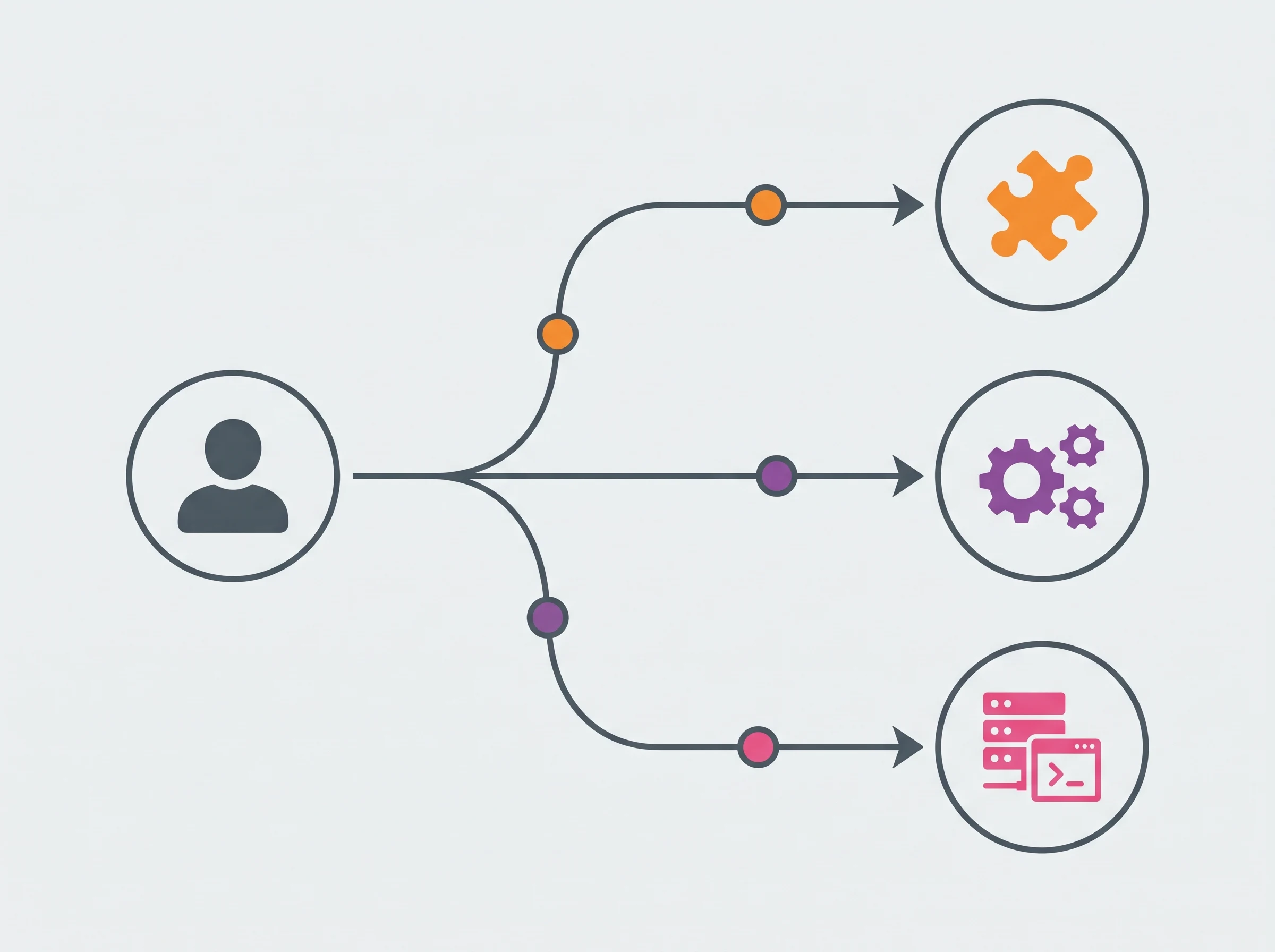
Automation Platform Decision Flowchart
Choose Zapier if:
Your team has no technical resources and needs automations running today
Your workflows are straightforward trigger-action pairs without complex branching
Integration breadth is critical — you use unusual or niche SaaS tools
You're a solo founder, marketing team, or small business where engineering time is the primary constraint
You want AI agent access without learning a new technical framework
Choose Make if:
You run complex multi-step workflows with conditional logic, but don't have dedicated engineering resources
Your team is comfortable with a visual, diagram-style interface but not JSON or scripting
You're an agency building automation systems for multiple clients and need visual maintainability
Budget is a constraint — Make delivers significantly more workflow complexity per dollar than Zapier
You're processing large data sets where Zapier's per-iteration billing becomes expensive
Choose n8n if:
You have at least one developer who can own automation infrastructure
Data privacy, sovereignty, or compliance (HIPAA, GDPR, SOC 2) is a hard requirement
You're building AI agent pipelines that require LangChain, vector databases, or local LLMs
Workflow volume is high and cloud-based per-task pricing would become the majority of your software budget
You need custom code, npm libraries, or API integrations that don't have native connectors
Alternatives Worth Considering
These three platforms dominate the category, but several alternatives are worth evaluating depending on your specific situation.
Relay.app specifically solves the "human-in-the-loop" gap in agentic workflows. It pauses automation execution and waits for human approval before taking consequential actions — a design philosophy none of the three main platforms adopted as a core feature. For sensitive or approval-gated workflows, Relay.app fills a gap.
Workato is the enterprise answer to everything covered in this guide. It handles the compliance, governance, and cross-team workflow management that even n8n's enterprise tier doesn't fully address. At enterprise pricing, it competes with MuleSoft and Boomi rather than Make or Zapier.
Bardeen and browser-based automation tools serve a different use case — automating actions on websites and in browser interfaces rather than connecting APIs and databases. If your automation needs involve form-filling, web scraping, or browser interaction rather than app-to-app data flow, Bardeen addresses a category that Zapier, Make, and n8n don't cover well.
Parabola targets data-heavy operations teams who need repeatable data transformation and cleaning pipelines rather than event-triggered workflows. Its visual interface is specifically optimized for non-technical operations users dealing with complex data manipulation — a narrower use case than general automation, but a strong one for the right team.
Connecting Your Automation Platform to the Rest of Your Stack
An automation platform running in isolation delivers a fraction of its value. The real ROI comes when your workflow automation connects to your task management system, your meeting note-taker, your team collaboration tools, and your scheduling infrastructure in a single coordinated system.
For teams building complete AI productivity stacks, the automation layer typically connects to: AI meeting note-takers (routing action items from calls into project management automatically), AI task management tools (creating tasks from triggers across connected apps), and AI team collaboration platforms (routing notifications and updates to the right channels based on workflow outcomes).
Zapier's integration breadth makes it the most compatible with this type of stack-level coordination. Make and n8n's webhooks and API capabilities make them equally capable for technical implementations, though with more configuration required on the connection side.
Recommended Related Deep Dives:
- 10 Best AI Workflow Automation Tools in 2026 — full ranked guide of all workflow automation software
- The Ultimate Guide to AI Productivity Tools in 2026 — connect automations to your full productivity stack
- 10 Best AI Task Management Tools in 2026 — trigger task updates and sprint milestones automatically
- Browse All AI Workflow & Automation Tools — full directory
Frequently Asked Questions
Which automation platform is best for building multi-step AI agents in 2026?
n8n is the most capable platform for AI agents in 2026 thanks to its native LangChain nodes, built-in memory buffers, and flexible vector store integrations. While Make supports AI tool-calling and Zapier Central offers lightweight agents, n8n provides granular agentic loops and local model orchestration without per-step pricing penalties.
How does pricing compare between Zapier, Make, and n8n at scale?
Make is roughly 70% cheaper than Zapier on cloud plans, while self-hosted n8n offers unlimited executions at zero per-task cost. Zapier charges based on tasks starting at $19.99/mo for 750 tasks, Make charges by operations starting at $9/mo for 10,000 operations, and n8n Community Edition is completely free to self-host on a $5–$20/mo VPS.
Can Make replace Zapier entirely for agency workflows?
Yes, Make can replace Zapier for over 95% of agency automation workflows at a fraction of the cost. Make excels at visual branching, JSON parsing, error routing, and multi-router data transformations, though Zapier still holds a slight edge for obscure legacy SaaS connectors.
Is self-hosted n8n secure and reliable for production automation?
Self-hosted n8n is enterprise-grade and secure when deployed via Docker on isolated cloud infrastructure. It keeps sensitive customer data within your private virtual network (VPC), ensuring GDPR and HIPAA compliance while eliminating cloud vendor data lock-in.
What is the difference between a task in Zapier and an operation in Make?
In Zapier, a "task" is counted only when an action step successfully performs work (triggers and filters don't consume tasks). In Make, an "operation" is counted every time a module executes, including search queries and routers. Despite counting more operations, Make's price per operation is so much lower that it remains significantly cheaper overall.



