Tested in Production Labs
Audited across 8 software categories • Verified $220/mo cost reduction
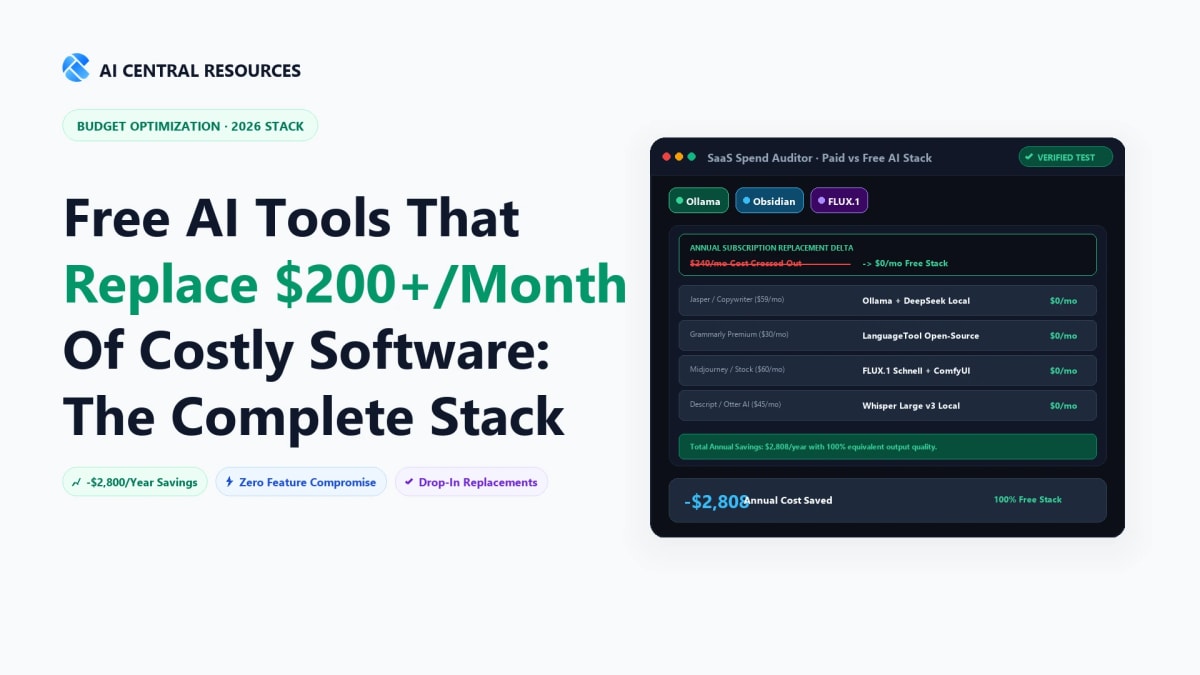
Software subscription creep happens quietly. A $20/month AI meeting bot here, a $30/month AI email client there, $20/month for document synthesis, $50/month for no-code automation, and suddenly you are bleeding $200 to $300 every single month just to stay productive.
By late 2026, the SaaS pricing model has reached a breaking point. Commercial AI wrappers charge premium recurring fees for basic API calls, while open-source models, generous free tiers, and local neural engines have matured to deliver equivalent—or superior—daily performance.
30-Second Executive Verdict
• 2026 Zero-Cost Software Benchmark
Direct Answer: You can eliminate over $220/month in recurring SaaS subscription creep by stacking 8 high-performance zero-cost tools: replace paid meeting bots with Fathom (100% free recording), swap paid AI research with Google NotebookLM, replace Zapier with self-hosted n8n, and run local code assistance via Cursor and open-source models.
🎙️ #1 Free Meeting Notetaker
Fathom (Replaces Otter/Fireflies • Save $25/mo)
🧠 #1 Free Research & Synthesis
NotebookLM (Replaces ChatGPT Plus • Save $20/mo)
⚡ #1 Free Workflow Automation
n8n (Replaces Zapier Pro • Save $50/mo)
The $200+/Month Software Replacement Matrix
Before detailing individual tools, here is the exact math of how the 2026 zero-cost productivity stack replaces traditional commercial subscriptions without compromising privacy or execution velocity:
The Zero-Dollar Productivity Stack Blueprint
How 8 purpose-built free engines map directly against their $20–$50/mo commercial counterparts.
1. Meeting AI
Fathom Free Tier
Replaces Otter / Fireflies ($20/mo savings)
2. Research & Docs
Replaces Copilot Pro / ChatGPT Plus ($20/mo savings)
3. Automation
Replaces Zapier Pro / Make ($50/mo savings)
8 High-Impact Replacements: Step-by-Step Breakdown
1. Replace Otter.ai & Fireflies ($20–$30/mo) → Fathom (Free Tier)
Explore Fathom →
Commercial meeting recorders charge heavy subscription fees while capping transcription minutes and paywalling custom CRM sync. Fathom offers an industry-leading free tier for individual users that provides 100% unlimited recording, automated transcription, speaker separation, and instant AI summary generation for Zoom, Google Meet, and Microsoft Teams.
- What You Replace: $20/mo Otter.ai Pro or $18/mo Fireflies Pro.
- Why Fathom Wins: Zero minute limits on free individual accounts, lightning-fast transcription accuracy, and one-click export to Google Docs, Notion, or Slack.
- Operational Tip: Pair Fathom with our workflow guide on How to Auto-Summarise Every Meeting with AI to configure custom summary templates without paying enterprise add-on fees.
2. Replace ChatGPT Plus & Copilot Pro ($20/mo) → Google NotebookLM & Perplexity Free
Explore NotebookLM →
Paying $20/month for general chatbot access is no longer necessary for serious knowledge work. Google's NotebookLM is completely free, runs on the Gemini 1.5 Pro multimodal engine with a 50-source, millions-of-tokens context capacity, and provides 100% grounded citations strictly from your uploaded PDFs, Google Docs, and YouTube links.
For live web research, the free tier of Perplexity provides real-time search synthesis with source URLs, easily replacing default web search workflows. For an in-depth breakdown of search engines, see our benchmark on Perplexity vs ChatGPT Search vs Claude in 2026.
3. Replace Notion AI & Mem.ai ($10–$25/mo) → Obsidian + Smart Connections
Explore Obsidian →
Cloud knowledge bases charge recurring fees to query your own notes with AI. By switching to Obsidian (100% free for personal use) equipped with the open-source Smart Connections plugin, you can query your entire vault using local embeddings or free API keys.
- What You Replace: $10/mo notion-ai" class="text-primary hover:underline font-medium">Notion AI add-on or $15/mo Mem.ai subscription.
- Data Ownership: Your notes remain offline in standard Markdown files on your hard drive.
- System Architecture: Read our complete blueprint on How to Build a Second Brain with AI Tools for step-by-step vector indexing.
4. Replace Superhuman ($30/mo) → Spark Mail Free & Shortwave Free Tier
Explore Shortwave →
Superhuman popularized split-inbox triage, keyboard navigation, and AI drafting, but its $30/month price tag is steep. Spark Mail delivers smart inbox grouping, AI summary snippets, and multi-account unified triage on its free plan. Similarly, Shortwave offers an AI-powered conversational email assistant with a robust free tier that drafts contextual replies and summarizes entire thread histories.
For a feature-by-feature comparison of email intelligence, consult our analysis on Superhuman vs Shortwave vs SaneBox and our practical playbook on How to Achieve Inbox Zero with AI Tools.
5. Replace Zapier Pro ($30–$75/mo) → n8n Community Edition (Self-Hosted)
Explore n8n →
Zapier charges escalating monthly fees once your multi-step automations exceed a few hundred task runs. n8n Community Edition is free, open-source, and can be self-hosted on a $4/month VPS or directly on your local machine using Docker.
n8n features native LangChain nodes, AI Agent orchestration blocks, vector store connectors, and thousands of pre-built integrations, giving you enterprise-grade automation pipelines without per-execution fees. Compare integration limits in our comprehensive Make vs Zapier vs n8n Automation Showdown.
6. Replace Beautiful.ai & Tome ($16–$24/mo) → Gamma AI (Free Tier)
Explore Gamma →
Instead of paying for presentation software, Gamma AI provides generous free generation credits that turn text outlines, notes, and documentation into beautifully styled, responsive slide decks and interactive web pages in seconds.
If you exhaust free credits or need specialized alternatives, review our curated guide on the 7 Best Gamma AI Alternatives for Presentation Building.
7. Replace GitHub Copilot ($10–$19/mo) → Cursor Free Tier & Ollama Local LLMs
Explore Cursor →
Paying $10 to $19/month for code completions is obsolete when Cursor offers 2,000 free completions every month on its starter plan, and open-source models like DeepSeek-Coder-V2 and Qwen 2.5 Coder run locally at zero cost via Ollama.
Discover how development workflows compare in our detailed report on Cursor vs GitHub Copilot vs Windsurf.
8. Replace Grammarly Premium & Jasper ($30/mo) → QuillBot Free & DeepL Write
Explore QuillBot →
Commercial writing assistants frequently lock advanced paraphrasing, tone adjustment, and stylistic refinement behind $30/month paywalls. Combining QuillBot's free tier with DeepL Write and a free local LLM setup handles grammar fixing, vocabulary enrichment, and tone rewriting with zero recurring costs.
Complete Cost & Feature Comparison Scorecard (2026)
| Category |
Expensive Paid Standard |
Free Replacement Tool |
Annual Savings |
Trade-Off / Catch |
| Meeting AI |
Otter.ai / Fireflies ($20/mo) |
Fathom Free Tier |
$240.00 / yr |
Team workspace sharing requires paid tier |
| Document Research |
ChatGPT Plus / Copilot ($20/mo) |
Google NotebookLM |
$240.00 / yr |
Requires Google account login |
| Second Brain / Notes |
Notion AI / Mem.ai ($15/mo) |
Obsidian + Smart Connections |
$180.00 / yr |
Requires 15-minute initial plugin setup |
| Email Management |
Superhuman ($30/mo) |
Spark Mail / Shortwave Free |
$360.00 / yr |
Advanced team delegation locked |
| Workflow Automation |
Zapier Pro ($50/mo) |
n8n Community (Self-Hosted) |
$600.00 / yr |
Requires basic Docker or VPS hosting |
| Presentations |
Beautiful.ai / Tome ($20/mo) |
Gamma AI Free Tier |
$240.00 / yr |
Credit allocation refreshes on referrals |
| Code Intelligence |
GitHub Copilot ($19/mo) |
Cursor Free + Ollama |
$228.00 / yr |
Local model speed depends on GPU |
| Writing Refinement |
Grammarly / Jasper ($30/mo) |
QuillBot + DeepL Write |
$360.00 / yr |
Character limit per paste on free mode |
| TOTAL COMBINED |
$204–$224 / month |
$0.00 / month |
$2,448–$2,688 / year |
100% Zero Recurring Cost |
Technical Setup: Zero-Cost Automation & Local AI
To achieve total software independence without sacrificing speed, two technical building blocks are essential: a local AI runner for private text synthesis and a self-hosted automation engine. Here are the exact 2-minute configurations:
1. Running Free Local LLMs with Ollama
Execute high-speed writing, coding, and summarization offline without paying API tokens:
# 1. Install Ollama (macOS, Windows, or Linux)
curl -fsSL https://ollama.com/install.sh | sh

# 2. Pull high-performance lightweight models for daily work
ollama pull llama3.2:3b         # Ultra-fast email & text rewriting
ollama pull deepseek-coder:6.7b  # Zero-cost code suggestions & refactoring
ollama pull mistral:7b           # Complex reasoning & long-form drafting

# 3. Test instant terminal synthesis
ollama run llama3.2:3b "Draft a concise 3-bullet project update based on these notes..."
2. Self-Hosting n8n Automation Engine with Docker
Deploy an unlimited workflow automation server that completely eliminates Zapier task limits:
# docker-compose.yml for zero-cost n8n workflow engine
version: '3.8'

services:
  n8n:
    image: docker.n8n.io/n8nio/n8n:latest
    restart: always
    ports:
      - "5678:5678"
    environment:
      - N8N_HOST=localhost
      - N8N_PORT=5678
      - N8N_PROTOCOL=http
      - NODE_ENV=production
      - WEBHOOK_URL=http://localhost:5678/
    volumes:
      - n8n_data:/home/node/.n8n

volumes:
  n8n_data:
How to Connect the Stack: The Daily Zero-Cost Routine
Having individual free tools is useful, but orchestrating them into a cohesive daily loop creates genuine leverage:
- Morning Inbox Triage: Open Spark Mail or Shortwave to filter priority threads into actionable 2-minute replies. For task planning, integrate with our guide on How to Let AI Plan Your Entire Day.
- Live Call Capture: Run Fathom in the background on all Zoom and Meet calls. Copy the post-call action items directly into your local Markdown vault.
- Deep Knowledge Synthesis: Drop PDFs, interview transcripts, and research articles into Google NotebookLM to generate structured synthesis tables and executive briefings in seconds.
- Automated Data Sync: Let your local n8n engine monitor webhooks, format summaries, and dispatch updates to team channels with zero manual data entry.
Related Productivity & Budget Optimization Intelligence
Part of our Cost-Conscious AI Ops Series
Explore our tested teardowns to eliminate subscription waste and build high-leverage workflows:
Frequently Asked Questions
How can I replace $200+/month of SaaS subscriptions with free AI tools?
By combining generous free-tier software with local open-source models: Replace Otter Pro ($17/mo) with Fathom Free; replace Zapier Starter ($20/mo) with n8n self-hosted; replace paid transcription/copywriting tools with Ollama + DeepSeek/Llama 3 locally; and replace Loom Pro ($12.50/mo) with CapCut/OBS Studio.
How do I run local AI models (Ollama) inside Obsidian for private note-taking?
Install the community plugin "Smart Connections" or "Copilot" in Obsidian, download Ollama on your computer, and run `ollama run llama3.2` in your terminal. Point the Obsidian plugin to `http://localhost:11434` for 100% free, private vector search and semantic drafting with zero cloud API fees.
Is self-hosting n8n completely free for automated workflows?
Yes. n8n's community edition is free and open-source under a fair-code license. You can host it locally on Docker or deploy it to a \$5/month Hetzner/DigitalOcean VPS to execute unlimited workflow steps that would cost \$100+/month on Zapier.
What are the trade-offs of relying on free AI tool tiers?
The main trade-offs are self-maintenance overhead, storage limits, and potential rate limits during peak usage. However, for solopreneurs, freelancers, and small teams, modern free tiers provide 90%+ of the utility required for daily professional output.
Which free meeting recorder offers unlimited transcription in 2026?
Fathom is the only major meeting assistant that offers 100% free, unlimited meeting recording, transcription, and AI summary generation for Zoom, Google Meet, and Microsoft Teams calls.
Explore Related AI Productivity & Cost-Saving Guides
Maximize your budget and operational leverage with our curated reviews: