

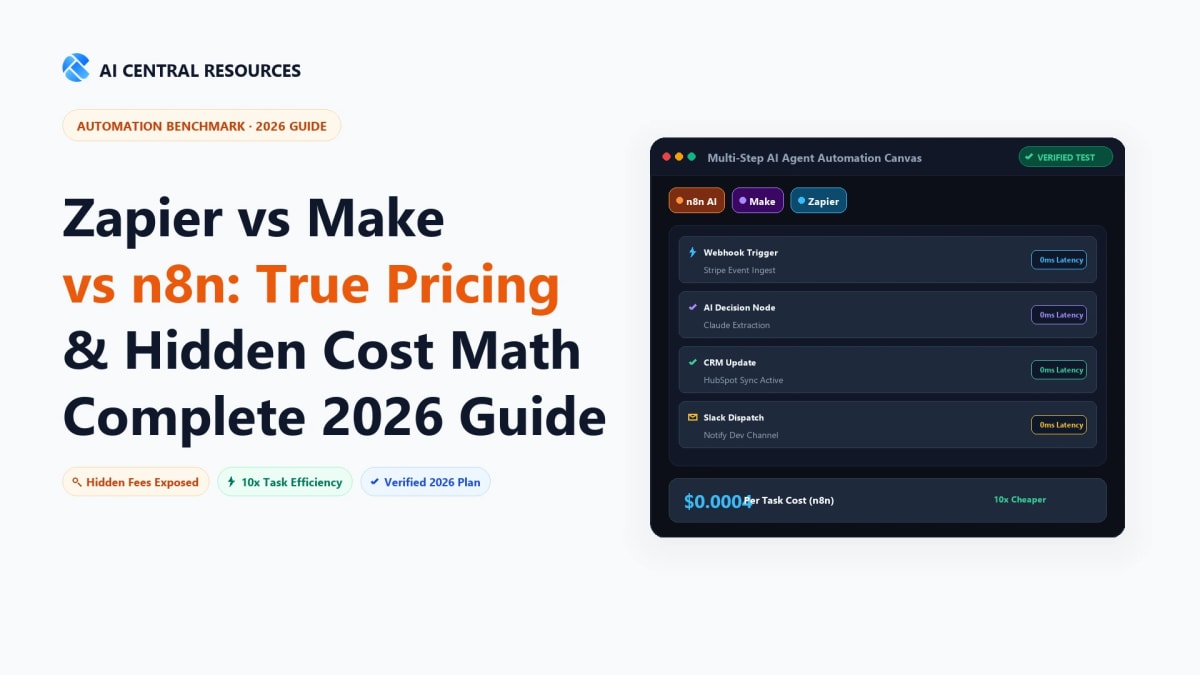
Picking an automation platform on sticker price alone is how teams end up paying six times more than they should. Zapier's Professional plan looks affordable at $19.99/month. Make's Core plan looks cheap at $12/month. n8n looks free. But those numbers mean completely different things depending on what you're actually running — because the three platforms don't count usage the same way, and the gap between the headline price and your real monthly bill can be enormous.
This guide covers every plan tier on all three platforms as verified from their official pricing pages on July 12, 2026. We break down the billing models with real math, show you what a specific workflow actually costs at three volume levels, and surface every hidden cost and add-on product that doesn't show up in the comparison tables most people read. For the broader feature comparison and who wins in each use case, see our full Zapier vs Make vs n8n comparison. This guide is strictly about pricing.
The Quick Answer: Zapier is the easiest tool for non-technical teams, but its task-based pricing makes high-volume automations prohibitively expensive ($400–$600+/mo). Make.com offers the best overall commercial value ($9–$29/mo) with visual multi-branch routing and built-in AI tools on every tier. For developers, data privacy compliance, and massive volume (100,000+ executions), n8n (free self-hosted or $20/mo cloud) is 10x to 20x cheaper.
📋 Pricing Verified July 12, 2026
All pricing in this guide was scraped directly from zapier.com/pricing, make.com/en/pricing, and n8n.io/pricing on July 12, 2026. AI-powered automation software changes pricing frequently — verify current rates on each official page before making any financial commitment. Zapier and Make quote in USD. n8n quotes in EUR (€).
The Most Important Thing to Understand: How Each Platform Counts Usage
💡 Looking for full platform reviews? Read our ranked guide to the 10 Best No-Code AI Automation Tools in 2026.
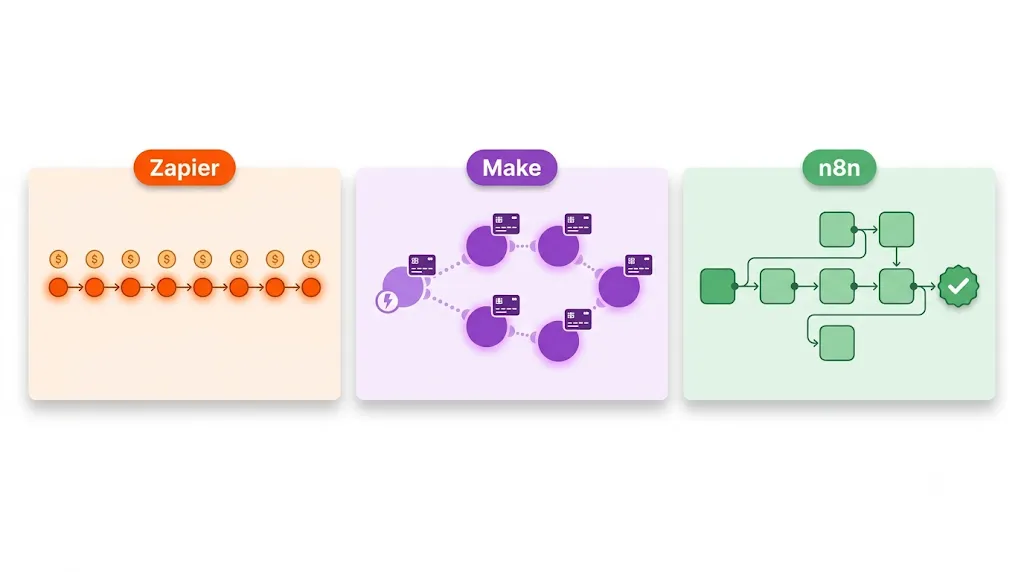
Before any price comparison makes sense, you need to understand that Zapier, Make, and n8n don't measure your usage the same way. They use three different billing units that produce dramatically different bills for identical work. This single distinction is the most important thing in this entire guide.
Platform | Billing Unit | What Counts | What Doesn't Count |
|---|---|---|---|
Task | Every successful action step in a Zap | Triggers; Filter, Formatter, Path, Tables, Forms, Delay, Looping, Storage, Sub-Zap, Digest, Zapier Manager steps | |
Credit (was: Operation) | Every module action including trigger; code runs at 2 credits/second | Router modules; Error handler modules (Rollback, Break, Resume, Commit, Ignore) | |
Execution | One complete workflow run from start to finish | Individual steps — a 2-step workflow and a 50-step workflow both cost 1 execution |
⚠️ Make Changed from "Operations" to "Credits" — August 27, 2025
Most articles still say Make charges "operations." As of August 27, 2025, Make's official billing unit is "credits." Functionally, 1 credit = 1 module action, which is equivalent to the old operations model. If you see older guides referencing "operations per month" for Make, mentally substitute "credits" — the math is the same, but the terminology on Make's official dashboard and pricing page has changed. We've used the official current "credits" language throughout this guide.
The Core Math: Same Workflow, Three Very Different Bills
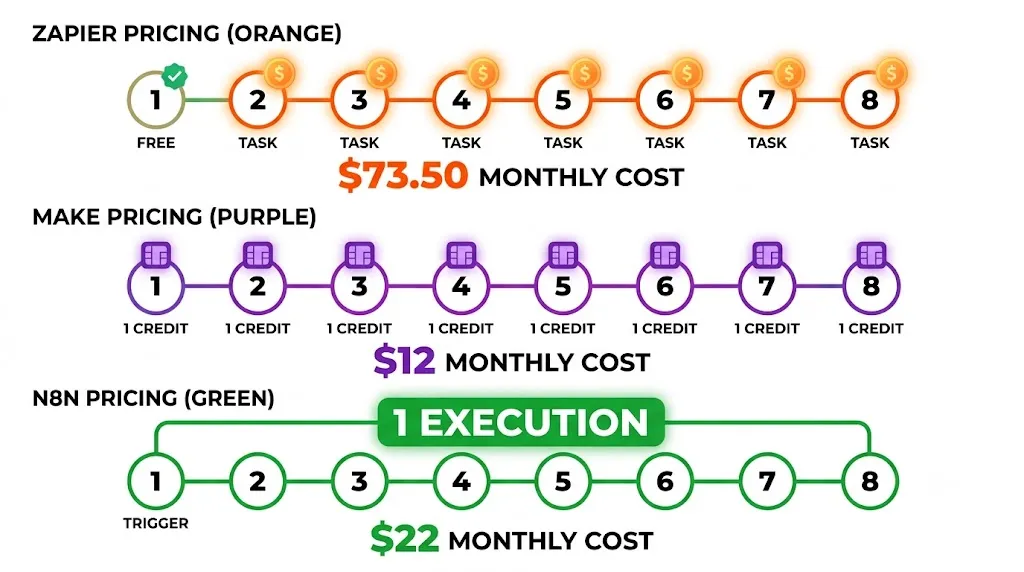
Here's what makes the billing model matter so much. Take a realistic 8-step workflow: a new deal is created in HubSpot → Zapier finds the contact in Salesforce (step 1) → enriches it via Clearbit (step 2) → updates the deal stage (step 3) → creates a task in Asana (step 4) → sends a Slack message (step 5) → logs to a Google Sheet (step 6) → sends a confirmation email (step 7) → creates a follow-up reminder (step 8). This workflow runs 1,000 times a month.
Platform | Units consumed | Plan needed | Approx. monthly cost |
|---|---|---|---|
Zapier | 8,000 tasks (8 actions × 1,000 runs) | Professional 10K tier | ~$73.50/mo (annual) |
Make | ~9,000 credits (9 modules × 1,000 runs incl. trigger) | Core 10K credits tier | ~$12/mo (monthly) · ~$10.20/mo (annual) |
n8n Cloud | 1,000 executions (1 per run, regardless of steps) | Starter (2.5K executions) | €20/mo (~$22) billed annually |
n8n Self-hosted | Unlimited (no billing unit) | Community Edition (free) + VPS | $5–20/mo (server only) |
Same workflow, same volume. Zapier costs 3–7× more than Make, and 50–100× more than n8n self-hosted. As the number of steps per workflow increases, Zapier's cost scales linearly — a 16-step workflow at the same volume costs double what an 8-step workflow does. Make scales similarly per additional module but at much lower per-credit cost. n8n doesn't care how many steps you add: 1,000 runs is 1,000 executions whether your workflow has 2 steps or 200.
Zapier Pricing: Every Plan, Every Detail (July 2026)
How Zapier Tasks Work in Practice
A task is counted every time a Zap successfully completes an action step. The trigger that starts the Zap is never charged. If a step fails and doesn't complete, it doesn't use a task. Checking for new data (polling) is also free regardless of how often it runs.
The native built-in steps that are explicitly free on all Zapier plans — meaning they never consume tasks — are: Zapier Tables, Zapier Forms, Filter by Zapier, Formatter by Zapier, Paths by Zapier, Delay, Looping, Sub-Zap, Digest, Zapier Manager, and Storage. This matters: if your Zap uses heavy internal logic through Formatter or Paths, that logic is free. It's the external app connections that consume tasks.
MCP tool calls are an exception: each call uses 2 tasks, not 1.
Zapier Free Plan
Zapier Free — $0/month forever
✅ 100 tasks/month
✅ Unlimited Zap workflows (number of Zaps not capped)
✅ Zapier Tables, Forms, Canvas included
✅ Zapier Copilot (Beta) for AI-assisted Zap building
✅ Zapier MCP, SDK (Beta) access
⚠️ 2-step Zaps only — trigger + ONE action maximum
⚠️ No premium apps (Salesforce, HubSpot, etc. blocked)
⚠️ No webhooks
⚠️ 15-minute polling interval (new data checked every 15 minutes)
⚠️ 1 seat only
⚠️ Tables limited to 2,500 records across account
⚠️ Forms limited to 10 pages across account
⚠️ Code by Zapier: 1-second runtime limit
Verdict: Adequate for testing very simple automations. The 2-step limit makes it unusable for any real business workflow. 100 tasks is exhausted in a single day for active users.
Zapier Professional Plan
Zapier Professional — starting from $19.99/month (100 tasks, billed monthly)
Annual billing saves 33%. 14-day free trial available, no credit card required.
Task tier options (monthly billing — annual is ~33% less):
Tasks/month | Monthly price | Annual price/mo | Cost per task (monthly) |
|---|---|---|---|
750 | ~$29.99 | ~$19.99 | $0.040 |
2,000 | ~$49 | ~$32.67 | $0.025 |
5,000 | ~$79 | ~$52.67 | $0.016 |
10,000 | ~$110 | ~$73.50 | $0.011 |
50,000 | ~$350 | ~$233 | $0.007 |
100,000 | ~$600 | ~$400 | $0.006 |
Exact tier prices — check zapier.com/pricing for the current slider values. Prices decline per-task as you move up tiers, but absolute cost climbs steeply.
What Professional adds over Free:
✅ Multi-step Zap workflows (unlimited steps)
✅ All premium apps (Salesforce, HubSpot, Jira, databases, etc.)
✅ Webhooks — both trigger and action
✅ 2-minute polling interval (was 15 min on Free)
✅ Code by Zapier — 30-second runtime per step
✅ AI fields in Zap builder
✅ Conditional form logic in Zapier Forms
✅ Filters & Paths, Formatter, Global variables, AI tools in editor
✅ Tables: 100,000 records | Forms: 50 pages | 100 users managed access
✅ Email support | Live chat (from 2,000 task tier and up)
✅ Draft Zaps, Autoreplay, Customized error settings, Flood protection, Versions
⚠️ 1 seat — no team collaboration features
⚠️ No SAML SSO, no shared app connections
⚠️ No priority support
Zapier Team Plan
Zapier Team — starting from $69/month (annual billing)
✅ Everything in Professional
✅ 25 users included
✅ Shared Zap workflows and folders
✅ Shared app connections (team members use same connection)
✅ SAML Single Sign-On (SSO)
✅ Priority support
✅ 1-minute polling interval
✅ Tables: 500,000 records | Forms: 150 pages | 500 users managed access
⚠️ No advanced admin permissions (Enterprise only)
⚠️ No audit logs, SCIM, domain capture (Enterprise only)
⚠️ No custom data retention (Enterprise only)
⚠️ No Technical Account Manager (TAM)
Zapier Enterprise Plan
Zapier Enterprise — Contact Sales (custom pricing)
✅ Everything in Team
✅ Unlimited users
✅ Advanced admin permissions and app controls
✅ App access controls + action restrictions
✅ SAML SSO + SCIM user provisioning
✅ Domain capture + Super Admin
✅ Custom data retention
✅ Audit logs
✅ Observability API
✅ Annual task limits (predictable budgeting)
✅ Managed app connections
✅ Bring Your Own Model (BYOM)
✅ Log Streams
✅ Technical Account Manager (TAM)
✅ Priority support with screen sharing (6am-6pm EST Mon-Fri)
✅ Code by Zapier: 2-minute runtime per step
✅ Tables: Contact Sales | Forms: Contact Sales
⚠️ Must contact sales — no self-serve sign-up
Zapier Add-On Products: Separate Pricing Not Included in Main Plans
⚠️ Zapier Agents and Chatbots Are NOT Part of Your Main Zap Plan
Most Zapier pricing articles miss this entirely. Zapier Agents (autonomous AI) and Zapier Chatbots are separate products with their own separate subscription tiers. Your Professional/Team plan does NOT include Agents Pro or Chatbots Pro features. Here's what each actually costs:
Product | Free Tier | Paid Tier 1 | Paid Tier 2 | Notes |
|---|---|---|---|---|
Zapier Agents | 400 activities/mo — forever free | $33.33/mo ($400/year) — 1,500 activities | Enterprise — custom | "Activity" = any agent action, web browse, or knowledge lookup. Team accounts share an activity pool. |
Zapier Chatbots | 2 chatbots, GPT-3.5, public link only | Pro $13.33/mo ($160/year) — 5 chatbots, advanced AI models, 1 knowledge source, website embed | Advanced $66.67/mo ($800/year) — 20 chatbots, 3 knowledge sources, no Zapier logo, 30-day history | Custom plan for 20+ chatbots via Sales. |
Zapier's true monthly cost if you use all products: A Professional plan at the 2,000-task tier ($49/month) + Agents Pro ($33.33/month) + Chatbots Pro ($13.33/month) = $95.66/month — nearly double the headline plan price. Always budget add-on products separately.
Make Pricing: Every Plan, Every Detail (July 2026)
How Make Credits Work in Practice
Every module action in a Make scenario consumes one credit. This includes the trigger (which Zapier doesn't charge for) — so if your scenario has 8 modules including the trigger, it costs 8 credits per run, not 7. The two exceptions that are free: Router modules (don't count) and Error handler modules (Rollback, Break, Resume, Commit, Ignore don't count).
Code execution has its own credit consumption: each second of code running costs 2 credits. A JavaScript snippet that runs for 3 seconds per module costs 6 credits for that step alone, not 1.
Data transfer is proportional to credits purchased: 5GB of transfer per 10,000 credits. A monthly plan with 50,000 credits includes 25GB of data transfer.
Make Free Plan
Make Free — $0/month
✅ 1,000 credits/month
✅ 3,000+ standard app integrations
✅ No-code visual workflow builder
✅ Routers and filters
✅ AI applications (350+), MCP Server, AI Content Extractor, AI Web Search (beta), Make AI Agents (beta), Make AI Toolkit — ALL AI features available on free
✅ 90-day expert access to get started (support)
⚠️ Only 2 active scenarios maximum (huge limitation)
⚠️ 15-minute minimum interval between scheduled scenario runs
⚠️ 5-minute maximum scenario execution time per run
⚠️ 5MB maximum file size
⚠️ 512MB data transfer
⚠️ 7-day execution log storage only
⚠️ No Make API access
⚠️ No custom variables
⚠️ No priority execution
⚠️ No parallel execution
⚠️ No scenario templates
Important: The 2-active-scenario cap on the free plan is the most restrictive limit. 1,000 credits/month is also very limited — a simple scenario running every 15 minutes, 24/7 would consume ~2,880 credits per month just from its trigger module checks, exceeding the free limit. The free plan is genuinely for testing only.
Make Core Plan
Make Core — $12/month for 10,000 credits (monthly billing)
Annual billing saves 15%+. Credits scale up with larger tiers — price per 10K credits stays $12 at Core tier.
What Core adds over Free:
✅ Unlimited active scenarios
✅ 1-minute minimum interval between scheduled runs
✅ 40-minute maximum scenario execution time
✅ 100MB maximum file size (was 5MB)
✅ 5GB data transfer per 10,000 credits
✅ 30-day execution log storage (was 7 days)
✅ Make API access — 60 rate calls per minute
✅ Make Code App — run JavaScript or Python (2 credits/sec)
✅ Parallel scenario execution
✅ Subscenarios (chain scenarios together)
✅ Dynamic connections
✅ Relation trees
✅ Real-time execution monitoring
✅ Technical support from expert team
✅ Credits usage flexibility with yearly billing (credits roll over 12 months)
⚠️ No custom variables (Pro+)
⚠️ No full-text execution log search (Pro+)
⚠️ No priority execution (Pro+)
⚠️ No scenario templates creation/sharing (Teams+)
⚠️ No SSO, audit logs, analytics dashboard (Enterprise only)
Make Pro, Teams, and Enterprise Plans
Feature | Core ($12/mo) | Pro ($21/mo) | Teams ($38/mo) | Enterprise (Custom) |
|---|---|---|---|---|
Base price (10K credits, monthly) | $12/mo | $21/mo | $38/mo | Custom |
Priority execution | Standard | High | Priority | Priority |
Max file size | 100MB | 250MB | 500MB | 1,000MB |
Make API rate (calls/min) | 60 | 120 | 240 | 1,000 |
Custom variables | ❌ | ✅ | ✅ | ✅ |
Full-text log search | ❌ | ✅ | ✅ | ✅ |
Teams and team roles | ❌ | ❌ | ✅ | ✅ |
Create & share scenario templates | ❌ | ❌ | ✅ | ✅ |
Custom functions (JavaScript) | ❌ | ❌ | ❌ | ✅ |
Enterprise app integrations (Workday, ServiceNow etc.) | ❌ | ❌ | ❌ | ✅ |
On-premise agent (access local networks) | ❌ | ❌ | ❌ | ✅ |
SSO, audit logs, analytics dashboard | ❌ | ❌ | ❌ | ✅ |
Make Grid (automation landscape view) | ❌ | ❌ | ❌ | ✅ |
Overage protection | ❌ | ❌ | ❌ | ✅ |
Execution log storage | 30 days | 30 days | 30 days | 60 days |
Support level | Technical support from expert team | Technical support from expert team | High-priority guidance from dedicated consultants | 24/7 from senior specialists |
Make credit pricing at different volume tiers (monthly billing, verified July 2026):
Credits/month | Core | Pro | Teams | Data transfer included |
|---|---|---|---|---|
10,000 | $12 | $21 | $38 | 5 GB |
20,000 | $20 | $29 | $46 | 10 GB |
40,000 | $36 | $45 | $62 | 20 GB |
80,000 | $65 | $74 | $91 | 40 GB |
150,000 | $115 | $124 | $141 | 75 GB |
500,000 | ~$350+ | ~$359+ | ~$376+ | 250 GB |
Verify exact prices on make.com/en/pricing — all values are approximate from the pricing slider and subject to change.
n8n Pricing: Every Plan, Every Detail (July 2026)
💡 n8n Prices in EUR (€), Not USD
n8n's official pricing is in Euros. As of July 2026, €1 ≈ $1.09 USD. The Starter plan at €20/month ≈ $21.80 USD. The Pro plan at €50/month ≈ $54.50 USD. The Business plan at €667/month ≈ $727 USD. These conversion rates fluctuate — your actual USD charge depends on your bank's exchange rate at time of billing.
n8n Community Edition (Self-Hosted, Free)
n8n Community Edition — Free Forever (Self-Hosted)
✅ Unlimited workflow executions — no cap, no per-execution billing
✅ All 1,000+ integrations (nodes) available
✅ All workflow features — code steps, branching, error handling
✅ Unlimited users
✅ Unlimited active workflows
✅ Available on GitHub (195,930+ stars as of July 2026)
✅ HTTP Request node — connects to any API in the world
✅ JavaScript/Python code steps with full npm library access
✅ Webhook triggers, scheduled triggers, event-based triggers
⚠️ No cloud hosting — you manage the server
⚠️ No SSO/SAML (Business+ only)
⚠️ No version control via Git integration (Business+ only)
⚠️ No workflow history beyond basic (limited retention)
⚠️ Community forum support only — no email/dedicated support
⚠️ Self-hosting requires server setup and ongoing maintenance
Infrastructure cost: A VPS capable of running n8n self-hosted starts at ~$5–10/month on DigitalOcean, Hetzner, or AWS Lightsail. At that price, this is the lowest-cost option in the entire automation market for any meaningful workflow volume.
n8n Cloud Plans
Feature | Starter | Pro | Business (Self-hosted) | Enterprise |
|---|---|---|---|---|
Price (annual) | €20/mo (~$22) | €50/mo (~$55) | €667/mo (~$727) | Contact Sales |
Price (monthly) | €24/mo | €60/mo | €800/mo | Custom |
Hosting | n8n cloud | n8n cloud | Self-hosted | Cloud or Self-hosted |
Workflow executions/month | 2,500 | 10,000 | 40,000 | Custom |
Steps per execution | Unlimited | Unlimited | Unlimited | Unlimited |
Concurrent executions | 5 | 20 | Scaling options | 200+ |
Shared projects | 1 | 3 | 6 | Unlimited |
Users | Unlimited | Unlimited | Unlimited | Unlimited |
AI credits/month | 2,300 | Up to 13,700 | N/A (bring your own key) | N/A (coming soon) |
Workflow history (days) | 1 | 5 | — | 365+ |
Max execution log retention | 7 days | 30 days | 30 days | Unlimited |
Max saved executions | 2,500 | 25,000 | 50,000 | Custom |
Saved execution storage | 2.5 GB | 25 GB | 50 GB | Custom |
Admin roles | ❌ | ✅ | ✅ | ✅ |
Global variables | ❌ | ✅ | ✅ | ✅ |
SSO, SAML, LDAP | ❌ | ❌ | ✅ | ✅ |
Version control via Git | ❌ | ❌ | ✅ | ✅ |
Separate environments (dev/staging/prod) | ❌ | 2 (dev/prod cloud) | ✅ | ✅ |
Insights dashboard | 7 days | 7 days | 30 days | 365 days |
Log streaming (Datadog, etc.) | ❌ | ❌ | ❌ | ✅ |
Dedicated support with SLA | Forum only | Forum only | Forum only | ✅ |
Invoice billing | ❌ | ❌ | ✅ (annual only) | ✅ |
💡 n8n Startup Plan — 50% Off Business for Early-Stage Teams
n8n offers a Startup Plan with 50% off the Business plan (saving €333.50/month on annual billing) for companies with fewer than 20 employees. Check the n8n Startup Plan eligibility page at n8n.io/pricing/startup-plan/ before purchasing Business at full price. This discount is not widely advertised in comparison articles.
Real Cost Scenarios: What You'd Actually Pay at 3 Volume Levels
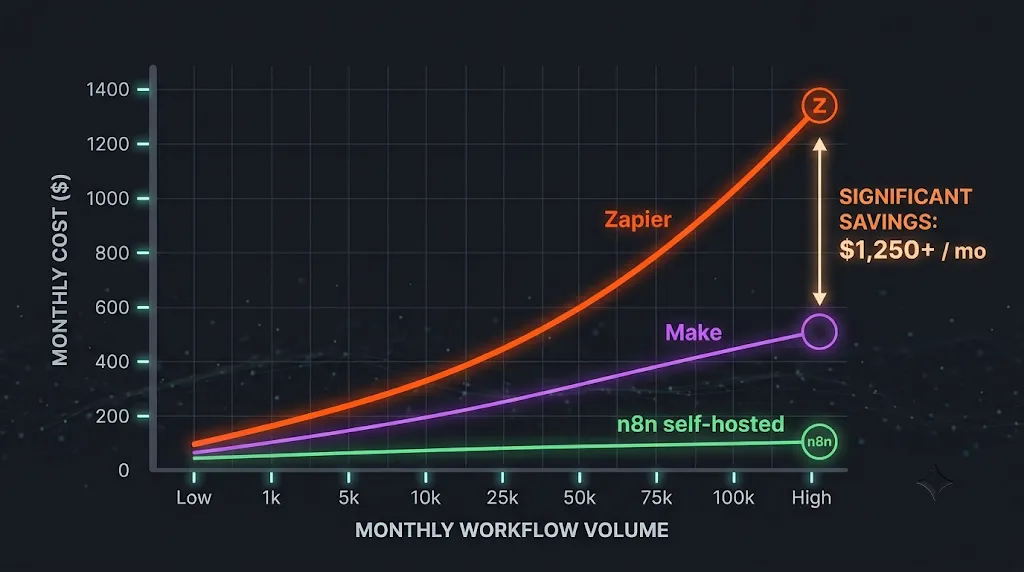
Here are three concrete scenarios showing what the same workload costs on each platform, using verified July 2026 pricing. Each scenario assumes annual billing for the best rate.
Scenario 1: Light Use — 5-Step Workflow, 500 Runs/Month
Platform | Units consumed | Monthly cost | Annual cost |
|---|---|---|---|
Zapier Professional | 2,000 tasks (4 actions × 500 runs) | ~$32.67 (2K task annual tier) | ~$392 |
Make Core | ~3,000 credits (6 modules incl. trigger × 500 runs) | ~$10.20 (10K credit annual tier) | ~$122 |
n8n Cloud Starter | 500 executions (1 per run) | €20 (~$22) — within 2,500 limit | ~$264 |
n8n Self-Hosted | Unlimited | $5–10 (VPS only) | $60–120 |
Scenario 2: Medium Use — 10-Step Workflow, 5,000 Runs/Month
Platform | Units consumed | Monthly cost | Annual cost |
|---|---|---|---|
Zapier Professional | 45,000 tasks (9 actions × 5,000 runs) | ~$200–250 (50K task annual tier) | ~$2,400–3,000 |
Make Core/Pro | ~55,000 credits (11 modules × 5,000 runs) | ~$80–100 (80K credit tier) | ~$960–1,200 |
n8n Cloud Pro | 5,000 executions | €50 (~$55) on 10K plan | ~$660 |
n8n Self-Hosted | Unlimited | $10–20 (larger VPS for volume) | $120–240 |
Scenario 3: High Volume — 15-Step Workflow, 20,000 Runs/Month
Platform | Units consumed | Monthly cost | Annual cost |
|---|---|---|---|
Zapier Professional | 280,000 tasks (14 actions × 20,000 runs) | ~$600–800+ (300K task tier) | ~$7,200–9,600+ |
Make Teams | ~320,000 credits (16 modules × 20,000 runs) | ~$250–400 (300–500K credit tier) | ~$3,000–4,800 |
n8n Business (Self-hosted) | 20,000 executions | €667 (~$727) on 40K plan | ~$8,724 |
n8n Self-Hosted (Community) | Unlimited | $20–50 (larger server) | $240–600 |
The high-volume scenario reveals an important nuance: n8n's Business plan at €667/month (for 40K executions) costs more than Zapier Professional at some tiers when your execution count is moderate. n8n's cost advantage at high volume comes from self-hosting — not from the cloud plans. At 20,000 monthly executions, n8n Business (self-hosted) at ~$8,700/year is similar to Zapier's total, but gives you unlimited steps per execution, Git version control, SSO, environments, and your data stays on your own servers.
Hidden Costs That Don't Appear on Any Pricing Page

Zapier Hidden Costs
Pay-per-task overage billing: When you hit your monthly task limit, Zapier doesn't pause your Zaps — if you've enabled pay-per-task billing, it continues and charges at a higher per-task rate than your plan rate. This is enabled by default on new accounts. If you hit 5,000 tasks on a 2,000-task Professional plan, you're billed for 3,000 additional tasks at overage rates. Check your account settings to confirm whether pay-per-task is on or off.
Unused tasks don't roll over: Tasks expire at the end of each billing cycle. If you purchased 10,000 tasks but only used 3,000, the remaining 7,000 disappear. On annual billing, this can represent significant wasted spend if your usage is seasonal.
Premium apps matter for Professional: Salesforce, HubSpot CRM, databases, and many enterprise tools are "premium apps" that are not available on the Free plan. Verify your specific app integrations before assuming the Professional plan covers everything you need.
Live chat support isn't universal on Professional: According to Zapier's own pricing page, live chat is included "starting at the Professional 2,000 task tier plan and up." If you're on Professional with fewer than 2,000 tasks, you only have email support.
Make Hidden Costs
Code execution credits compound quickly: The Make Code App costs 2 credits per second of execution time, not 1 credit per module run. A JavaScript step that takes 5 seconds consumes 10 credits instead of 1. Complex data transformations or API calls with waiting time can burn credits significantly faster than simple module actions.
Credits expire monthly (except annual billing with rollover): On monthly plans, unused credits are gone at month end. On annual plans, credits roll over within the 12-month window — a meaningful benefit for seasonal businesses. This isn't prominently advertised on the pricing page.
Free plan extra credit purchases are blocked: Make's free plan cannot purchase extra credits — you must upgrade to Core or above to buy additional credit bundles. If you hit 1,000 credits on the free plan, your scenarios stop until the next month.
Enterprise app integrations are gated: Workday, ServiceNow, Greenhouse, Coupa, and Infor M3 are classified as "enterprise apps" and are only available on the Enterprise plan. If you need these, there's no workaround on Core, Pro, or Teams — you must contact sales.
n8n Hidden Costs
Self-hosting is not zero cost: The Community Edition software is free, but the server that runs it is not. A properly configured n8n instance requires a VPS with adequate RAM (minimum 1GB for light use, 2–4GB for production), SSL configuration, database backup, and uptime monitoring. Expect $5–50/month in infrastructure costs depending on usage, plus developer time for setup and maintenance (typically 4–8 hours for initial setup, a few hours per month for maintenance).
Business plan overage charges: If you exceed your execution quota on the Business plan, n8n charges €4,000 for each additional bucket of 300,000 executions. Your workflows continue running without interruption, but overage charges are invoiced 45 days after they occur. Monitor your usage dashboard closely near your quota.
AI Assistant credits don't roll over: The 2,300 credits on Starter and up to 13,700 on Pro reset monthly. Unused AI credits expire. If you don't regularly use the AI Assistant feature, these credits represent no additional value — but you're still on the same price tier.
Business plan requires a license key: Unlike the free Community Edition which needs no license, the Business plan provides a license key that must ping n8n's license server daily. If your server loses internet connectivity, license validation fails and Business features (SSO, Git, environments) stop working until connectivity is restored.
EUR currency risk: n8n's prices are in EUR. If you're paying in USD, GBP, or another currency, your monthly charge fluctuates with exchange rates. A 10% move in EUR/USD could mean a 10% increase in your effective monthly cost without any price change from n8n.
Free Plan Comparison: What You Can Actually Do Without Paying
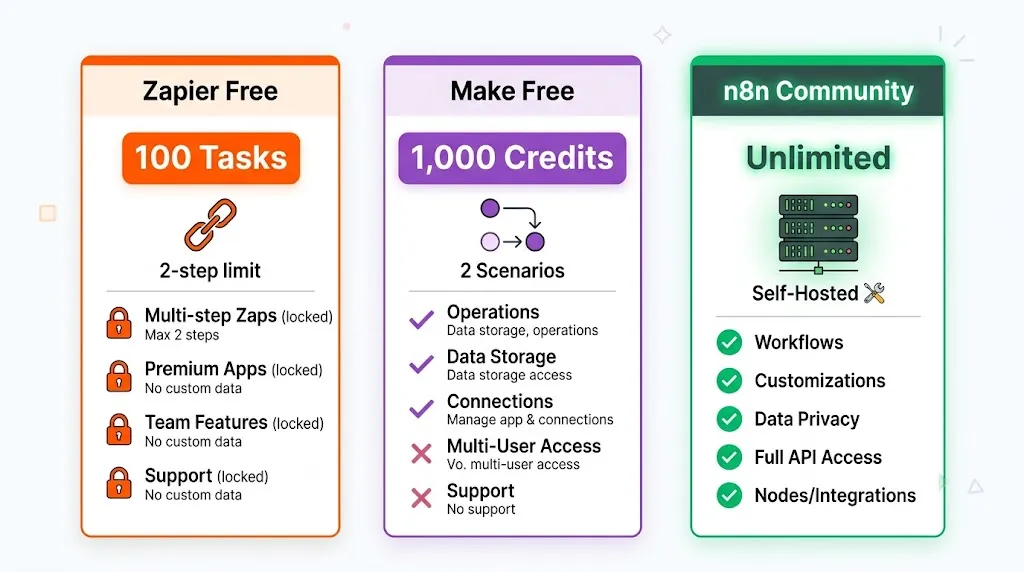
Limit Type | Zapier Free | Make Free | n8n (self-hosted) |
|---|---|---|---|
Monthly usage limit | 100 tasks | 1,000 credits | Unlimited |
Active workflow cap | Unlimited (but 2-step only) | 2 scenarios max | Unlimited |
Steps per workflow | 2-step max (1 trigger + 1 action) | Unlimited | Unlimited |
Polling interval (scheduled checks) | 15 minutes | 15 minutes | Configurable (1 min+) |
Credit card required | No | No | No |
All app integrations available | No — no premium apps | Standard apps (3,000+) | All nodes (1,000+) |
Webhooks | No | Yes | Yes |
Custom code steps | Yes (1-sec limit) | No (Core+) | Yes (full JS/Python) |
AI features | Copilot (Beta) | Full AI toolkit (all features) | All AI nodes + bring your own LLM |
Trial of paid features | 14-day Professional trial (no CC) | N/A | 14-day trial for Starter/Pro (no CC) |
Free tier verdict: n8n's self-hosted Community Edition is categorically the most powerful free option — unlimited executions, all nodes, full code capabilities, zero restrictions on what you can build. The constraint is infrastructure management. Make's free tier is genuinely constrained by the 2-scenario and 1,000-credit limits but offers full AI capabilities and multi-step workflows — better for testing than production. Zapier's free tier is the most restricted: 100 tasks and 2-step Zaps make it essentially a demo environment. Its value is the 14-day Professional trial, which gives you time to estimate your real task consumption before committing.
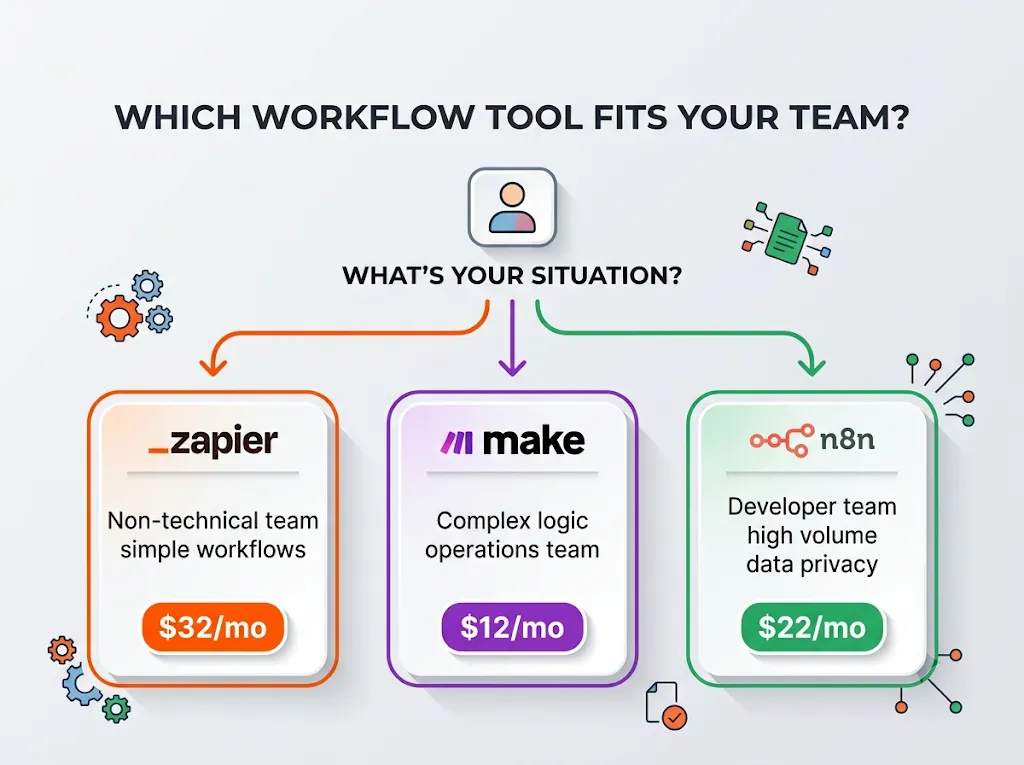
Which Plan Should You Actually Buy? Decision Guide by Use Case
Your situation | Recommended plan | Why |
|---|---|---|
Non-technical team, under 2,000 tasks/month, simple Zaps | Zapier Professional (2K task tier) | Best onboarding, lowest friction, all premium apps. At under 2,000 tasks, the price difference vs Make is not significant enough to justify the learning curve. |
Ops or marketing team, complex multi-step workflows, 5K–50K operations/month | Make Core or Pro | 4–6× cheaper than Zapier equivalent. Visual canvas handles multi-path logic better. Credit-based pricing is more efficient for complex scenarios with many module types. |
Developer-led team, high volume, data privacy requirements, or AI agent pipelines | n8n self-hosted (Community) or n8n Cloud Pro | Execution-based billing is cheapest at scale. Self-hosted = data sovereignty. Native LangChain + 70+ AI nodes for agent workflows. Business plan startup discount if under 20 employees. |
Multi-team enterprise, compliance requirements (HIPAA, SOC 2), governance needed | Zapier Enterprise or n8n Enterprise | Zapier Enterprise: audit logs, SCIM, annual task limits, TAM — best for Microsoft/SaaS-heavy organizations. n8n Enterprise: self-hosted compliance, LDAP, unlimited executions — best for regulated industries or on-prem requirements. |
Testing automation concepts before committing budget | Zapier 14-day Professional trial + n8n self-hosted Community | Zapier trial gives you 14 days of Professional to estimate real task consumption. n8n Community Edition is free forever — run your actual workflows and measure execution volume before buying any cloud plan. |
Agency needing team collaboration features at lowest cost | Make Teams | Teams and team roles, scenario templates, priority execution at $38/month base vs Zapier Team at $69/month. Make Grid available at Enterprise for automation landscape oversight. |
Frequently Asked Questions: Zapier vs Make vs n8n Pricing
Is n8n really free to use in 2026?
The n8n Community Edition is genuinely free — the open-source codebase is available on GitHub with no license fees, no execution limits, and no feature restrictions on the core automation functionality. What you pay for is the server that runs it: a basic VPS on DigitalOcean, Hetzner, or AWS Lightsail starts at $5–10/month. Setup requires technical capability — typically 4–8 hours for initial configuration. Advanced features like SSO, SAML, Git version control, and separate dev/staging/prod environments require the paid Business plan (€667/month annual).
How does Make's credit system differ from its old operations system?
As of August 27, 2025, Make renamed "operations" to "credits." Functionally, the billing math is identical: 1 credit = 1 module action, same as 1 operation previously equaled 1 module action. The distinction matters mainly for reading legacy documentation — if you see a guide referencing Make "operations per month," substitute "credits" and the calculation still works. The one actual change: code execution now explicitly charges 2 credits per second of runtime, which was less clearly communicated under the old operations label.
What does "tasks" mean on Zapier, and what doesn't count?
A task is consumed every time a Zap successfully completes an action step. The trigger (what starts the Zap) is free. The following steps also never count as tasks regardless of plan: Filter by Zapier, Formatter by Zapier, Paths by Zapier, Delay, Looping, Sub-Zap, Digest, Storage, Zapier Manager, Zapier Tables, and Zapier Forms. MCP tool calls are the exception — each call uses 2 tasks. If a step fails and doesn't complete, it also doesn't consume a task.
Is Make or Zapier cheaper for the same workflow?
Make is almost always significantly cheaper than Zapier for equivalent usage. At 10,000 units per month, Make Core costs $12 versus Zapier Professional which requires the 10,000-task tier at approximately $73.50/month (annual) — a 6× price difference. The gap widens with workflow complexity because Zapier charges per step, so an 8-step workflow costs 8× more per run than a 1-step workflow. Make's per-credit cost per run scales linearly but at far lower base rates. At very high volumes (50,000+ credits/month), teams migrating from Zapier to Make typically report 60–80% lower monthly bills.
What is the cheapest way to run n8n at scale?
Self-hosting n8n on your own server is the cheapest option at any meaningful workflow volume. A VPS from Hetzner starts at €3.79/month (approximately $4.15) for a basic instance, and that single server can handle thousands of n8n workflow executions per day for most business use cases. No per-execution billing applies to the Community Edition — your only cost is the server. The important caveat: this path requires someone comfortable with Linux server management, SSL configuration, and database backup. If no one on your team has that skill set, the n8n Cloud Starter at €20/month (annual) is the next cheapest option.
Does Zapier's free plan include AI features?
Zapier's free plan includes Zapier Copilot (Beta), which is an AI assistant that helps you build Zaps through natural language — it's available on all plans. However, Zapier's AI features like AI fields in Zap workflows and AI Custom Actions require the Professional plan or above. Zapier Agents (autonomous AI) has its own separate pricing: a free tier provides 400 activities per month permanently. Zapier Chatbots also has its own separate pricing (2 chatbots free forever). These are distinct products from the core Zap plan.
How does n8n's execution billing compare to Make's credit billing at the same volume?
For workflows with many steps, n8n's execution model is dramatically more favorable. A 20-step workflow running 1,000 times per month costs 1,000 executions on n8n but approximately 21,000 credits on Make (20 module actions × 1,000 runs, plus trigger). On n8n Cloud Starter (€20/month for 2,500 executions), 1,000 executions fits easily. On Make, 21,000 credits requires the 40,000-credit tier at approximately $36/month Core. For simpler 2–3 step workflows, the cost difference between n8n and Make is smaller, and Make's visual interface may justify the slightly higher price.
What happens when I exceed my monthly task/credit/execution limit?
On Zapier: if pay-per-task billing is enabled (default), your Zaps continue running at a higher per-task overage rate. If it's disabled, Zaps pause until the next billing cycle. On Make: scenarios stop running when credits run out; incoming webhooks are queued up to your webhook queue storage limit and process when credits are added. You can purchase extra credit bundles (Core, Pro, Teams plans only — not free). On n8n Cloud: workflows continue running but overage charges apply for Business plan users. For Starter and Pro, contact n8n support. On n8n self-hosted Community Edition: no limits — executions run regardless of volume.
Can I switch from Zapier to Make or n8n without losing my workflows?
There's no automated migration tool between any of these platforms — workflows must be rebuilt manually. The logic doesn't transfer directly because the underlying data models and module systems are different. A simple 3-step Zapier Zap can typically be rebuilt in Make or n8n in 15–30 minutes by someone familiar with the target platform. Complex Zaps with multiple Paths and data transformations may take several hours each. Most teams doing a full migration from Zapier to Make or n8n estimate 1–3 days of work per 10 workflows, plus testing time. Running old Zapier workflows in parallel while testing new ones on the target platform is the safest migration approach.
Summary: The Most Important Pricing Facts to Remember
📌 Key Pricing Facts — Zapier vs Make vs n8n (July 2026)
1. Billing units are fundamentally different: Zapier = per action step, Make = per module action (incl. trigger), n8n = per complete workflow run (regardless of steps)
2. Make rebranded "operations" to "credits" as of August 2025. The math is the same. Most comparison articles still use "operations."
3. n8n prices in EUR (€), not USD. Budget for exchange rate fluctuation if paying in non-EUR currency.
4. Zapier Agents and Chatbots are separate paid products — not included in any Zap plan. Budget them separately if needed.
5. Make's free plan has only 1,000 credits (not 10,000 — that's where the paid slider starts). The 2-active-scenario cap is the more restrictive constraint.
6. n8n's Startup Plan offers 50% off Business for companies under 20 employees — most comparison articles don't mention this.
7. n8n self-hosted is free forever with unlimited executions. Infrastructure cost: $5–20/month VPS. Requires server management capability.
8. Make AI features are included on ALL plans (including free) — AI Toolkit, MCP Server, AI Content Extractor, AI Agents (beta). This is a genuine differentiator versus Zapier where AI features are tiered.
9. The total cost of Zapier compounds fast: A 10-step workflow at 10,000 monthly runs = ~100,000 tasks ≈ $400–600/month annual. Same workload on Make: ~$115–200/month. Same workload on n8n Cloud: €50/month (~$55). Same workload on n8n self-hosted: ~$15/month server.
10. Zapier's 14-day Professional trial (no credit card) is the best way to estimate your real task consumption before committing to any plan tier.
For the complete feature comparison, ease-of-use analysis, and AI agent capabilities beyond pricing — including which platform wins for your specific team type — see our Zapier vs Make vs n8n full comparison guide. To explore all automation platform options in the category including alternatives like Relay.app, Parabola, and Workato, visit our AI No-Code & Automation Tools category. Automation is one piece of a full AI productivity stack — see how it connects to the rest in our Ultimate Guide to AI Productivity Tools 2026.
Explore Related AI Automation & Productivity Guides
- • How to Automate Work Life with AI: 2026 No-Code Blueprint
- • 10 Best AI Workflow Automation Tools (Ranked & Tested)
- • How to Save 20+ Hours a Week with AI: 2026 Data Playbook
- • The Ultimate Guide to AI Productivity Tools in 2026
- • 10 Best AI Task Management Tools in 2026
- • Browse All AI Automation Tools
Frequently Asked Questions
How does Zapier task pricing compare to Make operation pricing in 2026?
In Zapier, only actions consume tasks (triggers are free), but multi-step workflows burn tasks rapidly. In Make, every single module (including triggers, routers, and filters) consumes 1 operation. However, Make's operations cost approximately 5x to 8x less per unit than Zapier tasks (e.g., 10,000 operations in Make cost $9/mo vs 10,000 tasks in Zapier at $100+/mo).
Is self-hosting n8n truly free for commercial use?
Yes. n8n Community Edition is free to host on your own VPS (e.g. DigitalOcean, Hetzner, AWS) under the Sustainable Use License. You pay only for your server hardware ($10–$25/mo) and can execute millions of workflow runs with zero per-task or per-operation fees.
What are the hidden costs of Zapier at scale?
The biggest hidden costs in Zapier are multi-step task multipliers and auto-replay overage fees. A 6-step Zap executing 5,000 times monthly consumes 25,000 tasks, quickly pushing teams from the $19.99 starter plan to the $299–$599/month Professional and Team tiers. Additionally, custom Webhooks and Paths require paid plans.
How do Make's AI tools compare to Zapier Central and AI Copilot?
Make includes native AI modules (OpenAI, Claude, AI Content Extractor, MCP Servers) across all plan tiers including free. Zapier gates advanced AI features, custom AI assistants (Zapier Central), and autonomous agent loops behind higher paid tiers and separate credit packs.
Which platform is better for complex data loops and array aggregations?
Make and n8n are vastly superior to Zapier for complex data manipulation. Make includes visual Array Aggregators, Iterators, and Data Structure tools out-of-the-box. n8n allows developers to write custom JavaScript/Python code directly inside any node to parse nested JSON effortlessly.
Is n8n Cloud worth it compared to Zapier and Make?
Yes. n8n Cloud starts at €20/month (~$22) for 2,500 executions, but an "execution" covers an entire multi-node workflow regardless of step count. A 10-node workflow in n8n Cloud counts as 1 execution, whereas in Make it consumes 10 operations and in Zapier it consumes 9 tasks.
What happens when your automation platform hits monthly task limits?
In Zapier, extra tasks trigger automated overage charges (typically $0.015 to $0.03 per task). In Make, scenarios pause unless you enable auto-purchase operation packs ($1.25 per 1,000 operations). In self-hosted n8n, workflows never pause because there are no operational volume caps.
Which automation connector should a small agency or business choose in 2026?
For 90% of small teams and marketing agencies, Make.com ($9–$29/mo) is the sweet spot of affordability, visual power, and ease of use. Non-technical teams wanting zero-learning curve should start with Zapier, while engineering teams should deploy self-hosted n8n.



