


Just two years ago, AI video generation was defined by bizarre visual artifacts: human hands that morphed into six-fingered claws, coffee cups melting through tables, walking characters sliding sideways across ground planes, and rigid 3-second generation caps that looked more like surreal animated GIFs than cinema. Producing a commercial-ready commercial or narrative sequence required generating fifty throwaway clips to salvage two seconds of usable footage. In 2026, the breakthrough arrival of large-scale Diffusion Transformers (DiT), spatial world models, and physics-aware temporal attention has transformed AI video from an experimental curiosity into a foundational creative medium used by Hollywood studios, global advertising agencies, and independent creators worldwide.
Modern video generation models understand real-world physics: gravity, inertia, fluid dynamics, lighting specularities, and spatial depth. Furthermore, creators are no longer at the mercy of chaotic text prompts; contemporary platforms provide granular directorial controls, including 3D camera path choreography, motion brushes, keyframe-to-keyframe bridging, and synchronized sound effects. Crucially, the AI video landscape has diverged into two distinct technical categories: cinematic world models engineered for cinematic storytelling, visual effects, and b-roll (Runway, Kling AI, Luma Dream Machine, Hailuo AI, Pika), and photorealistic talking-head and marketing engines engineered for corporate training, localized sales outreach, and automated social content (HeyGen, Synthesia, InVideo AI). To determine which platform delivers authentic production-grade fidelity without hallucinated artifacts, we subjected the 8 leading AI video generators to a rigorous 30-day, 100+ prompt benchmark testing complex human action, fluid simulation, camera tracking, and text rendering.
⚡ 30-Second Executive Verdict: Which AI Video Generator Wins in 2026?
- Best Overall for Hollywood VFX & Directorial Camera Controls: Runway. With its flagship Gen-3 Alpha model, Motion Brush, multi-layer keyframing, and precise virtual camera controls (pan, tilt, zoom, truck), Runway remains the gold standard for filmmakers, creative directors, and VFX artists.
- Best for Physical Motion Realism & Complex Human Dynamics: Kling AI. Developed by Kuaishou, Kling AI delivers astonishing 1080p temporal consistency, accurately rendering high-speed human locomotion, complex martial arts, and realistic food preparation without limb distortion.
- Best for 3D Camera Choreography & Fast Generation Speeds: Luma Dream Machine. Built on a spatial 3D architecture that renders ray-traced lighting and coherent camera orbit shots in under 120 seconds, featuring superb start-and-end frame keyframe interpolation.
- Best for Creative Physics Effects, Lip Sync & SFX Audio: Pika. Pika 2.0 introduces delightful, surreal physics effects ("Melt," "Inflate," "Squish," "Explode"), automated sound effect generation, and seamless character lip-syncing for social creators.
- Best Free-Tier Quality & Photorealistic Natural Lighting: Hailuo AI. Powered by MiniMax's Video-01 model, Hailuo AI produces breathtaking photorealistic human facial micro-expressions, hair physics, and atmospheric lighting with generous free daily credits.
- Best for Photorealistic Talking-Head Avatars & Video Translation: HeyGen. The undisputed leader in personalized video communication. Features studio-grade custom digital twins, multi-language voice cloning with realistic lip synchronization, and automated video translation.
- Best for Enterprise Corporate Training & Compliance Videos: Synthesia. Built for enterprise scale with 160+ expressive AI avatars, 130+ languages, SOC 2 Type II security compliance, and an intuitive presentation-style video editor.
- Best for Full Prompt-to-Video Script & Social Assembly: InVideo AI. Transforms a single text prompt into a fully edited, captioned, and narrated video with stock footage, AI clips, voiceovers, and background music tailored for YouTube and social feeds.
Quick Comparison: The 8 Best AI Video Generators at a Glance
The comparison matrix below highlights core diffusion model architectures, maximum native clip durations, camera control capabilities, primary use cases, and starting commercial pricing across all eight platforms.
| Tool | Core Model Engine | Max Clip Length | Camera Controls | Best For | Starting Price |
|---|---|---|---|---|---|
| Runway | Gen-3 Alpha / Gen-2 | 10 sec (extendable) | Full 3D Pan, Tilt, Zoom, Roll | Cinematic Filmmaking & VFX | Free / $12/mo |
| Kling AI | Kling 1.5 DiT | 10 sec (extendable to 2 min) | Multi-Axis Camera & Trajectory | Complex Physical Dynamics | Free / $10/mo |
| Luma Dream Machine | Spatial 3D Video Transformer | 5 sec (loopable & extendable) | Orbit, Dolly, Crane, Tracking | Fast Turnaround & 3D Depth | Free / $9.99/mo |
| Pika | Pika 2.0 Engine | 4 sec (extendable) | Motion Strength & Camera Panning | Creative Effects, SFX & Lip Sync | Free / $8/mo |
| Hailuo AI | MiniMax Video-01 | 6 sec | Prompt-based Camera Trajectory | Photorealistic Human Lighting | Free / $10/mo |
| HeyGen | Generative Avatar Engine 3.0 | Up to 30 min per video | Static & Dynamic Avatar Framing | Talking-Head Sales & Localization | Free / $24/mo |
| Synthesia | Expressive Avatar Engine 2.0 | Up to 60 min per video | Presentation Scene Layouts | Enterprise L&D & Compliance | $22/mo |
| InVideo AI | Multimodal Script-to-Video Engine | Up to 15 min per project | Automated Stock & AI Pan-Zoom | YouTube & Social Faceless Videos | Free / $20/mo |
Our 4-Pillar Testing Methodology
Evaluating generative video tools requires looking beyond cherry-picked 3-second demo clips. A production-ready AI video model must maintain structural coherence through rapid motion, obey Newtonian physical laws, respond precisely to cinematic camera terminology, and render within practical operational turnaround times. We designed a 30-day testing benchmark using four objective criteria:
1. Temporal Coherence & Object Persistence
We tested character and object consistency across multiple camera angles. We evaluated whether clothing textures, facial features, vehicle reflections, and environmental backgrounds remained stable across 5 to 10 seconds, or if hands, limbs, and background geometry warped and melted during movement.
2. Physical Motion Realism & Dynamic Collisions
We fed models difficult physics-simulation prompts: pouring liquids into a glass, fabric fluttering in high winds, vehicles drifting on wet pavement, and human athletes performing complex gymnastics. We scored whether the model simulated momentum, gravity, and surface resistance naturally.
3. Prompt Fidelity & Camera Trajectory Controls
We issued prompts with exact cinematography jargon ("dolly-in with 35mm shallow depth of field," "crane shot descending from overcast clouds to street level"). We benchmarked how faithfully each tool followed spatial directives without ignoring secondary clauses.
4. Render Velocity & Pipeline Usability
We measured the clock time required to generate standard 5-to-10-second 1080p clips during peak server load hours. We also assessed workflow features: image-to-video initiation, keyframe interpolation, native upscaling, timeline stitching, and audio synchronization.
1. Runway — The Gold Standard for Hollywood VFX & Cinematic Directorial Controls
Runway has long occupied the vanguard of generative media, having co-authored the original Stable Diffusion architecture before developing its proprietary Gen-1, Gen-2, and now industry-defining Gen-3 Alpha models. Recognized across major film studios and boutique VFX houses, Runway offers the most sophisticated directorial interface in the entire AI video sector.

The technical superpower of Runway Gen-3 Alpha lies in its unmatched spatial and temporal control. Through its Motion Brush utility, creators can isolate up to five specific regions of an input image and assign independent motion vectors—allowing you, for example, to make waterfall water cascade downward while tree branches sway gently to the left and a foreground character remains perfectly still. Its Director Mode provides exact sliders for virtual camera movement: pan, tilt, zoom, pedestal, and roll. In our cinematic benchmarks, Gen-3 Alpha produced seamless 10-second 1080p clips that exhibited rich specular highlights, authentic atmospheric haze, and Hollywood-grade lens characteristics.
Key Features & Technical Capabilities
| Capability | Runway Specification |
|---|---|
| Core Model Engine | Gen-3 Alpha / Gen-3 Alpha Turbo / Gen-2 |
| Input Modalities | Text-to-Video, Image-to-Video, Video-to-Video, Motion Brush Inpainting |
| Camera Director Mode | Granular numeric sliders for Pan, Tilt, Zoom, Truck, Pedestal, and Roll |
| Temporal Length | Native 5s or 10s generations; extendable via iterative continuation clips |
| Post-Processing Suite | 4K AI Upscaling, Frame Rate Interpolation, Green Screen background removal |
✓ Runway Pros
- Unrivaled cinematic lighting, shallow depth of field, and lens flares.
- Motion Brush lets you direct motion in specific image regions with surgical precision.
- Gen-3 Alpha Turbo renders 10-second clips 7x faster with minimal fidelity loss.
- Comprehensive professional creative suite including green screen and audio tools.
- High enterprise adoption and commercial safety clearance for film and TV.
✕ Runway Cons & Limitations
- High credit consumption: Gen-3 Alpha consumes 100 credits per 10-second generation.
- Free plan is limited to 125 non-renewable credits and cannot generate with Gen-3.
- Fast human running or complex acrobatics can occasionally experience limb artifacts.
Runway Pricing (2026): Free tier provides 125 non-renewable credits. Standard plan is $12/user/month (billed annually) with 625 monthly credits and 4K upscaling. Pro plan is $28/user/month for 2,250 credits and custom AI voice generator access. Unlimited plan is $76/user/month with unlimited relaxed Gen-3 generations.
Explore detailed specs and user reviews on the Runway AI Directory Profile.
2. Kling AI — The King of Physical Motion Realism & Human Dynamics
Kling AI, developed by Chinese tech giant Kuaishou, stunned the global AI community upon release by matching and in several dimensions exceeding OpenAI's Sora in physical simulation fidelity. Built on a cutting-edge 3D Diffusion Transformer (DiT) architecture, Kling AI represents a massive leap forward in temporal modeling and human biomechanics.

Where traditional video diffusion models fall apart—such as when a person eats noodles, cuts a slice of cake, or performs high-speed martial arts—Kling AI excels. Its world model understands physical boundaries: food actually enters the mouth rather than melting into the chin; knives physically separate materials with accurate resistance; and fingers interact with objects without dissolving. Furthermore, Kling AI supports generating continuous videos up to 2 minutes in length using its iterative extension pipeline, rendering in native 1080p resolution at 30 frames per second.
Key Features & Technical Capabilities
| Capability | Kling AI Specification |
|---|---|
| Architecture | 3D Diffusion Transformer (DiT) with full spatiotemporal attention |
| Resolution & Framerate | Native 1080p HD rendering at 30fps with 4K post-upscaling |
| Duration Capabilities | Standard 5s/10s clips, iteratively extendable up to 2 minutes per sequence |
| Camera Choreography | Horizontal pan, vertical tilt, zoom, dolly, and custom multi-axis trajectories |
| Negative Prompting | Full negative prompt support to eliminate unwanted visual artifacts and blur |
✓ Kling AI Pros
- Best physical interaction modeling in the industry (eating, cooking, physical collisions).
- Flawless human anatomy, finger counts, and realistic facial micro-expressions.
- Can extend single coherent sequences up to 2 minutes in length.
- Generous daily free credits granted upon login for testing.
- Crisp 1080p native output with remarkable motion blur realism.
✕ Kling AI Cons & Limitations
- High-quality generation queues can experience long processing times during peak hours.
- Regional phone verification was historically required (now streamlined for global users).
- Advanced camera trajectory controls require the professional paid plan.
Kling AI Pricing (2026): Free tier provides 66 daily credits (enough for several 5-second generations). Standard plan starts at $10/month for 660 monthly credits, watermark removal, and priority queue processing. Pro plan is $37/month for 3,000 credits and 1080p High-Quality mode. Premier plan is $92/month for 8,000 credits.
Review user ratings and feature benchmarks on the Kling AI Directory Profile.
3. Luma Dream Machine — 3D Camera Choreography & Lightning-Fast Render Velocity
Luma Dream Machine, created by Luma AI (famed for their neural radiance field / NeRF innovations), approaches video generation from a distinct 3D computer vision lineage. Rather than treating video as flat 2D frame sequences, Dream Machine models video as a dynamic 3D space through which virtual cameras travel.

The standout advantage of Dream Machine is its rendering speed and keyframe bridging capability. While competitor models often take 5 to 10 minutes to render a single clip, Luma routinely generates full 5-second sequences in under 120 seconds. Its "Start + End Frame" feature is a game-changer for narrative continuity: upload an initial image and a destination image, and Dream Machine mathematically interpolates the complex 3D camera trajectory and character movement required to connect them seamlessly. In our testing, orbital 360-degree camera shots around architectural spaces and product mockups displayed remarkable geometric consistency without perspective warping.
Key Features & Technical Capabilities
| Capability | Luma Dream Machine Specification |
|---|---|
| Architectural Foundation | Spatial 3D Video Transformer trained directly on volumetric video datasets |
| Generation Latency | Fastest in class: standard 5s generation completes in ~90 to 120 seconds |
| Keyframe Interpolation | Start-and-End Frame bridging connects two distinct images with continuous motion |
| Camera Moves | Orbital 360, Dolly Zoom, Flying Crane, and continuous follow tracking |
| Looping Generation | One-click seamless looping creation for ambient backgrounds, ads, and game VFX |
✓ Luma Pros
- Fastest turnaround time of any high-fidelity video model on the market.
- Start-and-End frame keyframing provides precise storytelling control.
- Exceptional 3D geometric coherence and ray-traced lighting reflections.
- One-click seamless looping mode is perfect for UI backgrounds and digital signage.
- Generous free trial tier allows 30 free video generations per month.
✕ Luma Cons & Limitations
- Rapid complex human hand motion can occasionally experience brief frame morphing.
- Text rendering within scenes is less reliable than dedicated 2D graphic models.
- Individual clips are natively capped at 5 seconds before manual extensions.
Luma Dream Machine Pricing (2026): Free tier includes 30 generations per month with standard queue speed. Standard plan costs $9.99/month (or $8/mo billed annually) for 120 priority generations and commercial licensing. Pro plan is $29.99/month for 400 generations. Premier plan is $79.99/month for 1,200 generations with priority GPU allocation.
Inspect verified features and benchmarks on the Luma AI Directory Profile.
4. Pika — Creative Physics Effects, Automated Lip Sync & Integrated Sound Effects
Pika (Pika Labs) has established a massive following among social media creators, marketing animators, and digital artists by prioritizing creative playfulness and integrated multimedia synthesis. With the release of Pika 2.0, the platform expanded beyond standard video diffusion into interactive physical transformation effects.

The signature innovation of Pika 2.0 is "Pikaffects"—a collection of preset physical transformations that can be applied to any uploaded image or character. With one click, you can make a sports car "melt" like candle wax, make a corporate skyscraper "inflate" like a balloon and float away, or make a portrait character "squish" under an invisible hydraulic press. Beyond novelty effects, Pika features automated sound effect generation (Sound-FX AI) that synthesizes Foley audio perfectly synchronized with video action, as well as an integrated Lip Sync engine that aligns character mouth movements to uploaded audio tracks.
Key Features & Technical Capabilities
| Capability | Pika Specification |
|---|---|
| Pikaffects Engine | Interactive physics modifiers: Melt, Explode, Inflate, Squish, Crush, Cake-ify |
| Sound-FX Synthesis | Automatically generates contextual environmental audio and synchronized Foley effects |
| Lip Sync Engine | Aligns character mouth movements to uploaded voiceover audio or generated TTS |
| Canvas Expand & Inpaint | Modify specific regions of a video or expand aspect ratios from 16:9 to 9:16 |
| Supported Formats | 16:9, 9:16, 1:1, 4:5, 21:9 with native MP4 export |
✓ Pika Pros
- Pikaffects deliver viral, highly shareable visual physics effects for social campaigns.
- Integrated audio Foley generation saves hours of external sound design.
- Accurate automated lip-syncing for animated and live-action characters.
- Generous daily login credits for free experimental testing.
- Highly active community and intuitive Discord + Web application interfaces.
✕ Pika Cons & Limitations
- Cinematic realism and human facial textures trail Runway and Kling AI.
- Native generations start at 4 seconds, requiring manual credit-draining extensions.
- Free tier outputs carry a visible Pika watermark.
Pika Pricing (2026): Free plan offers 30 initial credits + 30 daily bonus credits with watermark. Standard plan is $8/month (billed annually) for 700 monthly credits and watermark removal. Pro plan is $28/month for 2,000 credits and commercial rights. Unlimited plan is $58/month with unlimited relaxed generations.
Review tool specifications and examples on the Pika Directory Profile.
5. Hailuo AI (MiniMax Video-01) — Best-in-Class Photorealistic Human Motion & Natural Lighting
Hailuo AI, powered by MiniMax's flagship Video-01 model, emerged rapidly in late 2024 and 2025 as one of the most formidable competitors to Sora. Designed with an intense focus on photographic realism, Hailuo AI sets an extraordinary benchmark for natural lighting, skin pore textures, and authentic human micro-expressions.
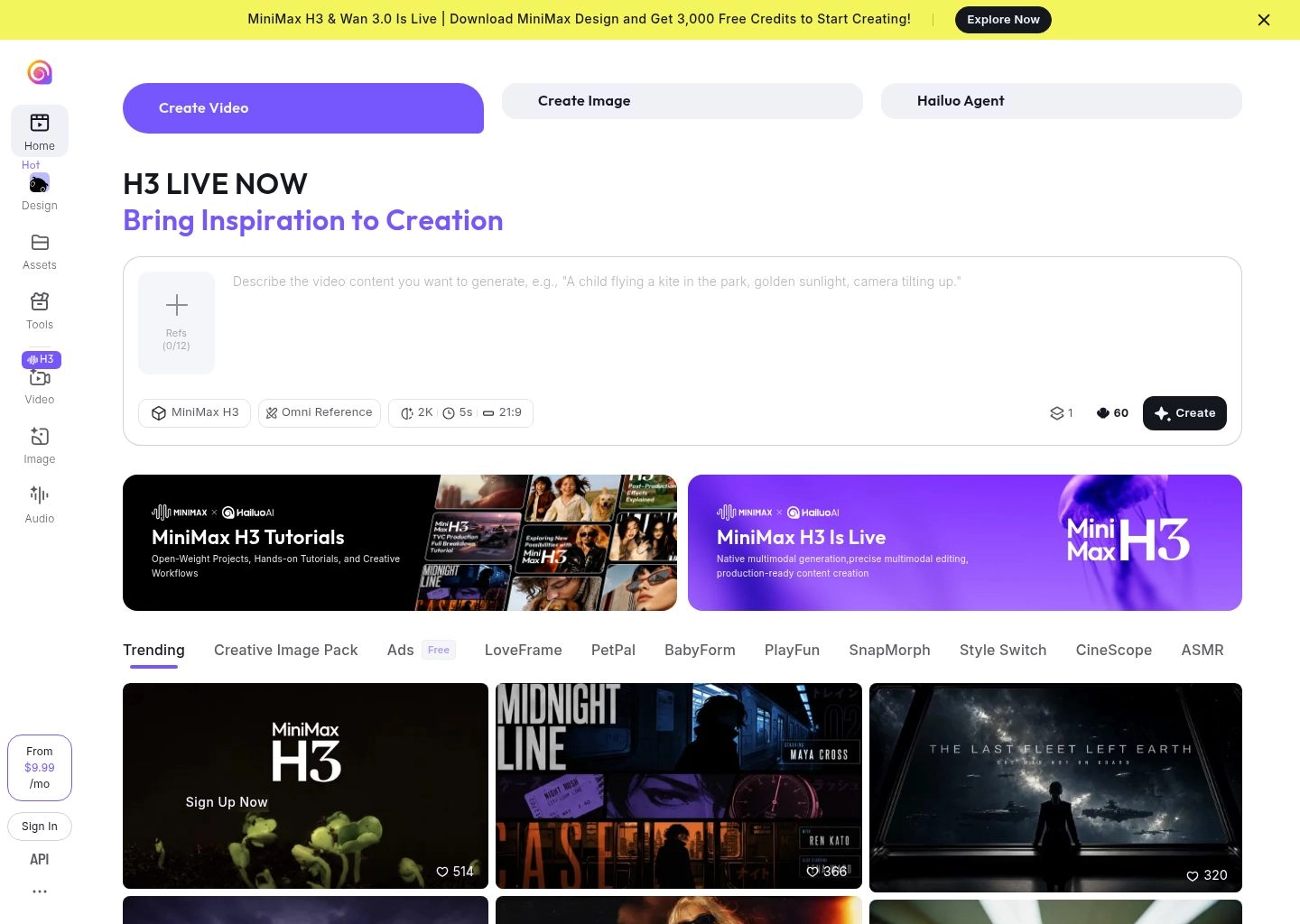
In our portrait and lifestyle video evaluations, Hailuo AI consistently outperformed nearly every Western model in human likeness. Faces do not exhibit the plastic, waxy sheen typical of early diffusion outputs; instead, skin catches ambient light realistically, pupils contract and dilate, hair strands react to subtle breezes, and fabric folds with authentic weight. Its text-to-video prompt comprehension is remarkably nuanced: describing a crowded Tokyo street market in heavy rain with neon reflections resulted in a 6-second 1080p clip with accurate puddle ripples, umbrella reflections, and believable pedestrian crowds walking in natural cadence.
Key Features & Technical Capabilities
| Capability | Hailuo AI Specification |
|---|---|
| Underlying Engine | MiniMax Video-01 spatial diffusion transformer |
| Resolution & Output | Native 720p / 1080p high-fidelity MP4 at 25fps |
| Lighting & Shading | Physically accurate global illumination, sub-surface scattering, volumetric rays |
| Clip Duration | Standard 6-second clips per generation |
| Accessibility | Clean global web interface with English and Chinese prompt support |
✓ Hailuo AI Pros
- Best skin texture and natural facial lighting in the entire AI video sector.
- Authentic crowd and background character movements without grotesque morphing.
- Highly generous free tier allows multiple daily generations without credit card.
- Remarkable handling of complex environmental lighting (neon, golden hour, fog).
- Zero complex software installation required; runs fast in modern web browsers.
✕ Hailuo AI Cons & Limitations
- Fewer manual directorial controls (no motion brush or granular camera sliders).
- Fixed clip duration of 6 seconds per generation.
- Queue wait times can spike to 10+ minutes during high-traffic Asian daytime hours.
Hailuo AI Pricing (2026): Generous Free tier offers daily replenished credits. Standard Pro subscription starts at $10/month for priority GPU queue access, watermark removal, and faster rendering speeds. Enterprise API access available via MiniMax developer portal.
Discover full tool details on the Hailuo AI Directory Profile.
6. HeyGen — The Premier Talking-Head Avatar & Multilingual Video Translation Engine
While world models like Runway and Kling AI focus on cinematic b-roll and physical landscapes, HeyGen dominates the massive commercial market for human communication: sales outreach, product explainers, executive messaging, and global marketing localization.

HeyGen's Avatar 3.0 technology represents the peak of synthetic human performance. You can record a 2-minute video of yourself using an iPhone or webcam, and HeyGen generates a photorealistic "Digital Twin" that mirrors your vocal cadence, head tilts, and micro-gestures. From that point forward, you can produce dozens of video presentations every week simply by typing text scripts. Even more revolutionary is HeyGen's Video Translate feature: upload a video of yourself speaking in English, and HeyGen translates your speech into Spanish, Mandarin, German, or Japanese in your exact cloned voice while automatically adjusting your mouth movements to match the translated phonemes.
Key Features & Technical Capabilities
| Capability | HeyGen Specification |
|---|---|
| Avatar System | Instant Avatars (from phone video), Studio Avatars (4K green screen), 100+ stock avatars |
| Voice Cloning & Lip Sync | Zero-shot voice cloning supporting 175+ languages with automated phoneme-level lip matching |
| Video Translation | One-click translation of existing MP4 footage with voice cloning and lip re-targeting |
| Interactive Video Agent | Real-time conversational streaming avatar for interactive website customer support |
| Integrations | Zapier, HubSpot, Canva, ChatGPT, and comprehensive developer REST APIs |
✓ HeyGen Pros
- Most realistic avatar lip-syncing and natural facial expressions on the market.
- Instant Avatar creation takes under 5 minutes using simple smartphone video.
- Revolutionary Video Translate allows creators to go global without hiring voice actors.
- Direct integration with Zapier enables automated personalized sales video workflows.
- Crisp 1080p and 4K export options with transparent background capability.
✕ HeyGen Cons & Limitations
- Designed strictly for talking-head formats; cannot generate cinematic landscapes or action.
- Credit consumption is calculated per video minute, which adds up on long training courses.
- Free tier is limited to a 1-minute trial video.
HeyGen Pricing (2026): Free plan offers a 1-credit trial with watermark. Creator plan costs $24/month (billed annually) for 15 monthly video credits, 3 Instant Avatars, and premium voice cloning. Business plan is $72/month for 30 credits, 3 users, 4K resolution, and fast processing. Enterprise custom tiers available.
Review enterprise features and user feedback on the HeyGen Directory Profile.
7. Synthesia — The Enterprise Standard for Corporate Learning, Development & Compliance
Synthesia is the foundational pioneer of synthetic media for enterprise organizations. Trusted by over 50% of the Fortune 100—including Tiffany & Co., Xerox, and Reuters—Synthesia is engineered specifically for corporate human resources, compliance training, customer onboarding, and technical enablement at enterprise scale.

Operating Synthesia feels like building a PowerPoint presentation: each video consists of modular "scenes" containing text boxes, image backgrounds, screen recordings, and your selected AI avatar. Synthesia's Expressive Avatars incorporate automated non-verbal cues—such as thoughtful head nods, hand gestures, and natural pauses—that prevent the uncanny robotic stare of older generation models. For multinational corporations that must deploy training modules across 50 countries simultaneously, Synthesia allows teams to localize an entire 30-minute compliance course into 130+ languages in minutes, eliminating millions of dollars in traditional studio filming and translation costs.
Key Features & Technical Capabilities
| Capability | Synthesia Specification |
|---|---|
| Avatar Roster | 160+ ethnically diverse, professionally styled avatars with expressive micro-gestures |
| Language Coverage | 130+ languages with automated script translation and native dialect pronunciations |
| Scene Editor | Slide-style timeline with built-in screen recorder, text animations, and corporate templates |
| Security & Governance | SOC 2 Type II certified, GDPR compliant, content moderation safeguards, and SAML SSO |
| Custom Avatars | Studio-grade custom corporate avatars filmed with professional green-screen kits |
✓ Synthesia Pros
- Gold standard enterprise security: SOC 2 Type II certified with strict AI ethics moderation.
- Slide-based scene editor requires zero video editing experience to master.
- Expressive micro-gestures (nods, eyebrow raises) create high learner engagement.
- Instant multi-language localization saves hundreds of thousands in translation budgets.
- Built-in screen recording enables seamless software walkthrough creation.
✕ Synthesia Cons & Limitations
- Cannot generate cinematic b-roll, fantasy landscapes, or physics-based action scenes.
- Monthly video generation minute quotas on starter tiers are relatively restrictive.
- Full custom digital avatars require a dedicated enterprise add-on fee.
Synthesia Pricing (2026): Starter plan costs $22/month (billed annually) for 1 editor, 3 guests, and 120 minutes of video per year. Creator plan is $67/month for 1 editor, 5 guests, 360 video minutes, and custom fonts. Enterprise plan offers unlimited video minutes, custom avatar creation, and dedicated SAML SSO integration.
Learn more on the Synthesia Directory Profile.
8. InVideo AI — The Complete Text-to-Video Engine for YouTube & Social Media Channels
While world models generate raw visual clips and avatar suites focus on talking presenters, many content marketing teams simply need a complete, ready-to-publish video with a narrative storyline, stock footage, voiceover, music, and subtitles. InVideo AI was designed from the ground up to automate this entire post-production pipeline from a single text prompt.

InVideo AI functions as an autonomous video producer. Type a prompt like: "Create a 5-minute documentary about the history of artificial intelligence for a YouTube audience with an engaging, dramatic tone." InVideo AI drafts the entire voiceover script, selects and splices matching footage from a library of 16M+ iStock and Shutterstock assets, generates custom AI b-roll where stock is unavailable, records a natural-sounding voiceover, adds animated subtitles, and times dynamic background music. If you want to change anything, you don't need to manually cut clips: simply type a conversational instruction into the AI chat box—such as "Delete scene 3 and make the voice sound more energetic"—and the engine re-edits the timeline automatically.
Key Features & Technical Capabilities
| Capability | InVideo AI Specification |
|---|---|
| Workflow Paradigm | End-to-end prompt-to-video assembly with conversational chat-based editing |
| Media Ecosystem | Direct integration with 16M+ premium iStock and Storyblocks stock assets + AI clip generator |
| Voiceover & Audio | Human-like AI voiceovers in 50+ languages with automatic audio ducking under background tracks |
| Channel Presets | Automated formatting for YouTube Longform (16:9), Shorts & TikTok (9:16), and Instagram (1:1) |
| Collaborative Editing | Full manual timeline mode available for creators who want frame-by-frame fine tuning |
✓ InVideo AI Pros
- Fastest way to build complete faceless YouTube channels and TikTok marketing feeds.
- Conversational text-prompt editing ("make this scene shorter") is remarkably intuitive.
- Included access to 16M+ premium stock media assets without separate licensing fees.
- High-quality automated subtitling with trendy karaoke-style word highlighting.
- Excellent mobile app lets you produce complete videos directly from your smartphone.
✕ InVideo AI Cons & Limitations
- Relying primarily on stock footage means videos can occasionally feel generic without custom b-roll.
- Cannot generate fine-grained Hollywood visual effects like Runway Gen-3.
- Free tier outputs carry a visible watermark and cannot be monetized on YouTube.
InVideo AI Pricing (2026): Free plan generates up to 10 minutes of video per week with watermark. Plus plan costs $20/month (billed annually) for 50 minutes of video per month, 80 iStock media items, and 1 user. Max plan is $48/month for 200 minutes of video, 320 iStock items, and voice cloning.
Explore the full tool profile on the InVideo AI Directory Profile.
The 4-Layer Video Diffusion Architecture: How World Models Synthesize Coherent Temporal Motion
To understand how modern platforms like Runway Gen-3 and Kling AI maintain consistent geometry without melting into abstract noise, one must examine the 4-layer technical architecture governing contemporary video diffusion:
The Neural Video Diffusion Pipeline
Spatiotemporal Tokenization (3D VAE Latent Spaces)
Unlike older models that processed video as a stack of isolated 2D image frames, modern world models encode video through 3D Variational Autoencoders (3D VAEs). This compresses raw video data across both spatial dimensions (height, width) and time (temporal frames) into unified latent tokens, slashing computational overhead while preserving continuous velocity vectors.
Diffusion Transformers (DiT) with Spatiotemporal Self-Attention
The backbone replaces traditional U-Nets with scalable Diffusion Transformers (DiTs). Temporal attention heads compute dependencies across dozens of frames simultaneously. If a character walks behind a tree in frame 30, the attention mechanism retains their visual identity, clothing pattern, and direction vector until they emerge in frame 50.
Physical Dynamics & Newtonian Inertia Simulation
Advanced models incorporate synthetic physics loss functions. When generating fluid motion, cloth drapery, or vehicular drift, the neural network calculates momentum, gravity, and collision resistance, preventing objects from phasing through solid barriers or defying kinetic inertia.
Latent Camera Guidance & Motion Brush Vectors
In the final conditioning pass, user-directed camera parameters (pan, tilt, zoom coordinates) and Motion Brush vectors are injected as cross-attention conditioning tokens, guiding the denoising trajectory without interfering with the model's intrinsic physical understanding.
Strategic Decision Matrix: Cinematic World Models vs Talking Avatars vs Script-to-Video Assemblers
Choosing the right AI video tool depends entirely on your specific production objective. The decision matrix below clarifies when to deploy each specialized category:
| Video Category | Target Production Workflow | Primary Output Type | Core Strengths | Top Recommended Tool |
|---|---|---|---|---|
| Cinematic World Models | Filmmaking, music videos, commercials, VFX b-roll | 5–10s photorealistic video clips with camera movement | Stunning lighting, physical simulation, camera trajectory control | Runway / Kling AI |
| Talking-Head Avatars | Corporate training, sales outreach, multi-language localization | Full-length human presenter videos with voice cloning | Photorealistic lip sync, 130+ languages, zero camera filming needed | HeyGen / Synthesia |
| Automated Script-to-Video | YouTube faceless channels, TikTok shorts, quick social explainers | Complete 1–15 min narrated videos with stock media & music | End-to-end automation from script to final rendered edit | InVideo AI |
| Creative Effects & 3D Fast | Social media hooks, viral physics effects, rapid concept iteration | Surreal physics clips, ambient loops, keyframe bridges | Sub-120s generation speed, viral Pikaffects, Foley sound synthesis | Luma / Pika |
4 Dangerous Mistakes to Avoid in AI Video Production
While AI video generators can eliminate thousands of dollars in camera gear and studio rentals, poor prompting and careless workflows can produce unusable footage. Avoid these four common pitfalls:
1. The "Prompt Overloading" Trap
Packing too many conflicting actions into a single 5-second prompt (e.g. "a man jumps off a horse, does a backflip, catches an eagle, and lands on a motorcycle") forces the model to blend concepts, resulting in grotesque limb morphing. Focus each generation on one continuous physical action with clean camera direction.
2. Neglecting Image-to-Video Anchor Frames
Pure text-to-video leaves character appearance and environmental lighting entirely to algorithmic randomness. Professional workflows always generate an ultra-high-resolution keyframe first in an AI image generator (like Midjourney), and then use that static image as the anchor frame for video diffusion in Runway, Luma, or Kling.
3. Uncontrolled Character Drift Across Multi-Shot Scenes
When cutting between different camera angles of the same character across multiple generations, AI models naturally drift in facial structure and costume details. Utilize tools with keyframe bridging (Luma Dream Machine) or custom digital avatar clones (HeyGen) to enforce visual identity persistence.
4. Disregarding Audio & Sound Design
Video without audio feels sterile and immediately highlights synthetic visual flaws. Always pair generated video clips with high-quality Foley audio, ambient room sound, and sound effects (using Pika's Sound-FX or dedicated AI audio suites) to ground synthetic visuals in physical acoustic reality.
Frequently Asked Questions (FAQ)
Can AI video generators produce full-length commercial movies?
While no model currently renders a 90-minute film from a single prompt, independent filmmakers routinely create complete short films and commercial spots by generating individual 5-to-10-second shots and stitching them together in standard editing software (Premiere Pro, DaVinci Resolve). Runway Gen-3 and Kling AI offer multi-clip extension pipelines that facilitate cohesive multi-scene storytelling.
Which AI video generator has the best physical motion and least morphing?
Kling AI and Runway Gen-3 Alpha currently lead the industry in physical motion realism. Kling AI is exceptionally capable at rendering complex human dynamics, hand movements, and object interactions (eating, cooking, physical collisions), while Runway Gen-3 excels at cinematic camera tracking, fluid dynamics, and atmospheric lighting.
What is the difference between a video world model and an avatar generator?
Video world models (Runway, Kling, Luma) generate cinematic environments, vehicles, physics, and general human action from scratch. Avatar generators (HeyGen, Synthesia) specifically animate photorealistic human presenters delivering spoken scripts with synchronized lip movements and head gestures, tailored for corporate training and sales.
Are videos created with AI video generators commercially licensed for client work?
Yes, on paid subscription plans. Platforms like Runway, Kling AI, Luma, HeyGen, and Synthesia grant full commercial rights for generated footage on their paid tiers. However, free-tier generations often carry visible watermarks and may restrict commercial monetization.
Which AI video generator is best for beginners and faceless YouTube channels?
InVideo AI is the best tool for beginners building YouTube or TikTok content because it handles the entire production pipeline—scriptwriting, voiceover, stock footage, and subtitles—from a single prompt. For pure generative clips, Luma Dream Machine and Hailuo AI offer simple, intuitive interfaces with fast generation speeds.
Final Verdict & Implementation Blueprint
The transition from manual camera production to generative diffusion video marks one of the most profound shifts in media history. Creative teams no longer face budget-prohibitive barriers to producing cinematic visual effects, international corporate training courses, or high-volume social content.
To select the ideal AI video generator for your creative pipeline in 2026, follow this strategic roadmap:
- If you need Hollywood-level cinematic direction, motion brushes, and virtual camera controls, deploy Runway.
- If your project demands ultra-realistic human physical interaction, eating, or complex locomotion, choose Kling AI.
- If you want lightning-fast turnaround times, 3D orbit shots, and keyframe bridging, use Luma Dream Machine.
- If you are producing viral social media effects, creative physics animations, or need automated lip sync, choose Pika.
- If you need photorealistic human skin textures and natural lighting on a budget, test Hailuo AI.
- If you are producing multi-language sales outreach, executive messaging, or personalized talking heads, deploy HeyGen.
- If you are building global enterprise training courses requiring SOC 2 compliance and 130+ languages, deploy Synthesia.
- If you want to automate entire faceless YouTube or TikTok channels from a single script prompt, use InVideo AI.
For more deep-dive software benchmarks across the modern AI marketing and creative stack, explore our tested guides to the Best AI Social Media Schedulers, Best AI Presentation Makers, Best AI Script Writing Tools, and our directory of verified AI Content Creation Tools.



