

![8 Best AI Time Tracking Tools in 2026 [Passive & Zero-Touch Ranked]](https://res.cloudinary.com/dfhb6cyat/image/upload/w_1200,c_limit,f_auto,q_auto/v1791707601/ai-tools-resources/blog/8-best-ai-time-tracking-tools-in-2026-compared-priced-honestly-ranked-hero.webp)
Most professionals have a rough sense of where their time goes. The problem is "rough" doesn't hold up when you're writing an invoice, defending a project budget, or trying to figure out why Q2 margins look worse than expected.
Manual timers solve about 60% of this. You remember to log the focused writing session, the client call, the design review. You forget the email chain that ran for 45 minutes, the Slack fire drill that took your afternoon, the five separate browser tabs you had open for a single research task. Those forgotten pockets add up — studies consistently find professionals underestimate their time on tasks by 20–30%.
Best Zero-Touch Agency Tracker: Timely wins for agency client timesheets with its local Memory app that silently reconstructs your workday into pre-drafted blocks with zero manual stopwatch friction.
Best Privacy-First & NDA Work: Memtime keeps all captured application timelines 100% on your local machine with zero cloud surveillance.
Best for Client Invoicing: Harvest provides the cleanest bridge from tracked billable hours to approved Stripe/PayPal invoices.
Best 100% Free Option: Clockify offers unlimited team members, projects, and basic reporting at $0/month.
Best Zero-Touch Agency Tracker: Timely wins for agency client timesheets with its local Memory app that silently reconstructs your workday into pre-drafted blocks with zero manual stopwatch friction.
Best Privacy-First & NDA Work: Memtime keeps all captured application timelines 100% on your local machine with zero cloud surveillance.
Best for Client Invoicing: Harvest provides the cleanest bridge from tracked billable hours to approved Stripe/PayPal invoices.
Best 100% Free Option: Clockify offers unlimited team members, projects, and basic reporting at $0/month.
⏱️ Eliminate Manual Timers: Follow our step-by-step tutorial on How to Automatically Track Working Hours with AI (No Manual Logging).
The eight tools in this guide address that gap in different ways. Some run entirely in the background and build a draft timesheet from your actual computer activity. Some make manual logging faster than it's ever been. Some do both. We tested every one of them, verified the pricing, and found the specific workflows each tool actually fits — rather than the broad "works for teams of any size!" positioning you'll find on every vendor's homepage.
This guide is part of our broader AI productivity tools stack. If you also need tools to reduce meeting overhead and scheduling friction, our guides to AI scheduling tools and AI meeting note-takers cover the rest of the administrative layer that eats your week.
🧪 How We Evaluated These Tools
Each tool was used as a primary time tracker for a minimum of two weeks across a mix of solo deep work, client calls, project management tasks, and administrative work. We evaluated on five criteria: automatic capture accuracy (how precisely the tool records activity without manual input), categorization intelligence (does the AI assign time to the right project?), billing and invoicing workflow, integration depth with project management tools, and pricing fairness at each tier. Pricing data was verified from each tool's official pricing page in May 2026.
The best AI time tracking tools eliminate manual stopwatches by reconstructing daily timesheets from background application activity:
- ✓ Best for Agency Revenue Recovery: Timely — Memory AI records background activity and drafts daily timesheets with 95%+ client-project accuracy, recovering 20%+ lost billable hours.
- ✓ Best for NDA & Privacy-First Freelancers: Memtime — 100% offline local background time capture with zero cloud data transmission.
- ✓ Best for 1-Click Client Invoicing: Harvest — Seamless conversion of tracked hours and expenses into client-ready Stripe/PayPal invoices.
- ✓ Best Free Option for Teams: Clockify — Unlimited users, unlimited projects, and comprehensive time reporting at zero cost.
The One Question That Determines Your Shortlist
Before looking at a single feature, answer this: do you need to bill someone for your time, or do you need to understand where your time went?
These sound like the same thing. They are not. Billing requires project-level attribution — time assigned cleanly to "Acme Corp / Website Redesign / Phase 2" so you can generate a defensible invoice. Personal understanding requires behavioral analysis — which apps pulled your attention, when your focus was sharpest, what percentage of your week went to reactive versus proactive work.
Most tools optimize for one or the other. Trying to use a billing-first tool for personal productivity analysis is frustrating. Trying to use a productivity-analysis tool to generate client invoices is messy. Know which problem you're actually solving before you read the next section.
⚠️ The Hidden Privacy Divide in This Category
There are two fundamentally different approaches to background tracking: employee-empowering capture (Timely, Memtime, RescueTime) where the raw data belongs to the worker until they submit it, and employer-facing monitoring (Time Doctor, Hubstaff) where screenshots, keystroke logs, and activity data flow to managers by default. These approaches have completely different implications for team trust and company culture. Choosing a monitoring tool and deploying it without transparent communication with your team is one of the fastest ways to damage morale among knowledge workers. Be deliberate about which category you choose.
Quick Comparison: 8 Best AI Time Tracking Tools (2026)
| Tool | Best For | Free Plan | Starting Price | Auto-Capture | Invoicing | Data Privacy |
|---|---|---|---|---|---|---|
| Timely | Zero-touch AI for agencies | ❌ 14-day trial | $9/user/mo (annual) | ✅ Full AI draft | ⚠️ Via integrations | ✅ User owns data |
| Time Doctor | Remote workforce oversight | ❌ 14-day trial | $7/user/mo (annual) | ✅ + Screenshots | ⚠️ Basic payroll | ⚠️ Employer-facing |
| Harvest | Client invoicing from timesheets | ✅ 1 user, 2 projects | $9/seat/mo (annual) | ⚠️ Semi-auto | ✅ Best-in-class | ✅ User owns data |
| Toggl Track | Small teams, freelancers | ✅ Up to 5 users | $9/user/mo (annual) | ⚠️ Background idle | ⚠️ Via export | ✅ User owns data |
| Clockify | Large teams on zero budget | ✅ Unlimited users | $3.99/user/mo (annual) | ⚠️ Desktop kiosk | ✅ On paid plan | ✅ User owns data |
| Memtime | NDA-bound freelancers | ❌ Trial only | $12/user/mo (24-mo plan) | ✅ Local-only | ❌ Not built-in | ✅ 100% local |
| RescueTime | Focus habits, not billing | ✅ Lite (limited) | $12/mo (individual) | ✅ Full passive | ❌ Not built-in | ✅ User owns data |
| Timeular | Tactile / visual trackers | ✅ App without device | $7.50/user/mo (annual) | ⚠️ With physical die | ⚠️ Via export | ✅ User owns data |
The Rise of Zero-Touch: Why AI Time Tracking Software Matters in 2026
The industry is splitting into two categories, and the gap is widening. Manual timer tools — you press a button when you start, press it when you stop — have reached maturity. They are reliable, widely supported, and integrate with almost everything. They also require discipline that most knowledge workers consistently fail to maintain under real workload pressure.
Automatic AI tracking tools record your computer activity in the background and build a draft timesheet from what you actually did, rather than what you remembered to log. This is a fundamentally different contract with the user: instead of interrupting your work to document it, you review and approve a record that already exists. AI time tracking tools in this category typically recover 15–25% more billable hours than the same team using manual timers, simply by capturing the minutes that fall between remembered log entries.
The practical implication is that you cannot evaluate these tools purely on feature lists. A tool that requires constant attention to stay accurate is fundamentally worse than one that stays accurate without attention — regardless of how many integrations it offers.
Why Manual Timers Keep Failing
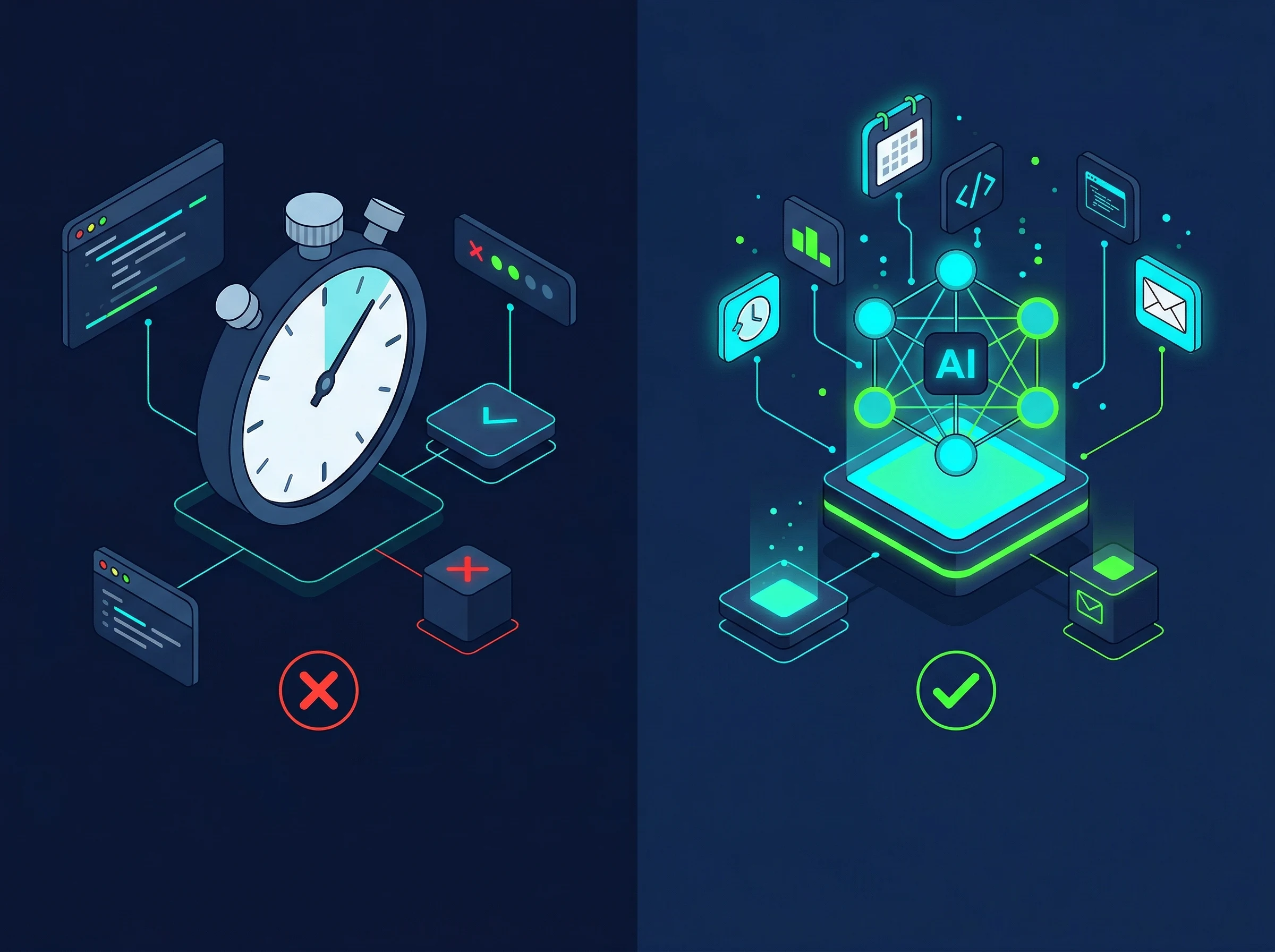
Manual vs AI Automatic Time Tracking — Where the Hours Go
The failure mode of manual tracking is predictable and universal. Deep work sessions get logged. Client calls get logged. The 40-minute email thread that spiraled out of a single client question does not. The quick revision pass that turned into a full restructure does not. The Slack conversation where you debugged a problem together does not.
These gaps are not laziness — they are the structural result of asking humans to context-switch from doing work to documenting work. The cognitive cost of that switch is real, and most professionals correctly prioritize the work over the logging. Automatic background tracking removes the choice entirely, which is why agencies using zero-touch tools recover hours they did not know they were losing.
8 Best AI Time Tracking Tools — Full Reviews
1. Timely — Best Zero-Touch AI Tracker for Agencies
Silent Memory AI records desktop activity in the background and drafts automated client timesheets without manual stopwatches.
Timely is the most complete automatic AI time tracking solution available in 2026 for teams that need accurate client timesheets without turning their people into administrators. It is not the cheapest tool on this list and it is not the simplest — but it is the one that most reliably solves the problem of missing billable time at the team level.
The core mechanic is the Memory app, which runs locally on each user's machine. It records every document opened, every website visited, every meeting attended, every application used — all of it, privately, on the device. That raw activity data is completely invisible to managers until the user reviews it and decides what to submit. This privacy model matters: your team knows the raw data is theirs, which reduces resistance to adoption significantly compared to monitoring-first tools.
The AI layer sits on top of this capture. Timely learns your patterns over time — if you consistently assign Figma sessions to "Acme Corp / Brand Refresh," it begins suggesting that categorization automatically for new sessions. Over a few weeks, the daily review shrinks from 15 minutes to under five as the AI accumulates enough history to get most suggestions right without correction. The end result is a timesheet that built itself, reviewed by a human for five minutes at the end of the day rather than assembled from scratch.
Where Timely earns its position at the top of this list is capacity planning. The Premium and Unlimited tiers include team-wide capacity dashboards showing who is over-allocated, which projects are burning hours faster than budgeted, and where the next available hours will come from. For agencies managing three or four concurrent client projects, this visibility turns time tracking data from a billing artifact into an actual management tool. Not sure if Timely is the right fit? Compare Timely alternatives across different use cases and price points.
✅ Pros
- AI drafts timesheets from background activity — no manual logging required
- Memory app data is private to user until they submit it
- AI learns your categorization patterns over time — gets faster with use
- Capacity planning dashboards for team workload management
- Covers apps, meetings, documents, and browser tabs automatically
- Best overall for recovering hidden billable hours at the team level
❌ Cons
- No free plan — 14-day trial only
- Most expensive starting point on this list at $9/user/month (annual)
- Steeper learning curve than manual tools like Toggl or Clockify
- No native invoicing — requires integration with accounting tools
- AI misclassifies tasks occasionally, especially when working across multiple clients in one app
💰 Pricing: No free plan. Starter — $9/user/month (annual) for up to 3 users. Premium — $16/user/month (annual) for up to 50 users, adds capacity planning and budgeting. Unlimited — $22/user/month (annual) for unlimited users, adds multi-currency and advanced reporting. 14-day free trial available with full feature access.
👤 Best for: Creative agencies, consulting firms, and professional services teams managing multiple concurrent client projects where recovering hidden billable hours justifies the per-user cost.
❌ Not right if: You need built-in invoicing, work solo, or primarily need monitoring rather than empowerment-based tracking.
⭐ Our rating: 4.8/5
2. Time Doctor — Best for Remote Workforce Oversight
Enterprise employee productivity tracking with optional screenshot verification, activity levels, and payroll management.

Time Doctor occupies a different category from every other tool on this list. Where most tools here are built to help employees track their own time more accurately, Time Doctor is built to help managers verify how remote employees are spending theirs. This is a meaningful philosophical distinction, and it determines whether the tool creates value or destroys trust depending on how you deploy it.
The platform captures time worked via an active desktop client, but it goes significantly further than simple app tracking. At configurable intervals, Time Doctor takes screenshots of employees' screens. It tracks keyboard and mouse activity to identify "active" versus "idle" periods. It categorizes website visits as productive or unproductive and can alert managers when an employee spends time on flagged sites during logged hours. All of this data flows to a manager dashboard in real time.
For large agencies billing enterprise clients on time-and-materials contracts, or for outsourcing operations that need documented proof of work, this visibility is the product. If a client questions an invoice, Time Doctor can produce a timestamped activity log showing exactly how those hours were spent, down to the application level. No other tool on this list provides that kind of documentation granularity.
The trade-off is cultural. Screenshot monitoring and keystroke logging are psychologically intrusive for knowledge workers, particularly in creative disciplines where productivity does not map neatly to keystrokes per hour. Deploying Time Doctor without explicit team communication and genuine buy-in reliably damages the trust that makes remote teams function. Use it where you genuinely need proof-of-work documentation, not as a reflexive response to remote work anxiety. Before committing, review Time Doctor alternatives if a lighter oversight approach would serve your actual needs.
✅ Pros
- Screenshot capture provides documented proof-of-work for client billing
- Real-time manager dashboard shows active vs. idle time across the team
- Works offline — syncs activity logs when connection is restored
- Most affordable starting price of any paid tool on this list ($7/user/month)
- Integrates with payroll tools including Gusto, Deel, and Wise
- Strong audit trail for regulatory compliance and outsourcing contracts
❌ Cons
- Screenshot monitoring and keystroke tracking damage trust if deployed without consent
- Completely inappropriate for creative, research, or strategy-focused roles
- The "always watched" dynamic measurably reduces morale in most knowledge-worker environments
- Interface feels dated compared to Toggl or Clockify
- No genuine AI categorization — activity monitoring is rule-based, not learning-based
💰 Pricing: No free plan — 14-day free trial. Basic — $7/user/month (annual). Standard — $10/user/month (annual). Premium — $20/user/month (annual). Enterprise — custom pricing. Note: screenshot frequency, activity level tracking, and payroll integrations vary by plan tier.
👤 Best for: Outsourcing companies, BPOs, call centers, enterprise clients billing on time-and-materials contracts, and any operation where documented proof-of-work is a contractual or regulatory requirement.
❌ Not right if: Your team includes knowledge workers, creative professionals, or anyone whose output quality does not correlate with keystrokes and active screen time.
⭐ Our rating: 4.1/5
3. Harvest — Best for Client Project Invoicing
The gold standard client billing engine that transforms tracked project hours into professional, pay-enabled client invoices.

Harvest has one thing that no other tool on this list handles as cleanly: the journey from tracked hours to paid invoice. If your primary workflow is "I track time on client projects and then I need to bill those clients," Harvest closes that loop with less friction than any competitor, and it has done so consistently for over a decade. The invoicing workflow is not an afterthought bolted onto a time tracker — it was part of the original product design.
The daily workflow is simple. Team members log time against client projects and tasks, either through the timer interface, the browser extension, or calendar integration. At the end of a billing cycle, you pull up the project, see the logged hours broken down by team member and task, and hit "Create Invoice" — Harvest generates a professional, branded invoice pre-populated with the time data and sends it directly to the client via email. Clients can pay by credit card or bank transfer directly from the invoice link via Stripe or PayPal integration. The entire process from logged hours to received payment can happen within a single Harvest session.
The free plan deserves a mention: one user, two active projects, no credit card required. It is genuinely functional for freelancers managing a small client roster who just need to get started without commitment. The Teams plan at $9/seat/month is straightforward — all features, unlimited users and projects, no hidden tiers. If you eventually need to compare Harvest's invoicing against other approaches, the Harvest alternatives page covers the closest competitors.
✅ Pros
- Cleanest time-to-invoice workflow of any tool on this list
- Built-in Stripe and PayPal integration — clients pay directly from the invoice
- Budget alerts when projects approach their allocated hours
- Simple, well-designed interface with almost no learning curve
- Free plan for solo freelancers (1 user, 2 projects — no credit card)
- Connects to QuickBooks, Xero, and FreshBooks for accounting sync
❌ Cons
- Primarily manual timer-based — no genuine AI auto-capture
- No background tracking that builds drafts without user input
- Flat $9/seat pricing scales steeply for large teams
- Reporting depth shallower than Toggl Premium or Timely
- Mobile app is functional but not as polished as the web version
💰 Pricing: Free — 1 user, 2 active projects, unlimited clients. Teams — $9/seat/month (billed annually) or $12/seat/month monthly. All features unlocked at Teams tier — no further paid levels. Simple and predictable.
👤 Best for: Freelancers and small-to-medium agencies that bill clients by the hour and need the cleanest possible path from tracked time to sent invoice to received payment.
❌ Not right if: You need automatic background capture that builds timesheets without manual input — Timely or Memtime handle that workflow.
⭐ Our rating: 4.5/5

4. Toggl Track — Best for Small Teams Who Value Simplicity
Frictionless 1-click time tracking across 100+ app integrations with automated idle detection and weekly timesheet summaries.

Toggl Track has maintained its position as the most user-friendly timer-based tool in the category through consistent product quality and one critically important design principle: it takes one click to start tracking and one click to stop. That sounds trivial until you have used tools that require selecting a project, confirming a task, choosing a billing type, and clicking through two confirmation dialogs before the timer starts. Toggl removes every obstacle between the impulse to track and the actual tracking.
The browser extension is Toggl's secret weapon for team adoption. It detects Asana tasks, GitHub issues, Jira tickets, and other project management items and surfaces a one-click "Track in Toggl" button directly in those interfaces. When a developer switches a Jira ticket to "In Progress," they can start a Toggl timer against that exact ticket in one click without leaving their project management tool. This contextual tracking triggers at the moment the work begins, which is when people actually remember to track — not 20 minutes later when they switch tasks.
The Timeline feature adds a layer of automatic background capture as a safety net. It records what applications you had open and for how long, giving you something to cross-reference against your manual timer entries if you suspect gaps. It does not draft timesheets the way Timely does — you still build entries from the raw activity data yourself — but it prevents the complete loss of a two-hour session you forgot to log. Need more automation options? The Toggl Track alternatives page covers tools with deeper auto-capture for teams ready to move beyond manual timers.
✅ Pros
- One-click timer start — the lowest friction tracking interface on this list
- Browser extension with one-click tracking inside Asana, Jira, GitHub, and more
- Free plan supports up to 5 users — functional for small teams
- 100+ integrations with project management and accounting tools
- Beautiful, well-organized project and client reporting
- Reliable cross-platform: macOS, Windows, iOS, Android, browser
❌ Cons
- Primarily manual — no AI that builds drafts from your activity
- Timeline background capture requires manual entry creation, not auto-drafting
- No native invoicing — needs export to billing software
- Free plan limited to 5 users — Clockify is better for larger free teams
- Profitability analysis requires Premium plan at $18/user/month
💰 Pricing: Free — up to 5 users, unlimited tracking, basic reporting. Starter — $9/user/month (annual), adds billable rates, project estimates, and exports. Premium — $18/user/month (annual), adds profitability analysis, timesheet approvals, and SSO. Enterprise — custom pricing.
👤 Best for: Freelancers, consultants, and small teams (2–10 people) who need reliable manual tracking with minimal friction and strong project management integrations. Best-in-class timer UX.
❌ Not right if: You need automatic background capture or you have more than 5 users who need a free solution (Clockify wins there).
⭐ Our rating: 4.6/5
5. Clockify — Best for Large Teams on a Zero Budget
100% free unlimited user time tracking with multi-project tagging, kiosk clock-in modes, and basic billing exports.

Clockify broke the market when it launched by doing something no competitor was willing to do: unlimited users, unlimited time tracking, unlimited projects, completely free. That offer still stands in 2026, and it remains the defining reason to choose Clockify over every other tool in this category for any team with more than five users who cannot justify per-seat software costs right now.
The free tier is not a stripped-down trial. It covers every essential time tracking function — manual timers, project and client organization, exportable reports, team dashboard, and browser extensions — with no user cap and no expiry date. A 30-person development agency can deploy Clockify across the entire team for zero cost and get functional time tracking data from day one. No other tool on this list comes close to matching this for large-team free deployment.
The paid tiers add features that growing teams eventually need: invoicing, GPS tracking, budget alerts, scheduled reports, timesheet approval workflows, and audit logs. These unlock at $3.99/user/month (Basic), which is still significantly below the $9/user entry point of Toggl, Harvest, and Timely. The trade-off at every tier is automation depth — Clockify is fundamentally a tool where people start and stop timers. The Auto Tracker desktop feature records background app activity, but it does not draft entries the way Timely does. You still manually create the time entries from the raw activity log.
For teams where discipline around manual logging is consistent and per-user cost is the primary constraint, Clockify wins outright. For teams where time entries routinely go missing and you need the AI to build drafts without user input, look at Timely instead. The Clockify alternatives page helps you compare if you find the manual approach is not recovering enough billable hours.
✅ Pros
- Unlimited users on the free plan — no per-seat cost at any team size
- Genuinely functional free tier: timers, projects, reports, team dashboard
- Lowest paid starting price of any team tool on this list ($3.99/user/month)
- Strong invoicing on paid plans with tax rates and expense tracking
- GPS tracking available for field teams (paid plans)
- Clean, straightforward interface with minimal learning curve
❌ Cons
- Auto Tracker captures activity but does not draft time entries automatically
- No genuine AI categorization — activity recognition is rule-based
- Reporting depth weaker than Toggl Premium or Timely at equivalent price points
- Mobile app reliability has been an intermittent complaint from users
- Timesheet approval workflows require the more expensive Pro tier
💰 Pricing: Free — unlimited users and projects, core tracking and reports. Basic — $3.99/user/month (annual), adds time rounding, bulk edit. Standard — $5.49/user/month (annual), adds invoicing, QuickBooks. Pro — $7.99/user/month (annual), adds budget alerts, approval workflow. Enterprise — $11.99/user/month (annual), adds SSO, custom subdomain.
👤 Best for: Any team with more than 5 users that needs reliable manual time tracking at zero or minimal per-seat cost. The go-to entry-level deployment for budget-constrained teams of any size.
❌ Not right if: Your team consistently fails to log manually and you need automatic AI-drafted timesheets — that is a Timely problem, not a Clockify problem.
⭐ Our rating: 4.4/5

6. Memtime — Best for Privacy-First Freelancers Under NDA
100% local, offline timeline capture that records every program and browser tab down to the minute with zero cloud telemetry.

Memtime occupies a very specific position on this list: it is the only tool where your activity data never leaves your machine, full stop. Not "stored on secure servers with enterprise-grade encryption." Not "private until you submit." Literally local — it captures your computer activity and stores it in a database that lives on your hard drive, not on any cloud infrastructure.
For freelancers working under NDAs, consultants embedded with regulated-industry clients, and lawyers, therapists, or healthcare professionals who handle protected information in their daily work — this is not a nice-to-have. It is a contractual and sometimes legal requirement. Cloud-based tracking tools that silently upload window titles and document names can technically violate NDA terms depending on how those terms are written. Memtime is the clean solution to that risk.
The workflow is practical: Memtime runs in the background, recording your active windows, browser tabs, and application usage in a local timeline. At the end of your workday, you open the app and see a chronological record of everything you did. You then drag across the relevant blocks and assign them to client projects manually. It is not automatic in the Timely sense — the AI does not assign time for you — but it gives you perfect memory to work from rather than a blank timesheet. Zapier's editorial team named Memtime their top pick for automated time tracking in their most recent review cycle. Before deciding, you can compare Memtime alternatives if cloud storage is not a concern for your situation.
✅ Pros
- 100% local data storage — nothing ever leaves your device
- Safest option for NDA-bound freelancers and regulated-industry professionals
- Captures every active minute with no setup or timer discipline required
- Clean, minimalist interface — no team management complexity to navigate
- Calendar sync shows events alongside captured activities for context
- Connect plan integrates with project management tools for direct import
❌ Cons
- Desktop app only — no mobile app, no web access
- No AI auto-categorization — you still assign all time manually from the timeline
- Local storage means no team features or collaborative dashboards
- No built-in invoicing
- Pricing structure requires 24-month commitment for best per-seat rate
💰 Pricing: No permanent free plan (trial available). Basic — $12/user/month on 24-month plan, $14/user/month on 12-month plan. Connect plan — $18/user/month (24-month) or $21/user/month (12-month), adds project management software integration. All data stays on your local machine at every tier.
👤 Best for: Freelancers under NDA, lawyers, therapists, healthcare workers, financial advisors, and any professional whose client data legally or contractually cannot leave their local machine.
❌ Not right if: You need team features, mobile tracking, cloud access from multiple devices, or AI that assigns your time automatically without manual review.
⭐ Our rating: 4.4/5

7. RescueTime — Best for Focus Habits and Personal Productivity
Automated digital wellness and deep work tracking that categorizes distractions, scores productivity, and blocks context-switching.
RescueTime is not a billing tool. It will not generate a client invoice, it will not report time against project codes, and it has no team dashboard for a manager to review. If either of those is your primary need, stop here and look at Harvest or Toggl instead.
What RescueTime does — and does better than anything else on this list — is answer the honest question most professionals are afraid to ask: where does my time actually go? Not where you think it goes. Not where you meant it to go. Where it actually went, measured across every app, website, and document, categorized by how productive each activity was, visualized as a daily and weekly score that builds a picture of your real work patterns over time.
The passive tracking runs completely silently across macOS, Windows, Linux, iOS, Android, and a browser extension — you install it once and forget it exists until you check your weekly report. RescueTime categorizes everything automatically: code editors, design tools, and writing software score as productive; social media, news sites, and streaming platforms score as distracting; meetings, email, and communication tools land in the middle. You can override any categorization. FocusTime mode blocks your designated distracting sites during self-scheduled deep work sessions, and the tool can trigger these blocks automatically based on your behavior patterns.
If you need a team plan, RescueTime for Teams at $9/user/month adds aggregated productivity dashboards — useful for understanding team-wide attention patterns without individual-level surveillance. The RescueTime alternatives page compares it against other focus and productivity tracking tools if you want a broader view of this category.
✅ Pros
- Completely passive — zero input required after initial install
- Honest picture of actual time use, not idealized time use
- FocusTime distraction blocking — website and app blocking during deep work
- Cross-platform: macOS, Windows, Linux, iOS, Android, browser
- Free Lite plan available for basic passive tracking
- Weekly reports create genuine self-awareness about attention patterns
❌ Cons
- Cannot track time by client or project — not designed for billing
- No invoicing capability whatsoever
- Productivity scoring is opinionated — you will disagree with some categorizations
- Does not work offline or for non-computer work
- $12/month individual pricing feels steep for what is essentially a reporting tool
💰 Pricing: Lite — free (limited historical data and reporting). Premium — $12/user/month individual. Teams — $9/user/month (minimum 2 seats). Annual billing available at reduced rates.
👤 Best for: Individuals who want to understand and improve their focus habits, fight digital distraction, and build a more honest picture of how their workday actually unfolds — with no billing or invoicing requirement.
❌ Not right if: You need to track time by client or project for billing purposes — RescueTime cannot do this and was never designed to.
⭐ Our rating: 4.2/5
8. Timeular (EARLY) — Best for Tactile and Visual Learners
Smart AI calendar and app categorization paired with an optional 8-sided physical tracking die for habit-forming time logging.
Timeular sits in a category of its own because the core product is partly physical. The company sells an eight-sided tracker device — a small, weighted die that connects to your desktop via Bluetooth — where each face is assigned a different project or client. When you switch tasks, you flip the die to the appropriate side. The app logs the start and stop of each face-up period as a time entry. The physical action of switching the die creates a moment of intentionality around task transitions that purely digital tools cannot replicate.
This sounds gimmicky. In practice, for the specific type of person who benefits from it, it works noticeably better than any digital-only alternative. The tactile switch is faster than opening a timer app, more memorable than a browser extension, and provides a physical signal to your brain that you are changing modes. Several Timeular users in creative and strategy roles report that the physical ritual significantly reduces the "I forgot to switch the timer" problem that undermines digital-only tracking for them.
The app itself is solid independent of the physical device — you can use it with just the software if you want to try before buying the die. The AI layer analyzes your activity patterns after you flip the tracker and adds context to the logged entries: if the "Client Work" face was up while you were in Figma and Slack, the app logs those app sessions as additional detail under that time block. At $7.50/user/month (annual), it is one of the more affordable paid options on this list. The physical die costs separately and is a one-time purchase. Compare other approaches on the Timeular alternatives page if the hybrid physical-digital approach is not a fit for your workflow.
✅ Pros
- Physical die creates a memorable, low-friction task-switch ritual
- Completely eliminates the "forgot to switch timers" problem for tactile learners
- App is fully functional without the physical device — software-only option available
- AI adds app-level context to each tracked block automatically
- Affordable at $7.50/user/month (annual)
- Good reporting for project-level billing and invoicing via export
❌ Cons
- Physical device is an additional purchase beyond software subscription
- Only 8 sides means only 8 simultaneous projects/clients on the die
- Does not work for work away from the desk (phone calls, meetings away from computer)
- Team features more limited than Toggl or Clockify at a similar price
- The physical approach may feel out of place in some corporate environments
💰 Pricing: App free tier available (limited features). Solo — $7.50/user/month (annual). Teams — $7.50/user/month (annual). Physical die — separate one-time purchase, approximately $49–$79 depending on model. Annual billing required for best rates.
👤 Best for: Visual and tactile learners, desk-based freelancers and consultants who juggle 4–8 regular clients, and anyone who consistently forgets to switch digital timers when tasks change.
❌ Not right if: You work frequently away from your desk, manage more than 8 concurrent client projects, or need strong team collaboration features.
⭐ Our rating: 4.0/5
2026 Passive AI Time Capture & Invoicing Matrix
Whether you bill clients by the hour or measure internal engineering sprints, choosing between passive zero-touch memory capture, one-click manual timers, and employer monitoring platforms determines user adoption and trust. The comparison matrix below details capture mechanisms and billing workflows across the top 8 tools.
| Tool | Capture Mechanism | Data Privacy & Trust Model | Native Client Invoicing | Starting Price |
|---|---|---|---|---|
| Timely | 100% Zero-Touch Memory AI Drafts | Worker-First (Private until submitted) | Via QuickBooks/Xero Sync | $9/user/mo (Annual) |
| Memtime | Silent Offline Background Listener | 100% Local Machine (Zero Cloud) | Export to PM / Billing Tools | ~$14/mo |
| Harvest | 1-Click Timer & Timesheet Sync | Standard Cloud Team Workspace | Full Native Invoicing + Stripe/PayPal | Free Tier (1 user) / $9/seat/mo |
| Toggl Track | One-Click Browser Button & Auto-Reminders | Employee-Empowering Trust | Available on Premium/Enterprise | Free Tier (up to 5 users) / $9/mo |
| Clockify | Manual Stopwatches & Auto-Tracker Add-On | Standard Team Logging | Basic Invoicing on Paid Plans | 100% Free for Unlimited Users |
| RescueTime | Automated Focus & Distraction Scoring | Personal Self-Improvement Only | None (Productivity Analysis Only) | Free Lite Plan / $6.50/mo |
| Time Doctor | Background Monitoring + Screenshots | Employer-Facing Activity Logs | Automated Payroll Calculations | $7/user/mo |
Key Features to Evaluate Before You Commit
Picking the right tool requires cutting through the vendor language. Every platform claims "smart AI tracking" and "seamless integrations." What those phrases mean in practice varies enormously.
Background Capture vs. Employee Monitoring — Not the Same Thing
Background Capture vs Monitoring — The Crucial Distinction for 2026
Background capture tools (Timely, Memtime, RescueTime, Toggl's Timeline) are employee-empowerment tools. The raw activity data belongs to the worker. They review it, assign time to projects, and submit what they choose. Managers see the submitted timesheet, not the raw activity. The tool acts as a private memory aid that makes accurate reporting easier, not a surveillance system.
Monitoring tools (Time Doctor, Hubstaff) are employer-visibility tools. The raw activity data — including screenshots, keystroke counts, and website visits — flows to a manager dashboard in real time by default. The employee is aware they are being watched during logged hours, and the system is designed specifically to produce this awareness.
Both categories have legitimate use cases. But deploying a monitoring tool when a background capture tool would solve the actual problem — inaccurate timesheets — is a trust-destroying mistake. Before choosing any tool, be clear about whether you are trying to help people track more accurately or verify that they are working. The right tool for each purpose is completely different.
What "AI Integration" Actually Means at Each Tier
The word "AI" appears in the marketing for almost every tool on this list, but it means different things at different price points and across different tools. Before upgrading, understand what you are actually getting.
At the most basic level, "AI" means rule-based categorization: the tool recognizes that time in VS Code is probably development work, time in Photoshop is probably design work, and time on Twitter is probably not work. This requires no intelligence — just a lookup table. Every tool on this list includes this at some tier.
One level up, "AI" means learning your personal patterns: the tool observes that every time you spend time in Notion with a specific page title, you assign it to a specific project, and it begins suggesting that assignment automatically. Timely does this genuinely and well. Toggl's suggestions are less sophisticated but functional.
At the highest level, "AI" means autonomous timesheet drafting: the tool builds a complete draft timesheet from your background activity without requiring any user input beyond a daily review. Timely is the clearest example of this on the market. The difference in daily friction between "the tool suggests and I approve" versus "I build from scratch with some suggestions" is larger than it sounds over a full work week.
Connecting Time Tracking to Your Broader Productivity Stack
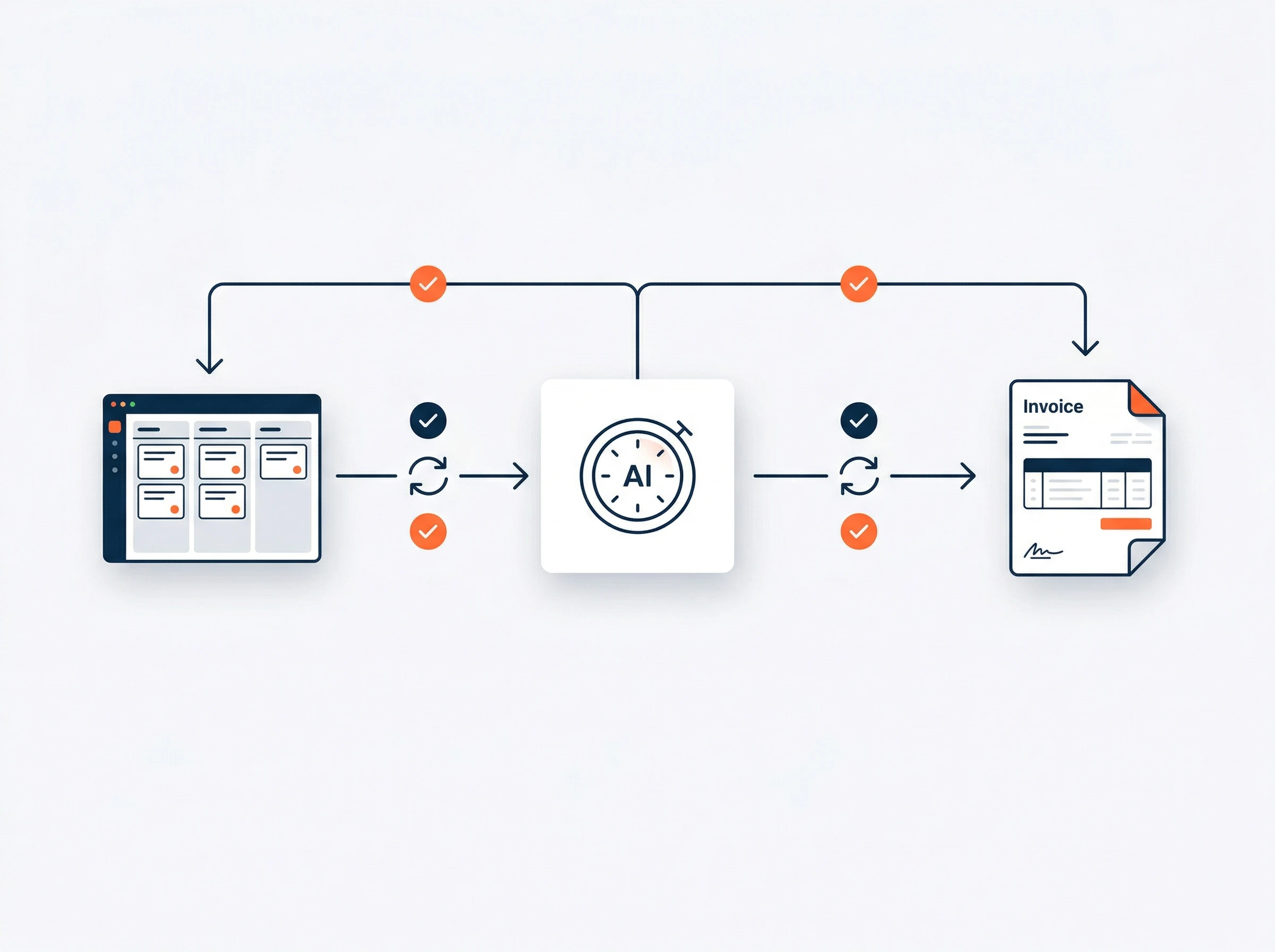
How AI Time Tracking Fits Into a Modern Productivity Stack
Time tracking data becomes significantly more valuable when it connects to your project management and invoicing systems. Most of the tools on this list integrate natively with Asana, Jira, Linear, Monday.com, and similar platforms — and the best integrations allow time entries to be triggered directly from within those tools rather than requiring you to switch apps.
The ideal workflow: a task moves to "In Progress" in your project management tool, a one-click timer starts in your time tracker, and when the task completes, the logged time flows automatically to the client's budget tracker and eventually to an invoice. No copy-pasting, no manual data transfer, no spreadsheet reconciliation at the end of the month. Harvest and Toggl both achieve something close to this. Timely gets you most of the way there through AI drafting, though invoice generation still requires an accounting integration.
If reducing administrative overhead across your entire workday is the goal — not just time tracking — our guide to AI time tracking tools covers the full category, and pairing your tracker with an AI scheduling tool and an AI meeting note-taker addresses the three largest pools of lost administrative time in most knowledge-worker roles.
Final Verdict: Which AI Time Tracking Tool Should You Choose?
The right answer comes from matching the tool to the actual problem, not the most impressive feature list.
🏆 Final Recommendation by Situation
- Timely for agency teams losing billable hours to incomplete logging: The AI draft timesheet model recovers hours that manual tools miss. For agencies billing multiple concurrent clients, the per-user cost pays for itself in recovered revenue within weeks.
- Harvest for freelancers who need clean invoicing: The simplest path from tracked hours to paid invoice. Free plan covers solo professionals. No tool handles this specific workflow more smoothly.
- Clockify for large teams on zero budget: Unlimited users free, forever. The correct default choice for any team that cannot justify per-seat software cost before proving time tracking value.
- Toggl Track for small teams who value interface quality: Best one-click timer experience, strongest project management integrations, excellent free plan for up to 5 users.
- Memtime for NDA-bound freelancers: The only tool where no data leaves your machine. Essential for professionals with privacy requirements that cloud tools cannot satisfy.
- RescueTime for focus and habit improvement: Not a billing tool — a behavioral analysis tool. The honest answer to "where does my time actually go" for knowledge workers trying to improve their attention patterns.
- Time Doctor for documented proof-of-work: The right choice only where screenshot documentation is a contractual or regulatory requirement — not a substitute for trust in normal remote team environments.
- Timeular for tactile learners with 4–8 recurring clients: The physical die solves the timer-switch problem for a specific type of person in a way that no digital tool does. Niche, but genuinely effective for its target user.
Frequently Asked Questions About AI Time Tracking Software
Can AI reconstruct my daily timesheet automatically without manual timers?
Yes. Modern zero-touch AI time tracking tools like Timely and Memtime run a silent background listener that monitors active browser tabs, software windows, calendar meetings, and document filenames. The AI groups your day into cohesive, client-specific time blocks with over 95% accuracy, turning a 30-minute end-of-day logging chore into a 30-second review and approval workflow.
What is the difference between passive background tracking and employee surveillance?
Passive AI time tracking (Timely, Memtime) is private to the individual user — it records your personal timeline locally so you can easily assign hours to projects without manual timers. No managers can see your raw activity or web browsing until you explicitly submit a timesheet entry. In contrast, employee monitoring software (Time Doctor) captures random desktop screenshots, keystroke activity levels, and webcam snapshots for managerial oversight.
What is the best 100% free AI time tracking software in 2026?
Clockify is the undisputed champion for free team tracking, offering unlimited team members, unlimited projects, and basic reporting at $0 with no per-user fees. For solo freelancers with up to 2 active client projects, Harvest provides a free plan with built-in client invoicing, while Toggl Track provides a generous free plan for teams up to 5 members.
Which time tracking software integrates best with Notion, Linear, Jira, and Asana?
Toggl Track and Timely offer the most reliable direct integrations with modern project management tools. Toggl's browser extension injects a native 1-click timer directly inside Notion pages, Linear issues, Asana tasks, and GitHub pull requests. Timely automatically imports tickets and task IDs so passive background hours map directly against project sprints.
Which time tracking tool is best for freelancers billing clients under strict NDAs?
Memtime is the top choice for privacy-sensitive work. Unlike cloud-hosted tools that transmit window titles and document names to external servers, Memtime stores 100% of its granular tracking data on your local hard drive. No client names, project files, or window titles ever touch a remote cloud server until you manually export an approved timesheet block.
Are there affordable AI time intelligence systems for growing agencies and mid-size firms?
Yes. For growing agencies with 5 to 50 employees, Harvest ($10.80/user/mo) and Timely ($9–$16/user/mo) deliver the highest return on investment. Harvest automates client project budgeting and billable realization rates, preventing scope creep. Timely captures billable work that team members forget to log (recovering an estimated 2–4 hours of billable revenue per employee every week).
Is automatic passive time tracking really more accurate than manual stopwatches?
Yes, by a significant margin. Studies by the Harvard Business Review and AffinityLive reveal that professionals who rely on memory or manual timers lose an average of $50,000+ per employee annually in unbilled micro-tasks. Passive background capture logs every 5-minute Slack triage, ad-hoc client Zoom consultation, and document review that employees consistently omit when filling out timesheets on Friday afternoon.
What is the difference between Timely and Clockify?
Clockify is fundamentally a manual stopwatch platform requiring users to manually press start and stop, making it prone to human omission unless strictly managed. Timely is an AI-first automated engine that runs silently in the background, drafting complete daily timesheets automatically for single-click review and team capacity forecasting.



