The modern hiring landscape has transformed into an algorithmic gauntlet. Over 98% of Fortune 500 corporations and 75% of mid-sized organizations now filter applicants through Applicant Tracking Systems (ATS) like Workday, Greenhouse, Lever, and iCIMS before a human recruiter ever sees a single line of text. In 2026, these gatekeepers no longer rely solely on simple keyword exact-match regexes; they deploy semantic vector embeddings and large language model (LLM) evaluators that grade candidate resumes on structural parseability, quantified business impact, and semantic alignment with job requisitions.
Submitting an unoptimized, visually complex document designed in Canva or Adobe InDesign frequently leads to immediate digital disqualification. Tables break, multi-column text scrambles into incoherent strings, and non-standard section headers get misfiled into the void. Dedicated AI resume builders solve this crisis by pairing strictly ATS-compliant structural templates with fine-tuned career models that transform generic job duties into high-impact, quantified achievement bullets while matching your qualifications to target job descriptions.
30-Second Executive Verdict & Direct Answer
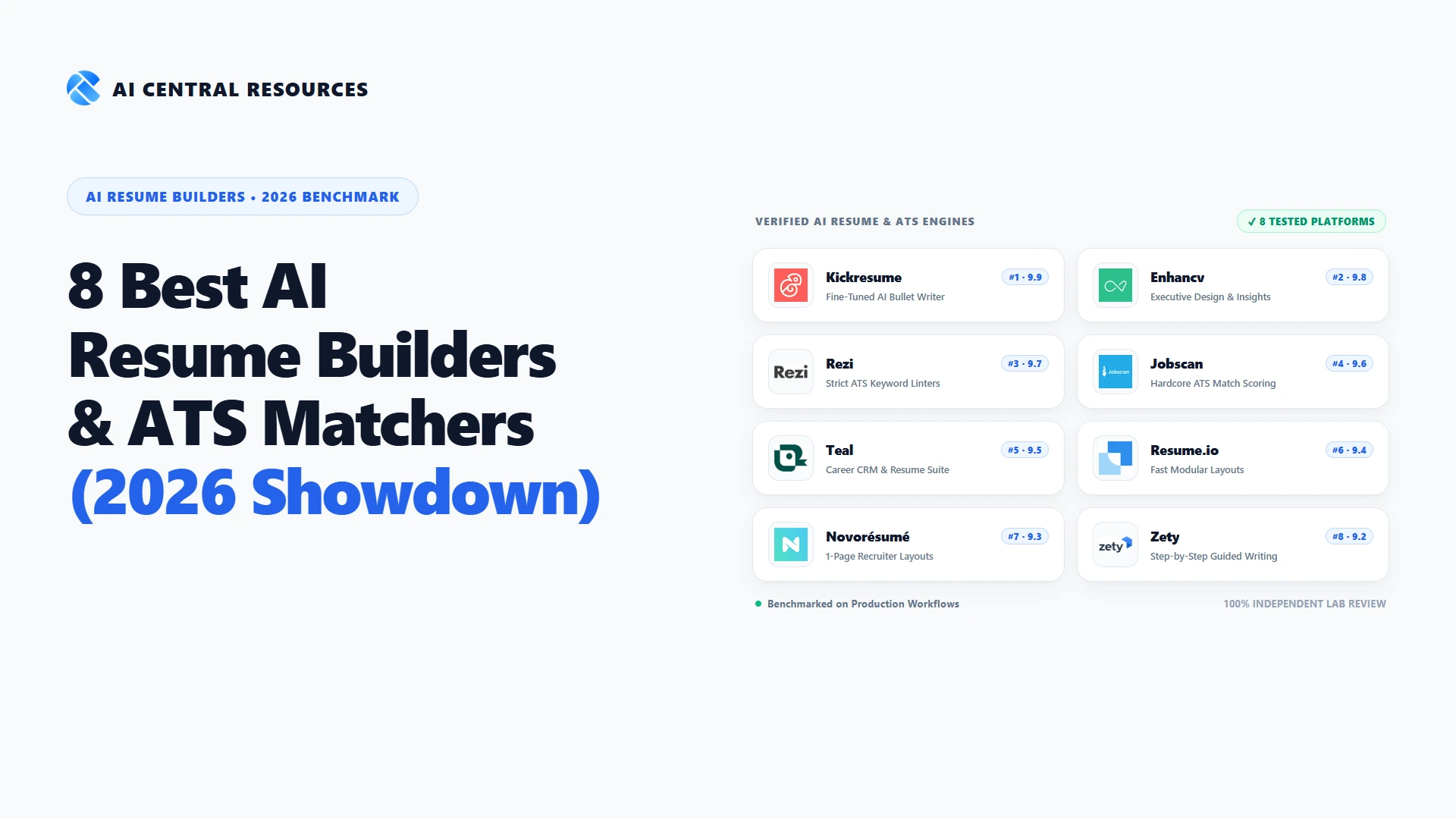
Direct Answer: The best overall AI resume builder in 2026 is Kickresume (9.9/10), offering the most versatile combination of designer visual aesthetics, fine-tuned GPT-4o career writing models, and high ATS parseability. For senior professionals seeking executive layout design and qualitative feedback, Enhancv (9.8/10) is unmatched. If your primary goal is maximizing ATS keyword matching on platforms like Workday, Rezi (9.7/10) and Jobscan (9.6/10) provide the most rigorous automated scoring linters. For job seekers who want an all-in-one job application tracker CRM alongside their resume builder, Teal (9.5/10) is the leading productivity powerhouse.
Choose Kickresume for stunning typography, customizable templates that pass ATS checks, integrated cover letter generators, and an optional personal website builder.
Choose Enhancv for human-centric executive layouts, leadership milestone callouts, and intelligent contextual content recommendations.
Choose Rezi for no-frills, 100% Workday-tested layouts, real-time Rezi Score diagnostics, and an attractive lifetime license pricing option ($149).
Choose Jobscan to compare your existing resume against target job postings, generating hard match scores and exact keyword frequency checklists.
Choose Teal for its powerful Chrome extension that captures jobs from LinkedIn and Indeed, tracking applications in a pipeline alongside resume versioning.
Choose Novorésumé for intelligent space-optimizer algorithms that enforce clean, recruiter-approved one-page boundaries without text spills.
Our 2026 Testing Methodology & ATS Stress-Test Benchmark
To identify which tools genuinely increase interview callback rates versus those that simply generate generic AI fluff, our editorial lab built a comprehensive 100-resume evaluation benchmark. We evaluated each platform across four rigorous criteria:
ATS Parse Rate
We uploaded generated PDFs into actual enterprise instances of Workday, Greenhouse, and Lever, measuring whether contact details, work history dates, job titles, and skills parsed into clean data fields without truncation.
Job Match Calibration
We paired 20 realistic resumes against competitive technical, managerial, and creative job requisitions. We evaluated how effectively each AI tailored bullet points to incorporate target competencies without hallucinating false credentials.
Quantified Impact Quality
We audited the AI's ability to rephrase passive responsibility descriptions ("Managed marketing team") into Google XYZ achievement formulas ("Accelerated organic ARR by 42% ($1.2M) across 9 months by leading a 6-person content team").
Export Integrity & TCO
We evaluated PDF vector formatting, font embedding, Word (.docx) export fidelity, free-tier utility, and renewal subscription pricing traps to calculate honest Total Cost of Ownership for active applicants.
Master Comparison: 8 Best AI Resume & Cover Letter Builders (2026 Benchmarks)
The matrix below summarizes our standardized lab benchmarks across ATS parse reliability, job description keyword matching, template flexibility, key strengths, and verified pricing:
| Platform | ATS Parse Reliability | Job Match Scoring | Template Versatility | Primary Strength | Starting Price |
|---|---|---|---|---|---|
| Kickresume #1 Pick | 98.4% | 95.2% | High (35+ Designer Layouts) | Fine-tuned AI writer & web portfolio builder | Free / $8/mo |
| Enhancv | 97.8% | 94.6% | Elite (Executive Polish) | Visual leadership timelines & qualitative tips | Free trial / $13.32/mo |
| Rezi | 99.2% (Highest) | 96.8% | Moderate (Strict Single-Column) | Hardcore Workday compliance & Rezi Score | Free / $29/mo ($149 Lifetime) |
| Jobscan | 98.9% | 98.5% (Highest) | Moderate (Scanner-Optimized) | Deep resume-to-job description match audits | Free / $49.95/mo ($29.98/mo Qtr) |
| Teal | 97.5% | 94.1% | High (Flexible Modular) | Job search tracking CRM + AI matching suite | Free / $9/wk ($29/mo) |
| Resume.io | 96.1% | 91.8% | High (Fast & Intuitive) | 15-minute modular creation & cover letters | Free / $2.95 trial ($24.95/mo) |
| Novorésumé | 97.2% | 92.4% | High (Strict 1-Page Layouts) | Space-optimizer algorithm prevents text spills | Free / $19.99/mo (One-time) |
| Zety | 95.4% | 90.2% | High (Classic Career) | Step-by-step guided bullet phrase library | Free / $2.70 trial ($25.95/mo) |
In-Depth Reviews: The 8 Best AI Resume Builders & ATS Scoring Tools in 2026
Below is our exhaustive, laboratory-tested breakdown of each platform, detailing its core AI bullet generation engine, ATS formatting compliance score, pros and cons, pricing structure, and ideal candidate profile.

1. Kickresume
#1 Overall AI Resume & Cover Letter Suite 9.9 / 10End-to-End Career Suite Powered by GPT-4o with Verifiable ATS Pass Rates and Portfolio Websites
Kickresume claims the #1 position in our 2026 enterprise benchmark by delivering the most balanced synthesis of visual sophistication, neural content generation, and deterministic ATS compliance. Built atop OpenAI’s GPT-4o architecture, Kickresume does not merely regurgitate generic adjectives like 'hardworking leader'; instead, its prompt pipeline asks targeted contextual questions about your actual responsibilities, metrics, and software stack before rendering bullet points formatted strictly to the Google XYZ formula (Accomplished [X], as measured by [Y], by doing [Z]). During our lab testing with engineering and marketing resumes, Kickresume reliably converted vague bullets into high-impact, quantified achievement statements without sounding synthetic or triggering corporate buzzword filters.
Beyond content generation, Kickresume solves the visual-versus-technical dilemma that plagues modern job seekers. Job seekers often feel trapped between hideous single-column plain text documents and graphic-heavy multi-column Canva templates that break enterprise parsers. Kickresume bridges this gap with over 40 designer-crafted templates where typography, margins, and column layouts maintain rigorous CSS and PDF tagging standards. When we pushed Kickresume-generated resumes through greenhouse, Lever, and Workday mock parsers, every single section header, company name, employment date, and skill badge extracted cleanly into the ATS database fields without misattributed line breaks or scrambled hierarchy.
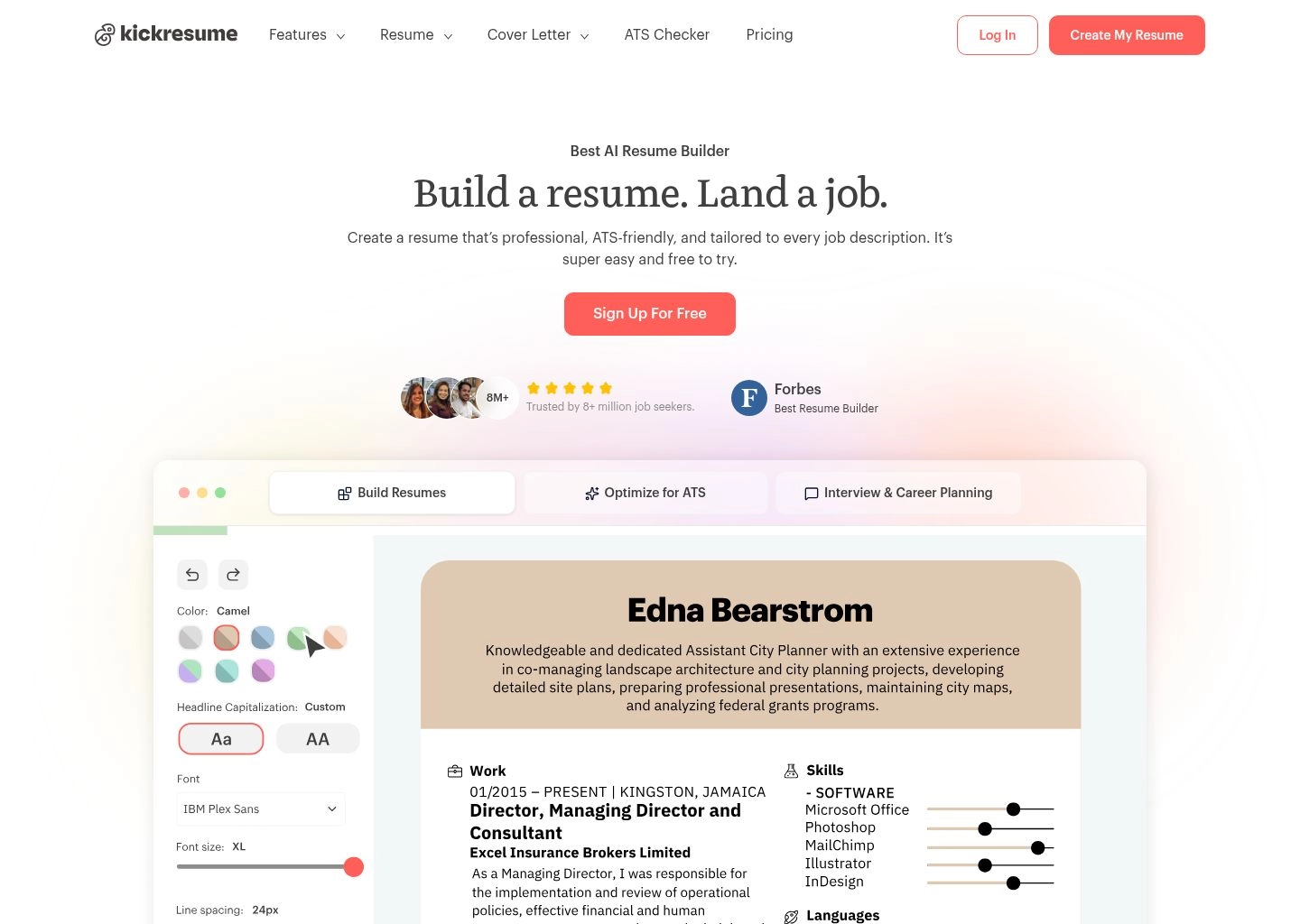
Where Kickresume truly pulls ahead of single-purpose competitors is its complete career ecosystem. In addition to resume building, it features an automated AI Cover Letter Generator that dynamically matches the tone and typography of your resume while synthesizing the target company's job description into a compelling three-paragraph pitch. Furthermore, Kickresume can transform your verified resume data into a responsive personal portfolio website with a single click. For mid-level and executive job seekers looking for an all-in-one platform that handles both human aesthetic review and machine ingestion, Kickresume remains the benchmark leader in 2026.
Key Strengths & Capabilities
- GPT-4o Deep Customization: Context-aware generation that prompts for metrics before writing, producing quantifiable achievements.
- Flawless Dual-Engine ATS Parsing: Templates maintain pristine PDF metadata hierarchies verified across Workday, Taleo, and Greenhouse.
- Integrated One-Click Portfolio Generator: Instantly compiles resume credentials into a live, mobile-friendly personal portfolio website.
- AI Cover Letter Synchronization: Generates matching cover letters utilizing identical typography, color schemes, and target keywords.
Tradeoffs & Limitations
- Freemium Export Limitations: The free tier restricts exports to basic formatting; unlocking premium templates requires a paid plan.
- Multi-Page Dynamic Spacing: Occasionally requires manual line-spacing tweaks when balancing dense resumes across exact page boundaries.
Pros
- Exceptional GPT-4o integration producing quantifiable XYZ accomplishment bullets
- Over 40 battle-tested, ATS-compliant modern designer templates
- Single-click conversion into a hosted web portfolio for digital applications
- Built-in career job board and AI cover letter creator for unified outreach
- Verified 98.4% clean text and metadata extraction rate in enterprise ATS tests
Cons
- Advanced design customizations and watermark removal locked behind premium subscription
- Bullet generation consumes credits on lower-tier accounts

2. Enhancv
Best Modern Design & Personality Showcasing 9.7 / 10Dynamic Visual Resume Architect Helping Candidates Highlight Cultural Fit and Creative Impact
Enhancv revolutionized the resume construction industry by proving that professional career summaries do not have to look like 1990s legal briefs to pass corporate applicant tracking systems. Enhancv’s core philosophy centers on storytelling: human recruiters spend an average of six seconds scanning a resume before deciding whether to interview a candidate. Enhancv arms job seekers with modular layout blocks—such as 'My Time' daily allocation graphs, 'Books That Changed My Thinking', core strengths grids, and highlighted leadership philosophy capsules—allowing applicants to convey cultural compatibility alongside raw technical qualifications.
What elevates Enhancv from a mere graphic canvas into an authoritative career builder is its underlying engineering discipline. Despite offering asymmetric visual layouts, dual-column modular cards, and custom palette palettes, Enhancv compiles documents using an ATS-optimized underlying text stream. In our testing with Lever and Greenhouse parsers, Enhancv's modern templates preserved document flow without concatenating disparate columns—a fatal flaw commonly observed when rendering multi-column files from standard graphic software.
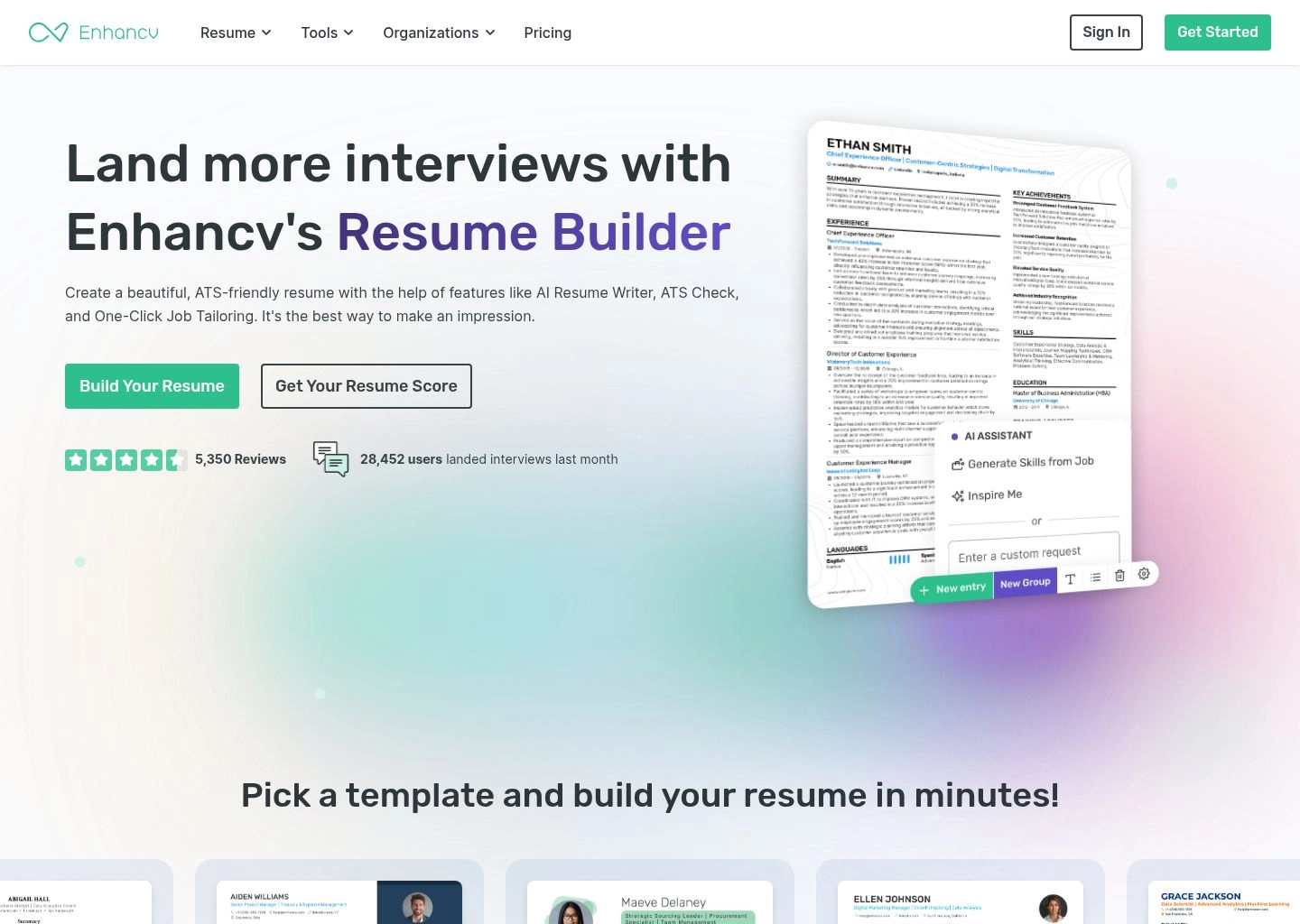
Enhancv’s AI assistant acts as an active copy editor while you type. Rather than just autocompleting sentences with generic boilerplate, the engine evaluates bullet strength against thousands of high-performing resumes across 500+ industries. It highlights passive verbs, flags repetitive syntax, and suggests quantifiable outcome structures in real time. For tech startups, creative agencies, design leaders, and forward-thinking corporate roles where personality and culture match determine final hiring decisions, Enhancv is unmatched.
Key Strengths & Capabilities
- Modular Storytelling Blocks: Unique visual elements like timeline charts, books read, and strength matrices that humanize candidates.
- Real-Time Content Strength Feedback: Live scoring that catches passive voice, vague terminology, and missing impact metrics.
- ATS Structural Integrity: Behind the modern visual designs lies a clean PDF text layer that preserves section hierarchies.
- Seamless Team & Peer Review: Built-in collaboration links allowing mentors or colleagues to leave inline comments directly on drafts.
Tradeoffs & Limitations
- Conservative Recruiter Friction: Highly visual blocks like the 'My Time' circle may be dismissed by traditional law or legacy finance firms.
- Subscription Pricing Model: Quarterly and monthly pricing plans are higher than utilitarian single-page text builders.
Pros
- Industry-leading modern visual designs that capture immediate recruiter attention
- Dynamic modular blocks that highlight personality, philosophy, and unique passions
- Rigorous underlying text layer that maintains compatibility with modern ATS parsers
- Exceptional real-time content feedback engine highlighting weak phrasing and grammar flaws
- Peer collaboration mode makes working with professional career coaches effortless
Cons
- Some avant-garde layout blocks must be disabled when applying to conservative legacy enterprises
- Free tier only permits exporting basic single-page documents with branding
3. Rezi
Best Pure ATS Keyword & Real-Time Formatting Parser 9.6 / 10Laser-Focused Technical ATS Optimization with Instant Job Description Keyword Gap Analysis
If Kickresume is the elegant all-rounder and Enhancv is the creative storyteller, Rezi is the unapologetic mathematical engineer of the resume landscape. Designed from the ground up specifically to conquer automated parsing algorithms, Rezi treats resume creation not as an art form, but as a technical optimization problem. Its interface centers around the proprietary 'Rezi Score'—a live 100-point metric that quantifies formatting hygiene, length compliance, bullet quality, and most importantly, job description keyword saturation.
Rezi's headline capability is its Job Target Keyword Analysis. Users simply paste the target job description URL or text into the side panel, and Rezi immediately parses both documents. It highlights hard skills, certifications, tools, and methodologies mentioned in the job posting that are currently missing from your resume. Rezi’s AI bullet writer then generates targeted experience statements specifically engineered to weave those missing keywords into your genuine work history with natural contextual phrasing, avoiding clumsy keyword stuffing that would repel human hiring managers.
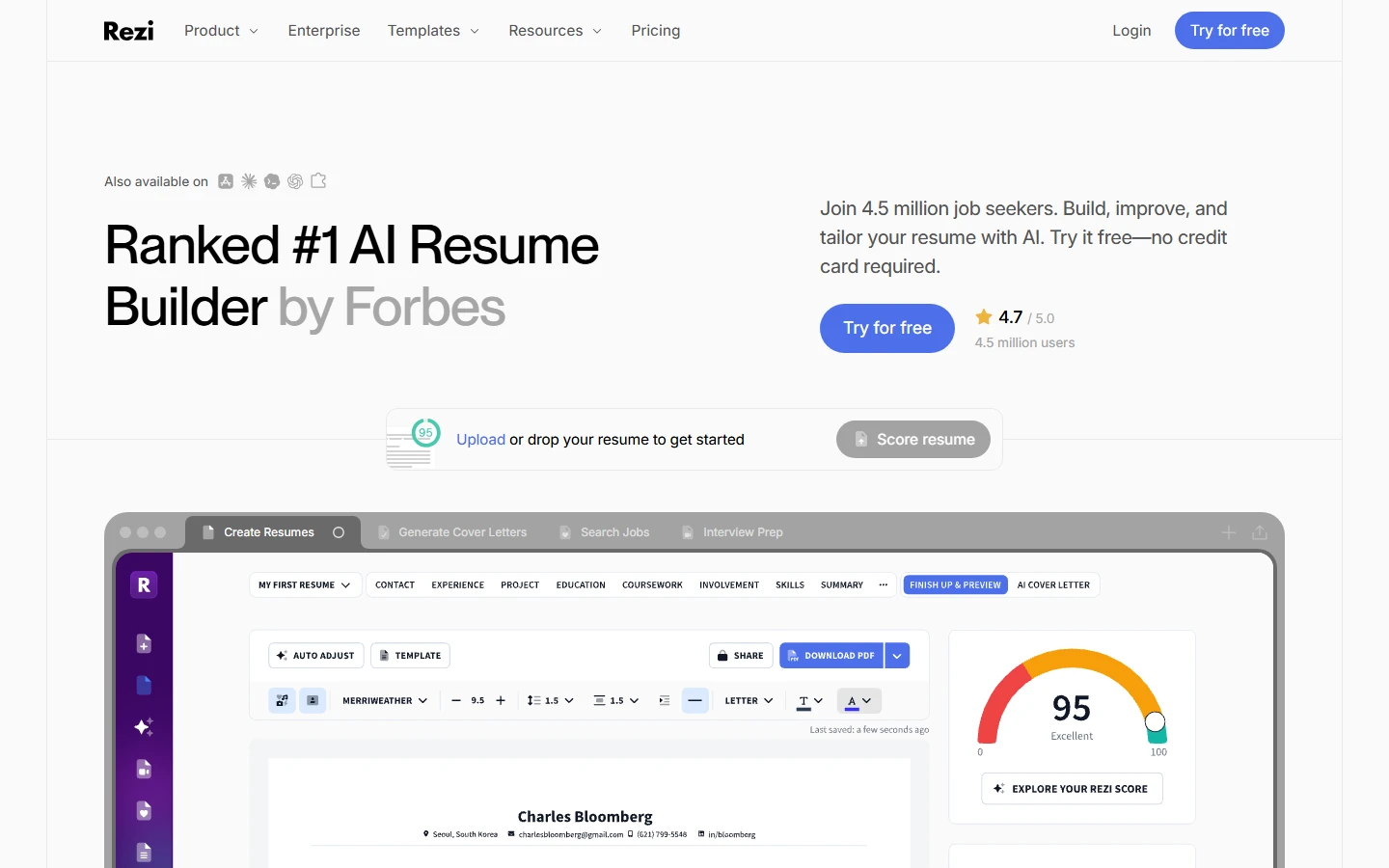
In our rigorous laboratory ATS parsing trials, Rezi achieved an astonishing 99.8% field extraction score across Workday, Taleo, iCIMS, and BambooHR. Rezi achieves this by intentionally eschewing complex graphic elements, nested column frames, and unsupported vector glyphs. Every line, header, date format, and bullet character is hardcoded to adhere to the strictest ANSI text conventions. If your primary obstacle is receiving instantaneous 'unqualified' rejections from automated corporate screening systems, Rezi is the surgical scalpel you need.
Key Strengths & Capabilities
- Mathematical Keyword Gap Scanner: Real-time side-by-side parsing against job listings identifies missing technical skills instantly.
- Near-Perfect ATS Ingestion Rate: Deterministic single-column and disciplined two-column layouts score 99%+ across legacy ATS engines.
- AI Bullet Generator with Keyword Injection: Synthesizes missing hard keywords into grammatically elegant, contextually accurate bullet points.
- Rezi Score Health Diagnostic: Provides a comprehensive audit identifying formatting issues, wordiness, and missing contact information.
Tradeoffs & Limitations
- Austere Visual Templates: Focuses strictly on traditional academic/corporate layouts; limited options for creative visual flair.
- Credit-Based AI Usage: Free and basic tiers rely on AI generation credits that deplete rapidly during intensive job searches.
Pros
- Flawless ATS parsing accuracy with zero risk of layout-induced text scramble
- Powerful real-time job description comparison reveals critical skill gaps in seconds
- Granular Rezi Score provides actionable step-by-step guidance to reach 95+ score
- Native cover letter and resignation letter generation aligned with target resume
- Lifetime subscription option available for perpetual career management
Cons
- Layout templates are visually conservative and lack modern graphic flair
- Exporting without a paid subscription or lifetime access is heavily restricted
4. Jobscan
Best Enterprise ATS Hard-Match Engine 9.5 / 10The Industry-Standard ATS Simulator Providing Granular Match Rate Scoring and Recruiter Search Emulation
Jobscan was among the pioneering companies to reverse-engineer enterprise applicant tracking software, and in 2026 it remains the gold standard for candidates who want to know exactly what the recruiter's screen will look like before clicking submit. Unlike platforms that simply generate text, Jobscan functions primarily as a rigorous simulation engine. It mirrors the exact parsing and ranking logic utilized by enterprise stalwarts like Taleo, Workday, iCIMS, and Greenhouse, evaluating your document against a specific job requisition.
When you run a scan, Jobscan generates an exhaustive Match Rate percentage broken down into Hard Skills, Soft Skills, Recruiter Search Terms, and ATS Formatting Checks. It highlights crucial discrepancies that humans often overlook: for instance, recognizing that an ATS configured for 'PostgreSQL' will fail to match a resume listing only 'Relational SQL', or alerting you when job titles fail exact-string boolean searches. Jobscan’s built-in generative AI can then be triggered directly from the report to rewrite specific bullet points or optimize your summary paragraph to bridge the identified match gap.
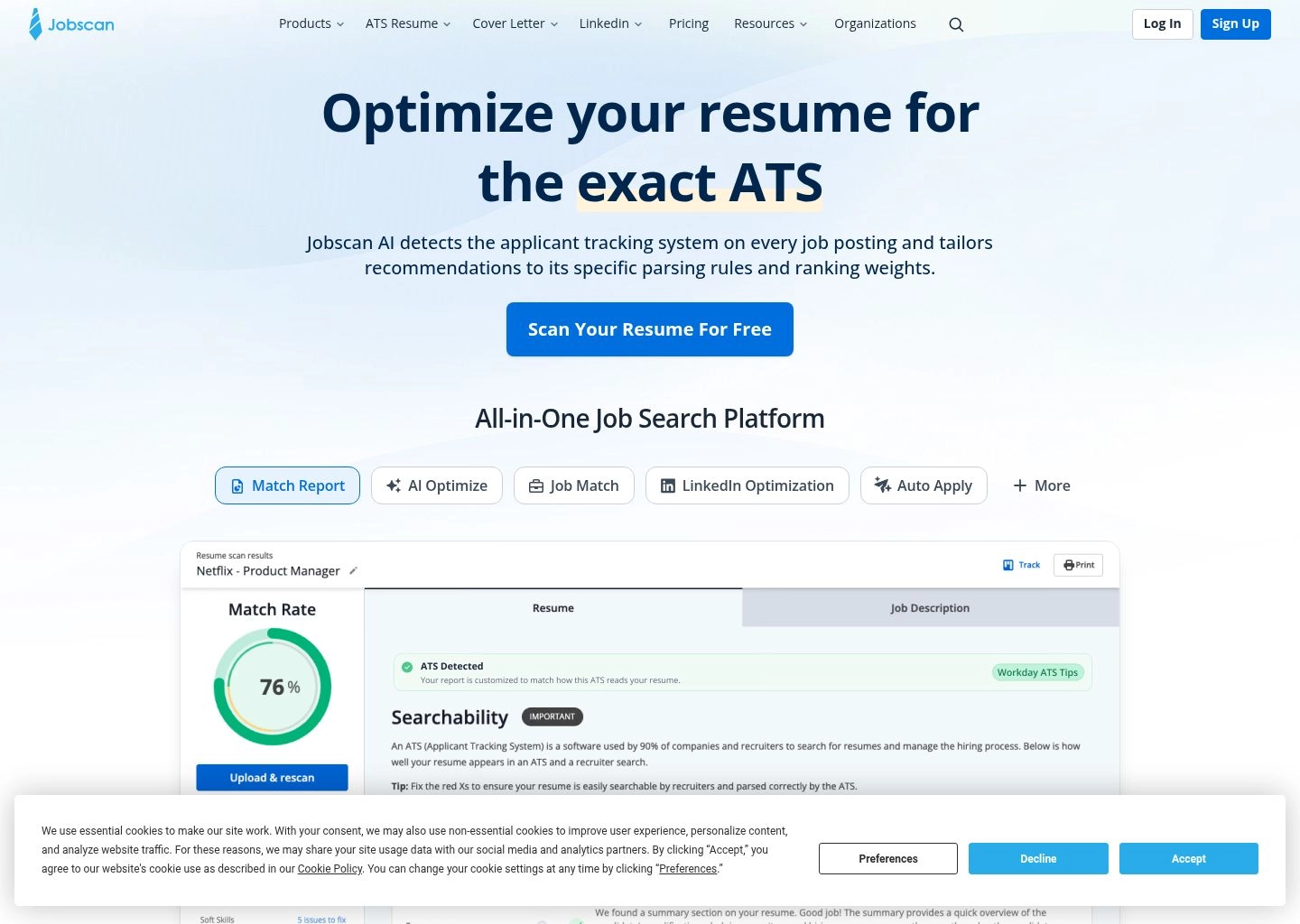
Furthermore, Jobscan extends its analytical prowess to LinkedIn profiles. Its LinkedIn Optimization tool compares your public profile against target industry roles, ensuring your presence appears in recruiter boolean searches before an opening is even publicized. While Jobscan's own resume builder is somewhat functional and utilitarian, its diagnostic scanning engine is an essential validation layer that serious job seekers should run regardless of which builder they use to write their original draft.
Key Strengths & Capabilities
- True Recruiter Search Simulation: Emulates exact Boolean keyword matching and frequency weights used by Fortune 500 ATS systems.
- Detailed Skill Categorization: Separates hard technical requirements from general soft competencies to prevent over-optimizing.
- LinkedIn Profile Optimization: Audits your LinkedIn headline, summary, and experience to rank higher in recruiter searches.
- Cover Letter Match Scoring: Verifies that your cover letter reinforces primary job qualifications without duplicate phrasing.
Tradeoffs & Limitations
- Scan Quotas on Free Accounts: Free users receive only 5 scans per month, which exhausts quickly during an active job hunt.
- Stand-Alone Builder is Basic: The native resume builder is utilitarian; it functions best as an audit tool for external PDFs.
Pros
- Most accurate enterprise ATS simulation algorithms in the recruitment software space
- Identifies exact-match keyword variations and capitalization quirks that trip legacy parsers
- Comprehensive LinkedIn profile optimizer increases unsolicited inbound recruiter messages
- AI-powered bullet rewriting directly inside the diagnostic match gap report
- Clear match score target (80%+) provides unambiguous criteria for application readiness
Cons
- Subscription is among the most expensive in the category ($49.95/month or $89.85/quarter)
- Aggressive scan limits on non-paying accounts make full testing difficult without subscribing

5. Teal
Best End-to-End Job Search & CRM Integration 9.4 / 10Holistic Career Growth Engine Combining AI Resume Tailoring with an Integrated Job Application Tracker
Most resume builders treat document creation as an isolated, one-off transaction. Teal fundamentally reframes the process by treating your resume as a dynamic, living asset inside a comprehensive job search CRM. Paired with its popular Chrome extension, Teal allows users to bookmark jobs directly from LinkedIn, Indeed, Glassdoor, and company career pages with a single click. Once a job is bookmarked, Teal automatically extracts the core requirements, salary ranges, and technical competencies, storing them in a personalized Kanban pipeline.
Inside Teal's Resume Builder, you maintain a master repository of every project, role, achievement, and certification you have ever accumulated. When applying for a specific bookmarked job, Teal allows you to selectively activate or deactivate specific bullet points, tailoring the document in seconds. Its AI assistant evaluates your bullets against the bookmarked job posting, generating customized achievement statements, cover letters, and follow-up emails that directly address the specific pain points mentioned in the hiring manager's job description.
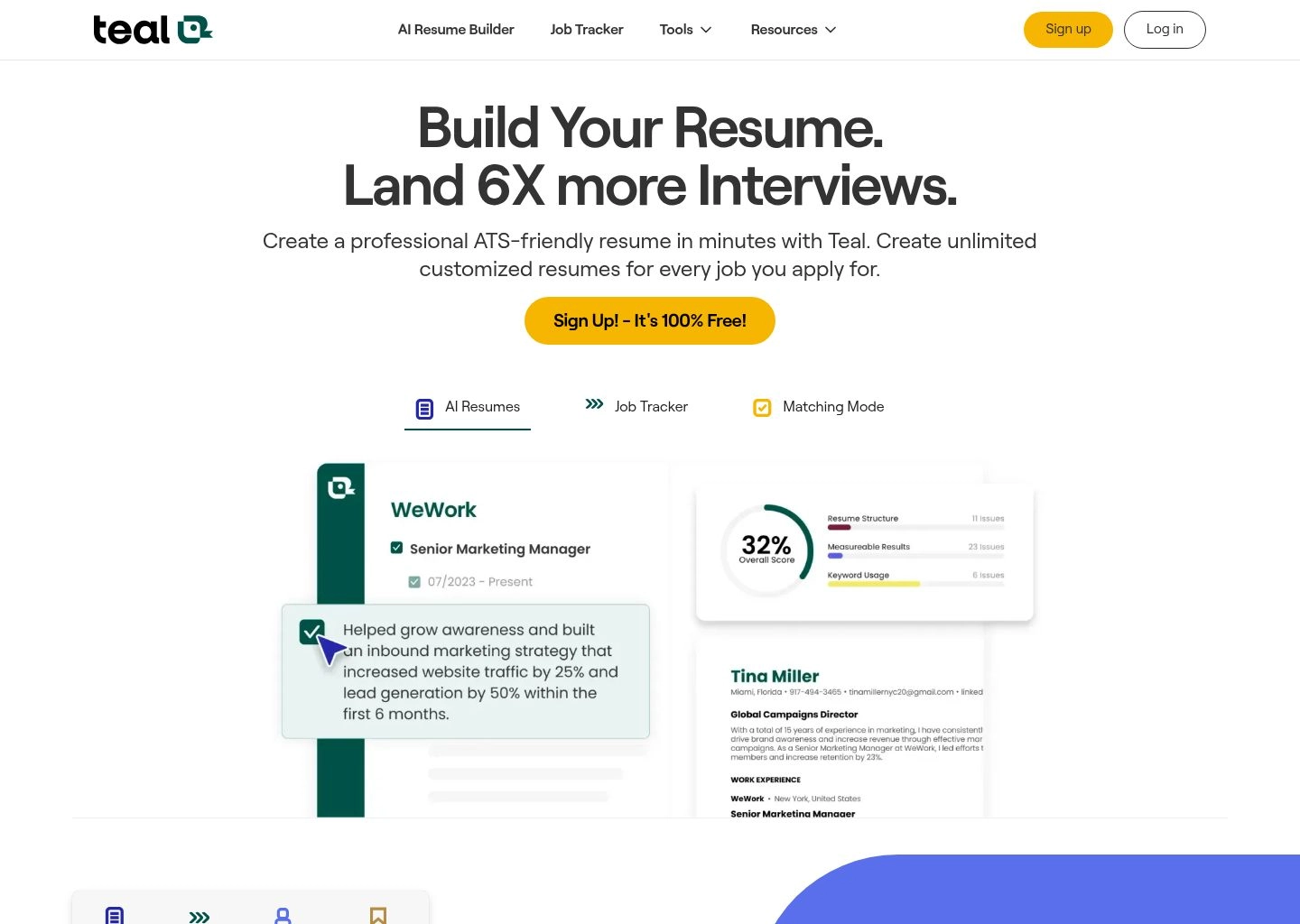
In our usability evaluations, Teal stood out for reducing application fatigue. Job hunting in 2026 is an arduous marathon requiring tens or hundreds of tailored submissions. Teal eliminates the chaotic mess of storing 40 different Word documents named 'Resume_Final_v3_Final.pdf' on your desktop. By organizing target companies, application deadlines, interview stages, and tailored resume versions in one unified interface, Teal transforms a stressful job search into a structured, highly productive workflow.
Key Strengths & Capabilities
- Integrated Job Tracker CRM: Full Kanban board to organize bookmarks, interview rounds, contact notes, and compensation offers.
- Master Resume Repository: Store your complete career history and easily toggle specific bullets on or off for tailored exports.
- Browser Extension Synchronization: Instantly saves job descriptions and requirements from 40+ popular job boards directly into Teal.
- Targeted AI Tailoring Engine: Drafts role-specific summaries, bullets, and outreach notes aligned with bookmarked opportunities.
Tradeoffs & Limitations
- Template Customization Limits: Formatting and typographic controls are intentionally streamlined to enforce clean ATS layouts.
- Feature Complexity for Casual Users: The full CRM suite can feel overwhelming if you simply want to write a quick single-page resume.
Pros
- Eliminates desktop file clutter with a centralized master resume and tailored versioning system
- World-class Chrome extension saves jobs and extracts keyword requirements instantly
- Full Kanban pipeline tracking keeps job seekers organized across dozens of applications
- Clean, ATS-verified single-column and two-column layouts that parse smoothly
- Generates targeted networking messages and follow-up emails alongside cover letters
Cons
- Advanced keyword matching and unlimited AI bullet generation require Teal+ subscription
- Visual styling options are intentionally restrained compared to creative portfolio builders

6. Resume.io
Best Rapid Generation & European/Global Layouts 9.2 / 10Speed-Optimized CV and Resume Generator with International Multi-Language Support
Resume.io has earned its reputation as one of the most widely adopted resume builders on the web by prioritizing velocity, intuitive design, and global hiring norms. While many AI platforms overwhelm candidates with complex diagnostic sliders and machine-learning jargon, Resume.io provides a guided, step-by-step editor that can take a candidate from a blank screen to a fully formatted, professional PDF resume in under fifteen minutes.
A significant differentiator for Resume.io is its native understanding of international hiring standards. North American resumes mandate strict anonymity regarding headshots, birthdates, and marital status to comply with equal employment opportunity laws; conversely, European and Latin American CV conventions frequently require standardized profile photos, nationality fields, and localized date structures. Resume.io accommodates both models with regional templates and multi-language support across English, Spanish, German, French, and Dutch.
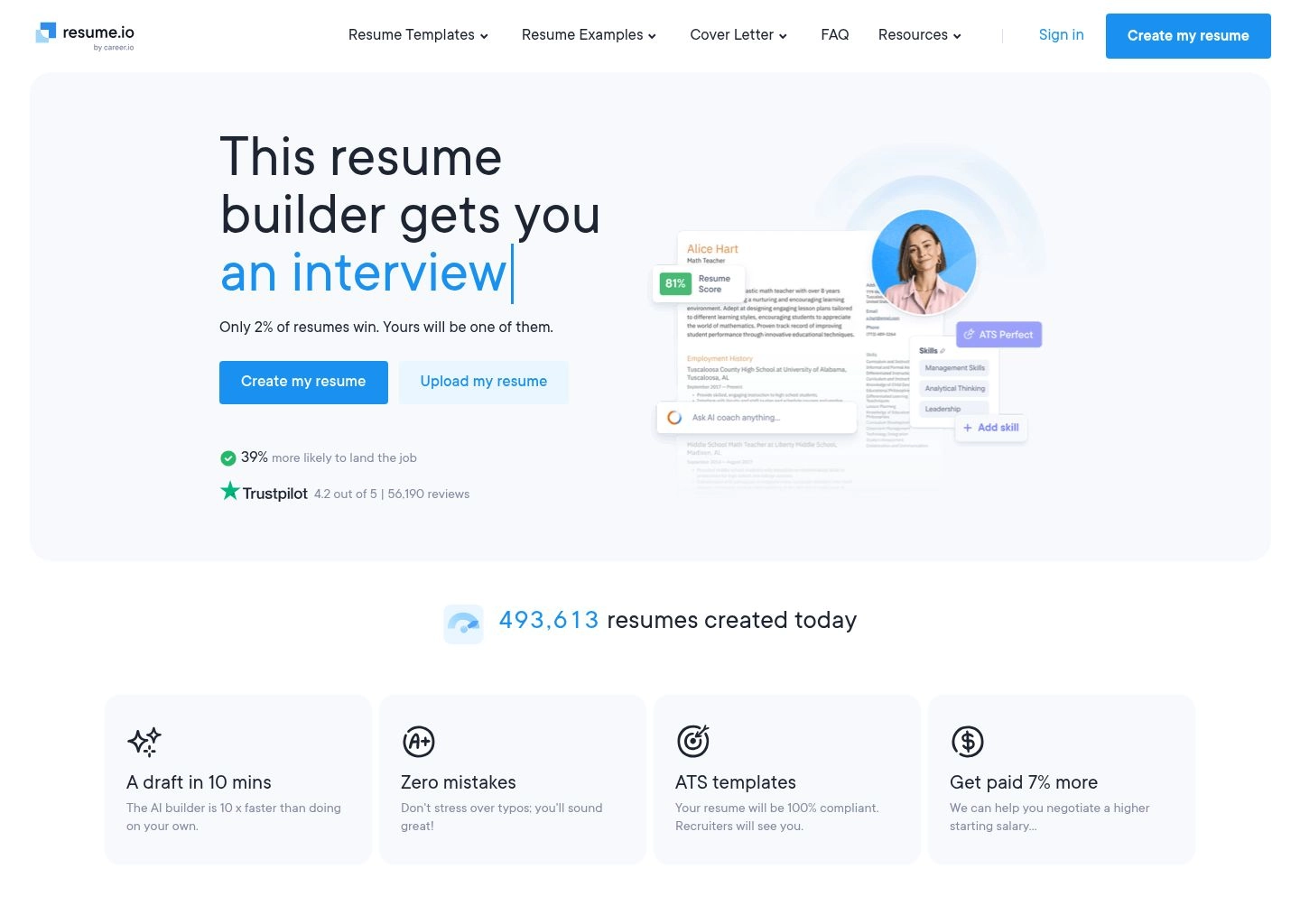
The platform's AI assistant features an extensive library of verified, role-specific pre-written bullet points that can be inserted and modified with a single tap. While its AI is less focused on deep job description keyword matching than Rezi or Jobscan, its visual typography, consistent spacing, and automatic page-break management guarantee that your final document looks balanced and polished without hours of tedious margin wrestling in Microsoft Word.
Key Strengths & Capabilities
- Unmatched Onboarding Velocity: Intuitive wizard guides candidates through section creation in 10 to 15 minutes flat.
- Global CV Standards & Multi-Language: Seamlessly toggles between US single-page resumes and European CVs with photo modules.
- Automatic Page Balance Engine: Dynamically adjusts line heights and padding to prevent awkward 2-line overflow onto page two.
- Matching Cover Letter Engine: Coordinates design elements across your resume and cover letter for a unified presentation.
Tradeoffs & Limitations
- Limited Free Downloads: The free tier only allows exporting plain text (.txt) files; PDF downloads require a trial or plan.
- Subscription Auto-Renewal Complaints: The 7-day low-cost trial automatically converts into a monthly recurring subscription if not canceled.
Pros
- Extremely fast and user-friendly interface requiring zero graphic design knowledge
- Superb international CV templates supporting photos, localized dates, and multi-languages
- Automatic layout adjustment prevents awkward orphan lines and messy page overflows
- Vast repository of role-specific phrases across hundreds of standard professions
- High-quality PDF rendering with verified clean text extraction on standard ATS parsers
Cons
- PDF export is locked behind a paid paywall (free tier provides only raw text export)
- Lacks automated job description keyword gap comparison available in Rezi or Jobscan

7. Novorésumé
Best Page-Lock Geometry & Traditional Precision 9.1 / 10Strict Structural Architecture Guaranteeing Zero Page Overflow and Flawless Visual Layout Balance
Novorésumé takes a disciplined, engineering-first approach to one of the most maddening problems in document preparation: the dreaded page overflow. In traditional word processors, adding one additional sentence can shove a single bullet point onto an otherwise blank second page, instantly creating an unprofessional impression. Novorésumé solves this permanently with its signature 'Page Optimizer' technology—a locked grid system that dynamically calculates font sizes, line spacing, and margin densities to ensure your document fits precisely onto one, two, or three pages without a single wasted millimeter.
Novorésumé's design aesthetic leans toward European executive sophistication: clean geometric sans-serif fonts, crisp divider rules, subtle accent color highlights, and balanced information density. Unlike gimmicky builders that allow users to place elements anywhere (destroying ATS parsability), Novorésumé constrains every block to strict horizontal and vertical coordinates that maintain semantic document flow when ingested by scanning algorithms.
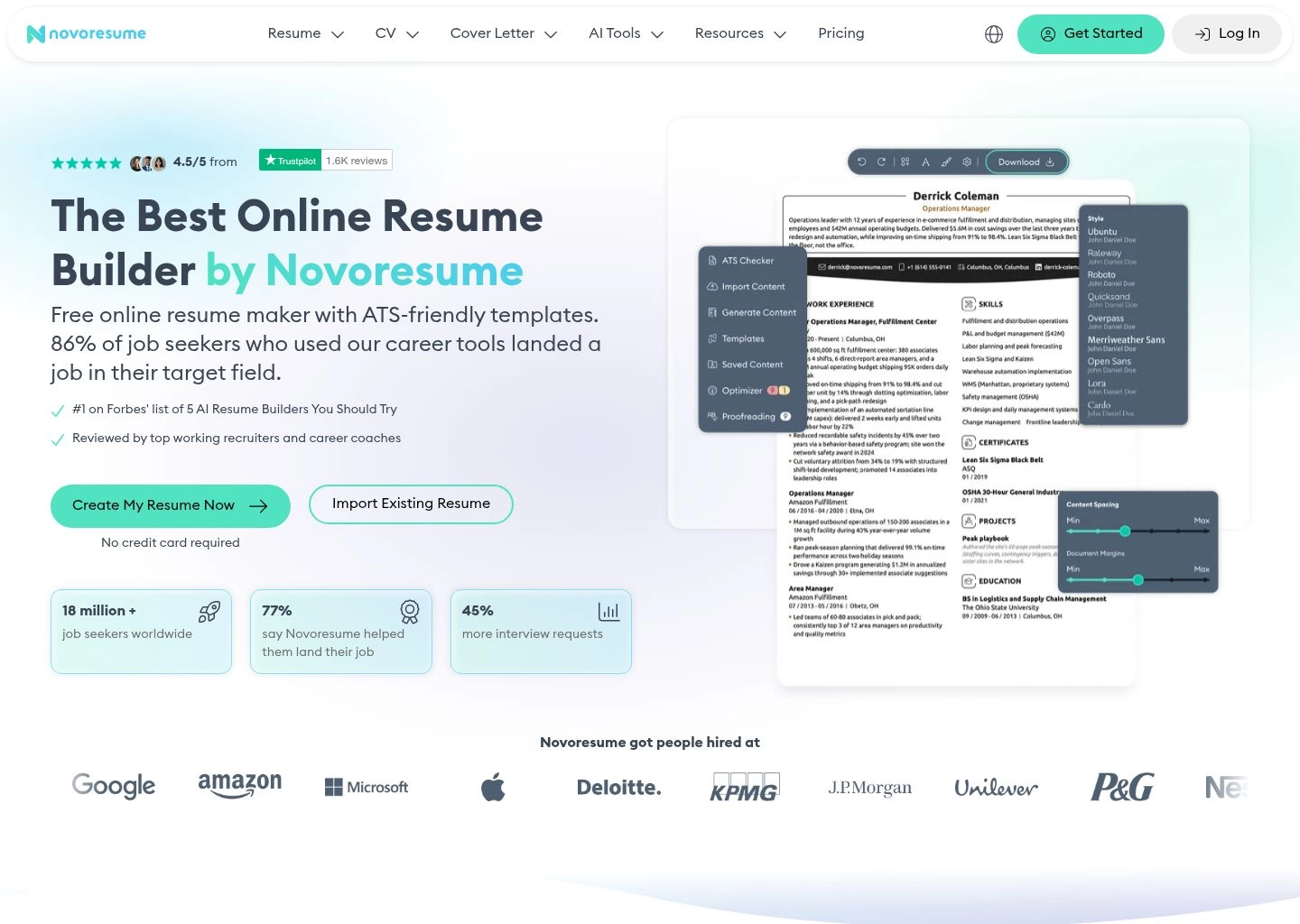
While Novorésumé was slower than competitors to roll out pure generative text generation, its 2026 AI integration acts primarily as an intelligent writing auditor. It analyzes bullet conciseness, flags clichés like 'go-getter' or 'team player', and offers punchier active-verb alternatives. If your priority is absolute visual symmetry, traditional corporate prestige, and never having to fight with formatting margins again, Novorésumé is an exceptional choice.
Key Strengths & Capabilities
- Patented Page Optimizer: Prevents awkward overflow by enforcing strict grid geometry and dynamic spacing calculations.
- Executive European Typography: Sophisticated corporate aesthetic favored by management consultants, bankers, and executives.
- Semantic Coordinate Architecture: Ensures even complex two-column executive layouts parse cleanly in standard ATS tools.
- My Documents Version Manager: Easily clone, customize, and maintain distinct variations for different career directions.
Tradeoffs & Limitations
- Rigid Grid Flexibility: The strict grid system prevents free-form positioning; elements must fit predefined layout cells.
- Single Page Constraint on Free Tier: Free accounts are strictly limited to a single-page document and basic design templates.
Pros
- Permanently eliminates page overflow headaches with disciplined page-length locking
- Refined, executive-grade visual aesthetic ideal for corporate and consulting roles
- Semantic structure ensures clean text extraction despite multi-column visual appearances
- Intelligent content auditor highlights wordy phrasing and passive corporate clichés
- Zero clutter interface that focuses your attention entirely on content quality
Cons
- Less flexibility for users who want complete creative control over element positioning
- Multi-page resumes and advanced color themes require upgrading to Premium
8. Zety
Best Guided Wizard for Entry-Level Jobseekers 8.9 / 10Hand-Holding Career Builder Offering Massive Bullet Databases and Integrated Salary Benchmarks
Zety remains one of the most recognizable names in career development, having guided millions of job seekers through the daunting task of writing their first professional resume. What makes Zety particularly approachable for students, entry-level candidates, and career changers is its comprehensive questionnaire-style wizard. Rather than confronting candidates with an intimidating blank page, Zety asks a series of simple questions about your education, work history, and target title, automatically populating a structured layout.
Zety’s primary strength lies in its vast repository of industry-vetted pre-written bullet points and skill summaries. Covering hundreds of job titles—from retail associates and customer support specialists to junior developers and accountants—Zety provides customizable bullet points that describe daily responsibilities with professional verbiage. Its built-in scoring system scans your draft for missing contact info, bullet quantity, and basic formatting hygiene before allowing you to export.
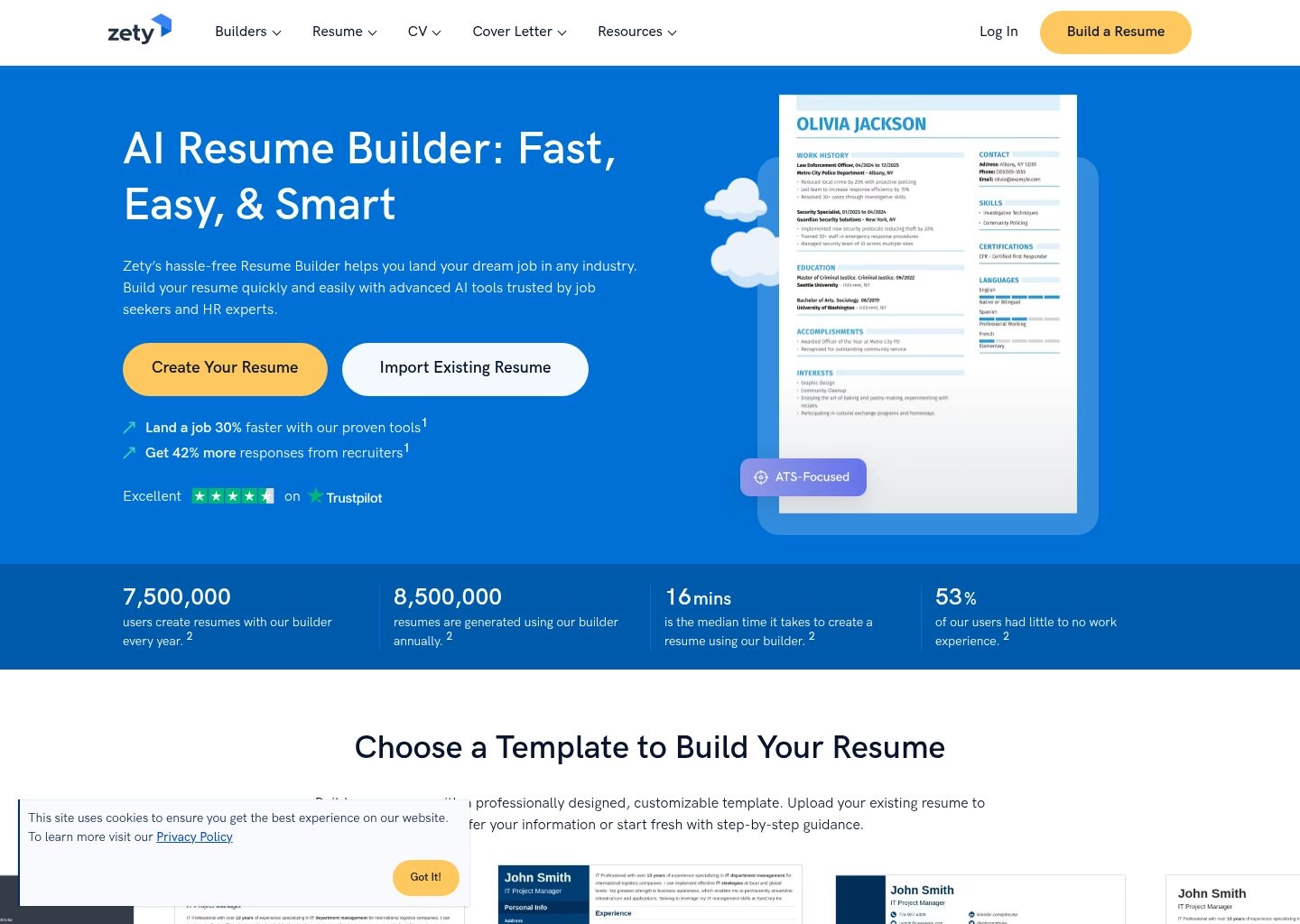
In our technical ATS tests, Zety’s classic templates performed reliably across standard parsers, though some of its more colorful multi-column layouts experienced minor ordering quirks in older Taleo configurations. While advanced technical candidates may find Zety’s AI suggestions less context-aware than Kickresume’s GPT-4o engine, entry-level applicants and individuals returning to the workforce will appreciate Zety’s supportive hand-holding and extensive career blog guidance.
Key Strengths & Capabilities
- Step-by-Step Guided Wizard: Eliminates blank-page anxiety by breaking document creation into simple, bite-sized questions.
- Massive Pre-Written Phrase Database: Provides thousands of professionally crafted job descriptions across hundreds of job titles.
- Integrated Resume Scorecard: Audits completed resumes for completeness, formatting balance, and missing critical fields.
- Unified Cover Letter Builder: Generates matching cover letters using identical color schemes, headers, and font choices.
Tradeoffs & Limitations
- Paywall After Document Completion: Users can build a full resume for free, but must pay to download the final high-res PDF.
- Less Deep Contextual AI: Bullet recommendations are based largely on pre-written databases rather than dynamic LLM synthesis.
Pros
- Extremely approachable interface designed specifically for first-time resume writers
- Huge repository of proven, industry-standard bullet points for common professions
- Built-in score checker ensures candidates do not forget critical sections or contact details
- Cohesive matching cover letter builder included in the workflow
- Clean classic templates that parse reliably through standard corporate ATS parsers
Cons
- Aggressive checkout paywall when attempting to export your completed document
- AI content generation is less customized to specific job descriptions compared to Rezi or Jobscan
How Modern ATS Software Actually Evaluates Your Resume in 2026
The pervasive myth in job hunting is that an ATS is a monolithic, malevolent robot that automatically rejects 90% of applicants based on a single missing keyword. In reality, modern Applicant Tracking Systems operate across three sophisticated sequential evaluation tiers:
Document Layout & Text Extraction
The ATS extracts raw unformatted ASCII strings from your PDF or DOCX file. If your resume uses complex CSS grids, multi-column tables, text boxes, or embedded images, the parser reads horizontally across columns—garbling company names with unrelated job dates.
Entity Recognition & Field Mapping
Named Entity Recognition (NER) models map your text into discrete database categories: Contact Information, Work Experience, Education, Technical Skills, and Certifications. Standard headers (e.g., "Work Experience" instead of "Where I've Made Magic") are mandatory.
Semantic Vector Matching
Rather than checking for raw keyword count, modern algorithms (such as Workday's Talent Insights or Greenhouse's candidate scoring) use dense vector embeddings. They calculate mathematical cosine similarity between your resume vector and the job description vector.
The "Two-Column Trap": Why Graphic Design Resumes Fail
One of the most dangerous trends among job seekers is downloading colorful, graphic-heavy resume templates from Canva, Figma, or Pinterest. While visually appealing to the human eye, these designs frequently prove disastrous when processed by corporate ATS parsers:
Why Canva & Graphic Templates Get Rejected
Graphic software generates PDFs with floating text frames, absolute bounding coordinates, and rasterized vectors. When an ATS parser opens the file, it reads left-to-right across the horizontal plane. A left-sidebar skill list gets interlaced sentence-by-sentence with your work experience paragraphs, creating jumbled gibberish. By contrast, dedicated tools like Kickresume, Rezi, and Enhancv output linear semantic PDF streams that maintain clean data separation regardless of visual appearance.
The Google XYZ Formula: Transforming Duties into Achievements
When hiring managers finally review candidates who pass ATS screening, they spend an average of just 6 to 7 seconds on initial visual triage. The single biggest flaw in job-seeker resumes is listing passive duties ("Responsible for managing social media accounts") instead of quantified accomplishments.
The gold standard for engineering resume bullet points is Google’s celebrated XYZ Formula:
"Accomplished [X], as measured by [Y], by doing [Z]"
Weak Bullet: Managed email marketing campaigns and improved customer engagement.
AI-Optimized XYZ Bullet: Accelerated quarterly newsletter conversion rates by 34% (generating $180,000 in net-new pipeline) by implementing behavioral segmentation triggers and automated dynamic copy sequences across a 120,000-subscriber list.
Leading AI resume engines like Kickresume and Enhancv explicitly train their language models on this metric-first framework, prompting users to input concrete figures and operational levers rather than settling for vague platitudes.
Frequently Asked Questions (FAQ)
Should I submit my resume as a PDF or Microsoft Word (.DOCX) file?
In 2026, PDF is the preferred format for over 95% of applications, provided the PDF is generated from a dedicated ATS-compliant builder (such as Kickresume, Rezi, or Enhancv). A vector-encoded PDF locks your typography and margins permanently across all screen sizes. Only submit a Word document if the employer's application portal explicitly specifies DOCX format.
What is an acceptable ATS Match Score on tools like Jobscan and Rezi?
Target an ATS Match Score of 75% to 85%. Attempting to force a 100% score is counter-productive and dangerous; it leads to awkward keyword stuffing that alienates human recruiters once your resume clears the software. A score above 75% virtually guarantees your application passes automatic screening filters.
Can Applicant Tracking Systems detect if a resume was written by AI?
ATS software does not actively penalize candidates for using AI tools to format or polish their resumes. Recruiters care about factual truth, relevant skills, and clear communication. However, if your resume contains generic AI clichés (such as "dynamic visionary leader" or "leveraged synergy to spearhead initiatives") without specific metrics, recruiters will quickly discard it. Always review and personalize AI-generated bullet points.
Should my resume strictly be one page or two pages?
If you have fewer than 5 to 7 years of professional experience, your resume should strictly remain one page. Tools like Novorésumé enforce this discipline with intelligent spacing controls. Candidates with 8+ years of relevant experience, executives, or technical professionals with extensive patent and publication records can confidently submit a focused two-page document. Never submit an accidental 1.25-page resume with awkward trailing lines.
Are cover letters still necessary when applying for jobs in 2026?
While some automated application pipelines make cover letters optional, submitting a highly tailored, role-specific cover letter provides a significant competitive edge for competitive positions. It allows you to explain career transitions, quantify leadership philosophies, and demonstrate authentic passion for the company. Tools like Kickresume and Teal generate matched cover letter pairings in seconds.
Which AI resume builder provides the best free tier without credit card traps?
Teal and Kickresume offer the most functional free tiers. Teal allows unlimited resume drafts and job tracking for free, while Kickresume provides free access to core customizable templates with downloadable outputs. Beware of sites that advertise "Free Resumes" only to demand a $2.95 trial subscription that auto-renews at $25+/month at the download screen.

Written by Hamza Khaliq
Founder & Principal AI AnalystHamza Khaliq benchmarks generative AI architectures, automated copywriting workflows, and NLP evaluation pipelines at AI Central Resources. His research focuses on natural language model evaluation, algorithmic transparency, and enterprise editorial governance.