Copilot in Microsoft Teams
Transform team collaboration with AI to boost productivity and streamline workflows.
Gallery
5 items


About Copilot in Microsoft Teams
Having run Copilot in Microsoft Teams across executive standups and strategy syncs, asking "What decisions were made so far?" generated instant, accurate summaries without interrupting ongoing discussions. Its ability to draft action items attributed to specific speakers during live calls is remarkably helpful. Requiring an active Microsoft 365 Copilot add-on ($30/user/month on top of M365 business licensing) makes it an enterprise-grade investment. For organizations living in Microsoft 365, it provides unmatched real-time meeting synthesis and collaborative productivity.
Copilot in Microsoft Teams revolutionizes team collaboration by automating routine administrative tasks that often consume valuable time, such as notetaking, tracking action items, and organizing follow-ups. This allows teams to shift their focus from mundane operational details to high-impact activities like innovation, problem-solving, and strategic decision-making, ultimately accelerating project delivery and improving overall productivity.
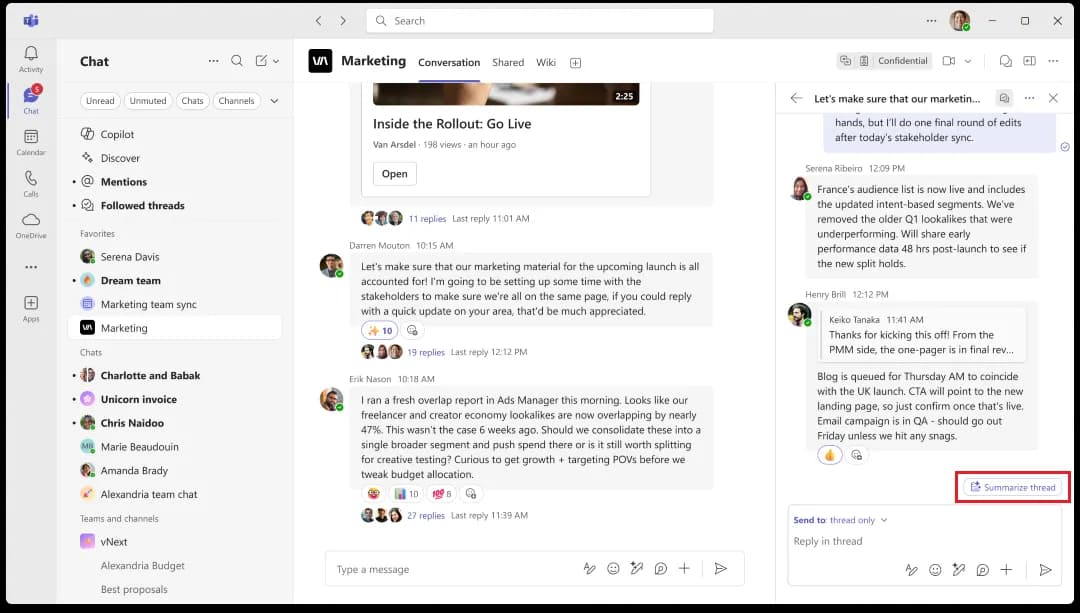
Leveraging advanced AI, Copilot offers a suite of features including automatic meeting transcription, intelligent detection and assignment of action items, dynamic agenda suggestions, and timely reminders. It also breaks down communication barriers with multilingual support for chats and meeting transcripts, on-demand summaries, and refined messaging suggestions. Deeply integrated within the Microsoft 365 ecosystem, Copilot works intelligently with your organization’s data, ensuring a unified and contextual AI experience across all your familiar Microsoft applications.
Designed for modern teams of all sizes, from small businesses to large enterprises, Copilot in Microsoft Teams is ideal for project managers, global teams, and frontline workers seeking to optimize their workflows. It provides enterprise-grade security and compliance, ensuring data privacy and control while offering an intuitive user experience that integrates seamlessly into existing workflows without a steep learning curve. This empowers teams to confidently adopt AI and thrive in an increasingly digital workplace.
Key Features
- Automatic meeting transcription and summaries
- Intelligent action item detection and assignment
- Multilingual chat and meeting translation
- Dynamic agenda suggestions based on past topics
- Smart task prioritization and tracking
- Simplified meeting scheduling with calendar analysis
- Refined messaging suggestions for clearer communication
- Enterprise-grade security and data compliance
Pros
- Seamless integration with the Microsoft 365 ecosystem
- Automates routine administrative tasks, freeing up team time
- Enhances communication and collaboration, especially for global teams
- Improves meeting efficiency with AI-generated notes and action items
- Scalable to meet the needs of any team size, from small to enterprise
- Provides enterprise-grade security and data privacy within Microsoft's framework
Cons
- Requires an existing Microsoft 365 subscription and potentially Teams Premium for full benefits
- Involves an upfront investment for AI tools, which may impact cost-effectiveness for some organizations
- Deep integration with the Microsoft ecosystem may limit flexibility with non-Microsoft third-party tools
Pricing
Microsoft 365 Copilot is available as an add-on for eligible Microsoft 365 Business and Enterprise plans. Pricing starts at $18 per user/month (billed annually) during promotional periods and $21 per user/month at standard rates. Copilot Chat is included with eligible Microsoft 365 subscriptions, while advanced AI features require the Copilot add-on. Limited free trials may be available for qualifying users.
Claim Verified Creator Badge
Are you the founder of Copilot in Microsoft Teams? Display this listing's verified badge on your website to show your customers that your product has been vetted and listed on AI Central Resources.
<a href="https://www.aicentralresources.com/tool/copilot-in-microsoft-teams" target="_blank" rel="noopener">
  <img src="https://www.aicentralresources.com/badges/featured-badge-dark.svg" alt="Featured on AICentralResources" width="200" height="54" style="border: none;" />
</a>
* Place this HTML snippet in your website's footer, landing page, or press section. This creates a search-friendly backlink directly to your verification page.
Connect with Copilot in Microsoft Teams
Frequently Asked Questions
Yes, Copilot in Teams provides multilingual support, including real-time translation of chats and meeting transcripts, to facilitate seamless collaboration among global teams.
Copilot in Teams operates within Microsoft’s enterprise-grade security framework, prioritizing data privacy and control with features like encrypted data storage and built-in compliance controls.
Yes, Copilot in Teams streamlines project management by automatically logging tasks from meeting notes, updating their status, recommending task prioritization, and simplifying scheduling.
Yes, Copilot in Teams is designed to be scalable, adapting its AI capabilities to meet the needs of small businesses and large enterprises alike.
Yes, Copilot in Teams automatically generates detailed meeting transcripts, detects decisions, assigns action items to team members, and sets deadlines within integrated task managers.
Similar AI Tools to Copilot in Microsoft Teams
View all alternatives of Copilot in Microsoft Teams
Slack AI
Boost team productivity with AI-powered summaries, search, and automation in Slack.


Confluence
AI-powered workspace for collaborative knowledge creation, sharing, and project acceleration.

Miro AI
Accelerate teamwork and innovation with an AI-powered collaborative canvas.


Loom AI
Record, enhance, and transform video messages with intelligent AI automation.
Compared with Copilot in Microsoft Teams
Direct head-to-head feature matrices, pricing breakdowns, and real-world performance benchmarks