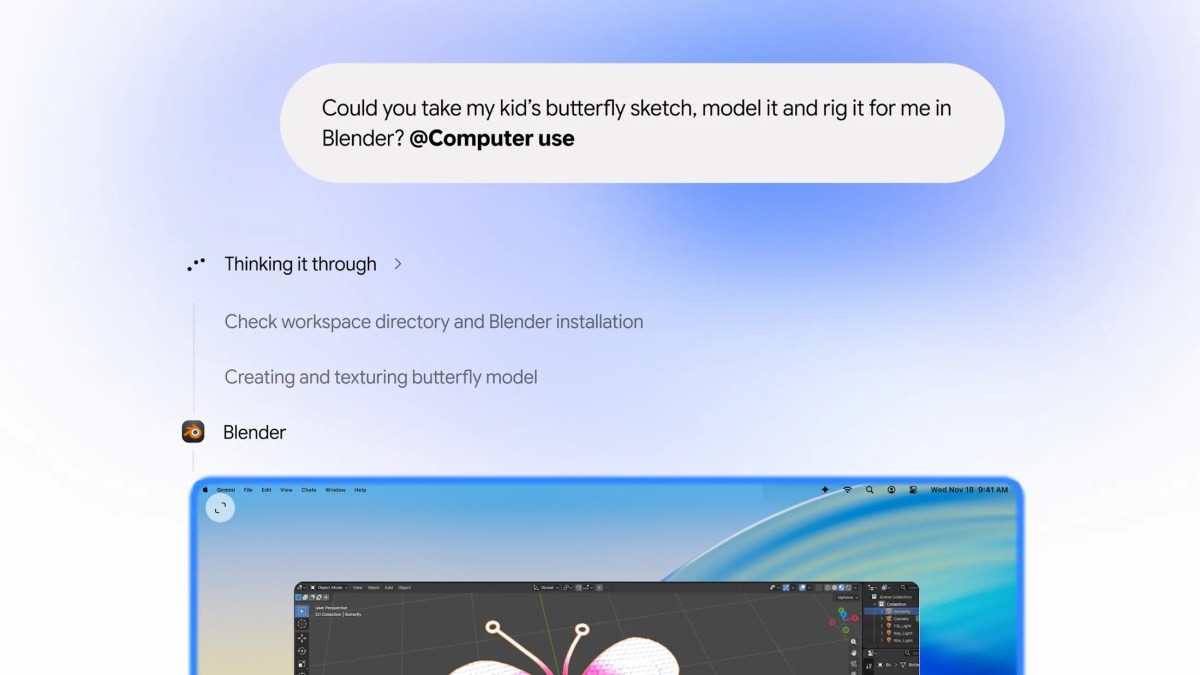
MOUNTAIN VIEW, Calif. — Advancing the artificial intelligence industry into a new phase of autonomous desktop agency, Google has officially begun rolling out Computer Use capabilities inside the official Gemini desktop application for macOS. Available initially to paid Google AI subscribers on Apple Silicon hardware running macOS Sequoia, the release empowers Gemini to autonomously navigate native macOS applications, organize local file directories, interact with third-party software, and complete multi-step browser workflows on behalf of the user.
While competitors like Anthropic and OpenAI have introduced preliminary computer-use tools, Google's implementation solves the single most frustrating user-experience flaw in desktop agent technology: cursor hijacking. When previous desktop agents operated, they commandeered the physical mouse cursor and active screen display, forcing the user to sit idle and watch. Google's engineering team engineered Gemini to execute inside an isolated background virtual display. As Gemini opens applications, fills complex PDF forms, and aggregates research across websites, a live streaming preview renders directly within the Gemini chat sidebar, leaving the user's primary desktop display, keyboard focus, and mouse pointer completely free for uninterrupted productivity.
30-Second Executive Verdict & Direct Answer
Direct Answer: Google's Gemini Computer Use for macOS redefines autonomous desktop productivity by executing tasks in an isolated background virtual screen with live video streaming into chat, allowing users to delegate tedious multi-app workflows without losing control of their physical screen or mouse cursor.
Knowledge Workers & Executives: Delegates repetitive manual workflows—such as extracting invoices from email, entering tabular data into spreadsheets, and drafting slide decks—completely in the background.
Enterprise Security & Compliance: Automated safety guardrails halt execution immediately when encountering password prompts, two-factor authentication, or financial checkout pages.
Competitive Desktop Landscape: Establishes a formidable UX advantage over ChatGPT Operator and Claude Computer Use by eliminating disruptive physical screen lockouts.
Core Specifications & Operational Metrics
Google developed the background execution layer by interfacing with macOS's native Virtual Display APIs and Quartz Core display server. When the user requests a multi-step task, the Gemini macOS daemon spins up a headless virtual framebuffer matched to the application's aspect ratio. Gemini's multimodal vision-language model evaluates screen states at 5 to 10 frames per second, computing coordinates and dispatching synthetic mouse events and keystrokes exclusively into the virtual container.
Desktop Agent Scoreboard: Gemini vs Frontier Competitors
To evaluate how Google's implementation compares against contemporary desktop automation platforms, the following matrix analyzes primary operational characteristics across leading agent ecosystems:
| Agent Platform / Lab | Display Architecture | User Interruption | Native App Access | Sensitive Action Policy | Hardware Target |
|---|---|---|---|---|---|
| Google Gemini Computer Use | Isolated Virtual Framebuffer | Zero (Full Multi-Tasking) | macOS Local Apps + Web | Automatic Pause & Confirmation | Apple Silicon (M1 - M4) |
| Anthropic Claude Computer Use | Physical Display Takeover | High (Cursor Hijacked) | Cross-Platform Desktop | User Emergency Break Key | Linux / Docker / macOS |
| OpenAI Operator / Dots | Remote Cloud Virtual Machine | Zero (Runs in Cloud) | Cloud Browser Only (No Local Files) | Human Approval Prompts | Cloud Data Centers |
| Microsoft Windows Copilot Runtime | OS Shell Hooks (Recall API) | Low (Inline Tool Cards) | Windows 11 Native Apps | UAC Admin Dialogs | Copilot+ PC (Snapdragon/Intel) |
Enterprise Safety Architecture & Permission Sandboxing
Granting an autonomous AI agent permission to interact with desktop applications inherently introduces significant security risks, from accidental data deletion to unauthorized email transmissions. Google addressed these concerns by implementing a strict three-tiered permission architecture:
- Granular App Whitelisting: Upon activation, the user explicitly selects which applications Gemini is permitted to launch and interact with (e.g., granting access to Safari and Numbers while strictly excluding Terminal, System Settings, and Keychain).
- Automated Credential Gates: When Gemini detects a password prompt, cookie consent modal with financial implications, or credit card checkout field, the virtual execution pauses immediately and surfaces a native macOS notification requesting human takeover.
- Full Session Auditability: Every virtual mouse click, keystroke, and screen evaluation is logged into an immutable local JSON session ledger, allowing enterprise IT administrators to review full action trajectories.
Architectural Strengths & Leaps
- ✔ Zero Workflow Interruption: Virtual display execution keeps user mouse and keyboard completely available for simultaneous work.
- ✔ Real-Time Video Preview: Live chat streaming allows the user to supervise execution without switching application contexts.
- ✔ Local & Web Hybrid Agency: Fluidly combines local macOS file operations with live web navigation in a single objective.
Technical Bottlenecks & Constraints
- ✖ Strict Hardware Gate: Requires an Apple Silicon Mac (M1 through M4) running macOS Sequoia; Intel Macs are permanently unsupported.
- ✖ Subscription Requirement: Gated behind paid Google AI Pro or Ultra subscriptions ($20 to $100/month).
- ✖ Dynamic UI Breakages: Highly non-standard custom GUI widgets without accessibility labels can occasionally cause navigation stalls.
The Future of Agentic OS UX: The Virtual Screen Paradigm
Google's introduction of background virtual screen automation establishes a critical precedent for human-computer interaction in the agentic era. By recognizing that human workers will not tolerate losing access to their physical computers while an AI performs tasks, Google has solved the primary adoption hurdle that stalled earlier computer-use experiments.
As operating system vendors like Apple, Microsoft, and Google continue to build native agent runtimes into their desktop platforms, the boundary between software as a tool and software as an autonomous colleague is rapidly dissolving. Desktop agents that can operate invisibly in the background while keeping human workers in the loop will become standard across enterprise knowledge work.
This technical report has been synthesized and cross-verified against official product releases from Google Workspace and the Google DeepMind Gemini Engineering Group.