Botika
AI fashion models that turn flat lays into on-model photos and videos
Gallery
7 items




About Botika
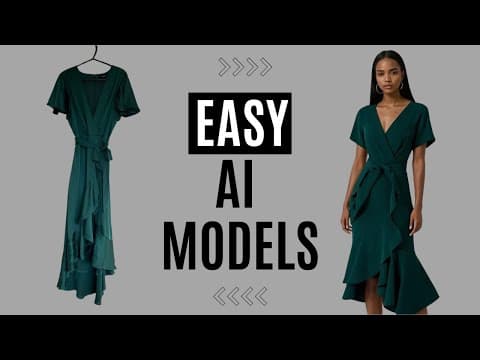
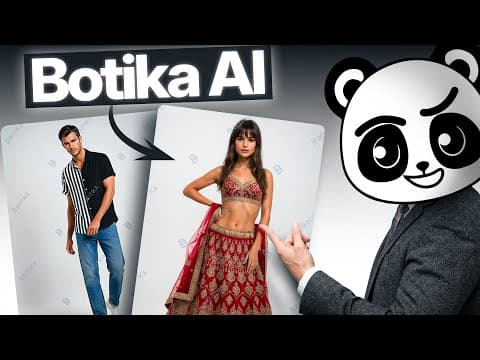
I evaluated Botika by uploading flat-lay and mannequin clothing photographs to generate on-model fashion catalog imagery. The synthetic model generation adjusts garment draping and diversity seamlessly, producing convincing lifestyle lookbooks without expensive studio photoshoots. However, intricate fabric textures like lace or embroidered patterns can occasionally soften, and high-resolution video exports remain limited. For online apparel retailers looking to refresh seasonal catalogs affordably, it significantly compresses photography budgets.

Botika is an AI fashion photography platform that converts flat-lay, ghost mannequin, and mannequin product photos into professional, studio-quality on-model images and videos, letting fashion ecommerce brands scale visual content without traditional photoshoots. The company was founded in Tel Aviv, Israel by Eran Dagan (CEO) and Yarin Didi Meir, with the two meeting during Israeli military service; sources place the founding date between 2018 and 2020, with the company itself citing 2018 as when the founders began researching image-to-video models. Dagan had already built and sold a B2B marketplace by age 18 and scaled a TV show discovery app to millions of users before turning to fashion AI, eventually pairing with Meir's technical background to build Botika. The company raised an $8 million seed round in January 2025 (bringing total funding to $11 million) from investors including Seedcamp, Stardom Ventures, and Secret Chord Ventures, and reported reaching $3 million in annual revenue in 2025 with a 27-person team, alongside a reported 9x revenue and 11x customer growth in a single year.
At the core of Botika's technology is a proprietary foundation model trained specifically on fashion data rather than a general-purpose text-to-image system, which the company says is what allows it to accurately render how fabric drapes, folds, and fits different body types, an area where generic AI image generators typically struggle. Botika is explicit that its AI-generated fashion models are not based on any real person, licensed face, or scraped stock photo; every model's features (skin tone, hair texture, body shape) are generated from scratch by Botika's own system, and the company markets this as both an ethical differentiator and a way to offer more diverse representation across tone, body type, and style than traditional casting typically achieves. Beyond static photos, the platform also generates image-to-video content showing garment fit and motion, and offers background swapping to create varied lifestyle or studio-style scenes from the same base product photo.
Botika serves more than 1,000 fashion ecommerce brands, with disclosed customer case studies including Jordache, which reported cutting production costs by thousands of dollars using the platform. The tool is available as a standalone web platform, a Shopify app with over 1,000 installs, and an iOS mobile app launched in January 2025. Pricing runs on a credit-based subscription model: each photo generation costs 1 credit and each video costs 5 credits, with unlimited credit rollover within an active subscription, plans ranging from an entry-level Lite tier around $22/month (30 credits) up to an Advanced tier around $230/month (200 credits), and a free trial available to test the platform before committing.
User feedback on Botika is genuinely mixed: while brands praise the ease of use, Shopify catalog integration, and quality of output for straightforward garments, review platforms like the Shopify App Store and Apple App Store show ratings in the 2.5-2.7 out of 5 range, with recurring complaints about generation errors on complex garments or accessories, slower-than-expected delivery times, and billing confusion around plan upgrades and watermarks. This makes Botika a reasonable option for fashion brands specifically looking to eliminate flat-lay and ghost-mannequin photoshoots at scale, though buyers should weigh the mixed quality-consistency feedback and evaluate the free trial carefully against newer competitors offering features like pose-changing and built-in upscaling that Botika does not yet include.
Key Features
- Flat-lay and ghost mannequin to on-model photo conversion
- Proprietary fashion-trained foundation AI models (not general text-to-image)
- AI-generated fashion models built from scratch, not based on real people
- Image-to-video generation showing garment fit and motion
- Diverse model library spanning tone, body type, and style
- Background swapping for lifestyle and studio-style photo variations
- Native Shopify app integration for direct catalog uploads
- Human retouching workflows layered on top of AI generation for brand consistency
Pros
- Proprietary fashion-trained foundation models handle fabric drape and fit more accurately than generic AI image generators
- AI models are built entirely from scratch rather than based on real people, licensed faces, or scraped stock photos
- Native Shopify app integration makes catalog upload and generation straightforward for ecommerce sellers
- Diverse model library helps brands represent a wider range of body types, tones, and styles in product imagery
- Disclosed case studies, including Jordache, show real cost savings compared to traditional photoshoots
Cons
- Mixed review scores across app stores (2.5-2.7/5 on Shopify and iOS) citing inconsistent quality, occasional generation errors, and slow delivery times
- No pose changer or built-in AI upscaling, features some competitors like Photta now offer
- Limited batch generation and customization options can slow workflows for brands managing large catalogs
- Output realism varies on complex garments, patterns, or accessories according to user feedback
- Higher price point relative to some newer competitors, with the Advanced plan reaching $230/month for 200 credits
Pricing
Botika uses a credit-based subscription model where each photo generation costs 1 credit and each video costs 5 credits, with unlimited credit rollover within an active subscription. Published plans include a Lite tier at approximately $22/month for 30 credits, a Pro tier around $35/month, and an Advanced tier around $230/month for 200 credits; some sources list slightly different naming and amounts (Starter at $15/month for 15 credits and 5 models, Studio at $225/month for 300 credits), suggesting plan details have changed over time and should be confirmed on the current pricing page. Botika also offers a free-to-install Shopify app with additional usage-based charges beyond the free tier, and a free trial (including 8 free credits referenced in third-party reviews) is available to test the platform. Upgrades on the web platform charge the full new plan price immediately with a reset renewal date, while Shopify and iOS app upgrades are prorated. Enterprise customers with large catalogs needing custom models and dedicated retouching should contact Botika's sales team directly for tailored pricing.
Claim Verified Creator Badge
Are you the founder of Botika? Display this listing's verified badge on your website to show your customers that your product has been vetted and listed on AI Central Resources.
<a href="https://www.aicentralresources.com/tool/botika" target="_blank" rel="noopener">
  <img src="https://www.aicentralresources.com/badges/featured-badge-dark.svg" alt="Featured on AICentralResources" width="200" height="54" style="border: none;" />
</a>
* Place this HTML snippet in your website's footer, landing page, or press section. This creates a search-friendly backlink directly to your verification page.
Frequently Asked Questions
Botika is an AI fashion photography platform that transforms flat-lay, ghost mannequin, or ground shot clothing photos into professional on-model images and videos, letting fashion ecommerce brands skip traditional photoshoots.
Botika starts at $22/month for the Lite plan (30 credits), with a Pro plan around $35/month and an Advanced plan around $230/month for 200 credits. Each photo generation costs 1 credit and each video costs 5 credits, with unlimited credit rollover within an active subscription, plus a free trial and free-to-install Shopify app tier.
Botika trains its own proprietary foundation models on fashion-specific data rather than using general-purpose text-to-image tools, which the company says helps it more accurately render how fabric drapes, folds, and fits different body types compared to generic AI image generators.
Botika states its AI-generated models are not based on any real person, licensed face, or scraped stock photo. Every model's features (skin tone, hair texture, body type) are generated from scratch by Botika's proprietary AI system, offering diverse representation across tone, body type, and style.
Botika was founded in Tel Aviv, Israel by Eran Dagan (CEO) and Yarin Didi Meir (co-founder), with sources placing the founding date between 2018 and 2020. The company has raised a total of $11 million, including an $8 million seed round announced in January 2025, and reported reaching $3 million in annual revenue in 2025 with a 27-person team.
Similar AI Tools to Botika
View all alternatives of Botika


SchedulerAI by Synapsa
Your AI copilot that books and manages meetings automatically.