Whether you are polishing academic research, rewriting dry technical documentation, optimizing marketing copy for distinct audience personas, or breaking through writer's block, sentence rephrasing is one of the most frequent tasks in daily knowledge work. In earlier years, basic automated article spinners merely swapped out individual words with awkward thesaurus synonyms, resulting in robotic, unreadable prose that damaged credibility and failed readability standards.
In 2026, modern AI paraphrasing tools operate on sophisticated transformer architectures and natural language understanding models. Rather than substituting isolated words, these advanced engines comprehend full paragraph semantics, sentence rhythms, and contextual tone. They can expand concise thoughts into comprehensive explanations, condense bloated paragraphs into punchy bullet points, simplify complex academic terminology for general audiences, or adapt formal corporate communications into engaging conversational copy—all while rigorously preserving the original factual meaning.
⚡ The 30-Second Executive Verdict
Best Overall Paraphrasing Tool: QuillBot remains the undisputed category benchmark, featuring 7 dedicated rewriting modes, a customizable synonym frequency slider, integrated grammar checking, and seamless Google Docs/Word extensions (see our AI Writing Assistant Guide).
Best for Contextual Sentence-Level Rewrites: Wordtune delivers superior contextual nuance, offering instant inline suggestions to shorten, expand, formalize, or casualize specific sentences across any browser tab.
Best for Enterprise Marketing & Brand Tone: Jasper AI and Copy.ai lead the market for marketing teams needing multi-persona rephrasing aligned strictly with corporate brand style guidelines.
Best Free Readability Polish: Hemingway Editor (Web) provides an entirely free, zero-signup platform for stripping passive voice and eliminating sentence bloat.
2026 Comparison Scorecard: Top 10 AI Paraphrasing Tools
The following scorecard benchmarks the leading AI paraphrasing software across linguistic fluency, available rewriting modes, free tier limits, browser integrations, and starting pricing.
| Tool | Rewriting Modes | Fluency Score | Free Plan Limit | Starting Price | Best For |
|---|---|---|---|---|---|
| 1. QuillBot | 7 Preset Modes + Custom | 98.5% | 125 words / spin | $4.17 / mo | 🏆 #1 Overall Pick |
| 2. Wordtune | Casual, Formal, Shorten, Expand | 97.8% | 10 rewrites / day | $9.99 / mo | Contextual In-Line Rewrites |
| 3. Jasper AI | Brand Voice Engine + 50+ Skills | 97.0% | 7-Day Free Trial | $49 / mo | Enterprise Brand Voice |
| 4. Copy.ai | Omnichannel Workflows & Repurposing | 95.8% | 2,000 words / mo | $36 / mo | Marketing Repurposing |
| 5. Writesonic | Content Rephrase & Article Spinner | 95.0% | Free 25 Credits | $20 / mo | Long-Form Bulk Rephrasing |
| 6. Hemingway Editor | Readability & Clarity Grading | 94.5% | 100% Free (Web) | $0 Free (Web) | Best 100% Free Polish |
| 7. Notion AI | Workspace In-Line Tone Switcher | 96.5% | Limited AI Responses | $10 / user/mo | Connected Team Notes |
| 8. Claude (Anthropic) | Prompt-Driven Literary Nuance | 99.1% | Free Web Interface | $20 / mo | Long-Context Complex Prose |
| 9. ChatGPT (OpenAI) | Custom GPTs & Conversational Modes | 98.2% | Free GPT-4o Mini | $20 / mo | Versatile Multi-Persona Rewriting |
| 10. Grammarly Go | Clarity & Tone Real-Time Rewriter | 96.0% | 100 AI prompts / mo | $12 / mo | Everywhere Desktop Integration |
In-Depth Reviews: The 10 Best AI Paraphrasing Tools
1. QuillBot — The Complete Rephrasing & Co-Writing Standard
#1 Top Ranked 2026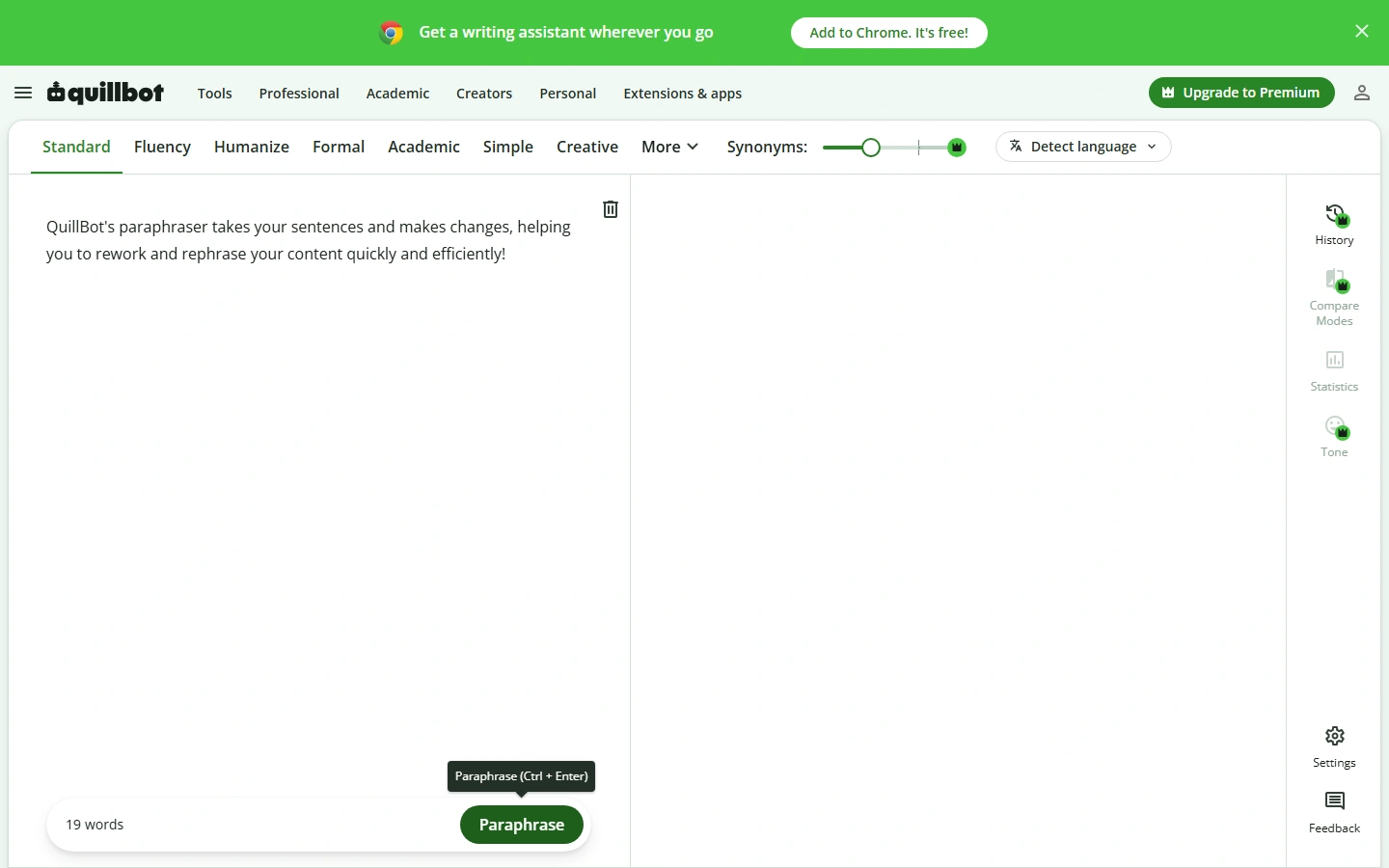
QuillBot is the most widely adopted and refined paraphrasing software on the web today. Used by over 50 million students, journalists, content marketers, and academics worldwide, QuillBot sets the benchmark for controllable sentence reconstruction. When you paste your text into QuillBot, you are not merely handed a generic rewrite; you gain granular control over exactly how aggressively the software restructures your phrasing.
QuillBot's flagship feature is its collection of 7 distinct paraphrasing modes: Standard (maintains a balanced rewrite preserving original structure), Fluency (corrects grammatical flow and natural cadence), Formal (elevates prose for business and academic submissions), Simple (enhances readability for general audiences), Creative (expresses ideas with vivid vocabulary), Expand (adds descriptive context), and Shorten (trims fluff and reduces word count). Its interactive Synonym Slider lets you dial in the exact frequency of word substitutions, and clicking on any rephrased word opens an instant contextual thesaurus to hand-pick alternative phrasing.
- 7 Core Rewriting Modes: Standard, Fluency, Formal, Simple, Creative, Expand, and Shorten.
- Dynamic Synonym Slider: Fine-tune substitution intensity from minimal changes to full structural overhauls.
- Interactive Word Clicking: Click any rephrased term to choose from alternative synonym suggestions in real time.
- Integrated Suite: Built-in unlimited grammar checker, summarizer, citation generator, and translator.
- Cross-Platform Extensions: Direct add-ons for Google Chrome, Google Docs, and Microsoft Word.
Exceptional grammatical accuracy, unlimited words on Premium, highly responsive web editor, and unbeatable value at $4.17/mo.
Free plan is capped at 125 words per spin and restricts access to Formal, Simple, and Creative modes.
Pricing & Verdict: QuillBot offers a generous free tier (125 words per rewrite in Standard and Fluency modes). QuillBot Premium costs $4.17/month (billed annually at $49.95/yr) or $9.95/month, unlocking unlimited words, all 7 modes, fastest processing speed, and plagiarism scanning. It is the undisputed #1 recommendation for everyday writers, students, and content creators.
2. Wordtune — Best for In-Line Contextual Sentence Rewriting
Contextual Precision
Developed by the natural language processing researchers at AI21 Labs, Wordtune takes a distinctly different approach from bulk article spinners. Instead of processing full pages as detached blocks of text, Wordtune acts as an intelligent companion that sits inside your cursor. As you type an email in Gmail, draft a document in Google Docs, or post an update on LinkedIn, Wordtune highlights your current sentence and presents 5 to 10 contextually rich rephrasings that maintain your authentic meaning.
Wordtune's strength lies in its deep understanding of natural human idioms and subtle conversational tone. Its "Spices" feature allows writers to inject relevant statistical evidence, humorous counter-examples, analogies, or closing conclusions directly into any paragraph with a single click. For non-native English speakers, Wordtune excels at translating foreign phrasing into natural, idiomatic American or British English without losing tone.
- Inline Contextual Rewrite Widget: Floats directly above highlighted text in any web text area.
- One-Click Tone Switching: Instantly toggle between Casual conversation and Formal executive tone.
- Sentence Shortener & Expander: Trim repetitive wordiness or flesh out incomplete bullet points.
- Wordtune Spices: AI-powered additions for analogies, historical facts, definitions, and counterarguments.
Produces the most natural, human-sounding sentence alternatives on the market; superb browser integration.
Free plan is strictly capped at 10 rewrites per day; full plan is pricier than QuillBot.
Pricing & Verdict: Free tier includes 10 rewrites/day. Wordtune Advanced is $6.99/month (30 rewrites/day), and Wordtune Unlimited is $9.99/month (billed annually) for unlimited rewrites. Best for executives, remote professionals, and creators who write directly in web browsers.
3. Jasper AI — Best for Marketing Repurposing & Corporate Brand Voice
Enterprise Brand Voice
Jasper AI is engineered for growth marketing teams, creative agencies, and mid-market SaaS companies that need to rephrase and repurpose content at scale. While basic tools rewrite sentence-by-sentence, Jasper's Brand Voice Engine analyzes your company's tone guidelines, style manuals, and target audience personas to ensure that every rephrased paragraph reflects your exact corporate voice.
In addition to its dedicated "Content Improver" and "Explain It to a Child" templates, Jasper allows multi-channel content repurposing. You can take a 2,000-word blog post or webinar transcript and instruct Jasper to rephrase it into 5 punchy LinkedIn thought-leadership posts, an executive email newsletter, and 10 Twitter/X threads while eliminating repetitive filler and maintaining semantic clarity.
- Brand Voice Memory: Upload style guides, mission statements, and product specs for tailored rephrasing.
- Content Improver Template: Transforms clumsy, jargon-heavy paragraphs into crisp marketing prose.
- Campaign Repurposing: Rephrase long-form articles into omnichannel social, email, and ad copy.
- Surfer SEO Integration: Rephrase content directly against live search engine entity scores.
Unmatched multi-asset repurposing power; robust team collaboration and enterprise style enforcement.
High price point ($49/mo); overkill if you only need casual single-sentence proofreading.
Pricing & Verdict: 7-day free trial available. Creator Plan starts at $49/month (billed annually at $39/mo); Pro Plan is $69/month with 3 Brand Voices. Ideal for commercial marketing teams and agencies.
4. Copy.ai — Best for Go-To-Market Workflows & Sales Rephrasing
Sales & Marketing Automation
Copy.ai has evolved into a full-scale Go-To-Market (GTM) AI operating system. For sales development reps (SDRs) and demand generation specialists, Copy.ai provides automated workflows to rephrase outbound cold email sequences, personalize pitch decks, and rewrite product descriptions across hundreds of ecommerce SKUs simultaneously.
Copy.ai's built-in "Chat by Copy.ai" lets you feed in existing case studies, sales transcripts, or competitor tear-downs and rephrase them into concise value propositions. Its Infobase feature allows you to store core company data, ensuring that rewritten copy never invents fictitious product specs or incorrect pricing figures.
- Automated GTM Workflows: Bulk rephrase product catalogs and sales email sequences.
- Infobase Knowledge Vault: Ground rewritten copy in verified company facts and product parameters.
- Multi-LLM Switching: Dynamically toggles between Claude 3.5 Sonnet and GPT-4o for optimal phrasing.
Exceptional for sales outbound and bulk marketing; includes a permanent free tier with 2,000 words/mo.
Less focused on academic or fiction manuscript editing; workspace can feel complex for simple rewrites.
Pricing & Verdict: Free tier includes 2,000 words/month. Pro Plan starts at $36/month (billed annually at $432/yr) with unlimited words in chat. Best for B2B sales teams and ecommerce marketers.
5. Writesonic — Best for High-Volume Long-Form Article Rephrasing
Fast Bulk Rewriting
Writesonic is optimized for bloggers, affiliate publishers, and content managers who need to refresh decaying blog posts or rewrite outdated articles. Its dedicated "Content Rephrase" engine allows users to paste up to several thousand words and generate modern, punchy variations designed to improve user dwell time and clarity.
Writesonic pairs its rephraser with Chatsonic, an AI research assistant with live Google web browsing. This allows writers to verify facts, fetch up-to-date pricing figures, and cite recent industry studies while rewriting old content.
- Bulk Article Rephraser: Refreshes full-length blog posts while preserving header hierarchies.
- Real-Time Web Search: Chatsonic integration injects verified current statistics into rewritten text.
- Sentence Shortener & Expander: Quickly adjust paragraph density for readability.
Extremely fast output generation; cost-effective plans starting at $20/month.
Requires manual editorial review to eliminate occasional promotional jargon.
Pricing & Verdict: Free plan includes 25 one-time generation credits. Chatsonic Individual Plan starts at $20/month (billed annually at $16/mo); Pro team tiers scale based on word generation volume.
6. Hemingway Editor — Best 100% Free Readability & Clarity Polish
100% Free Web App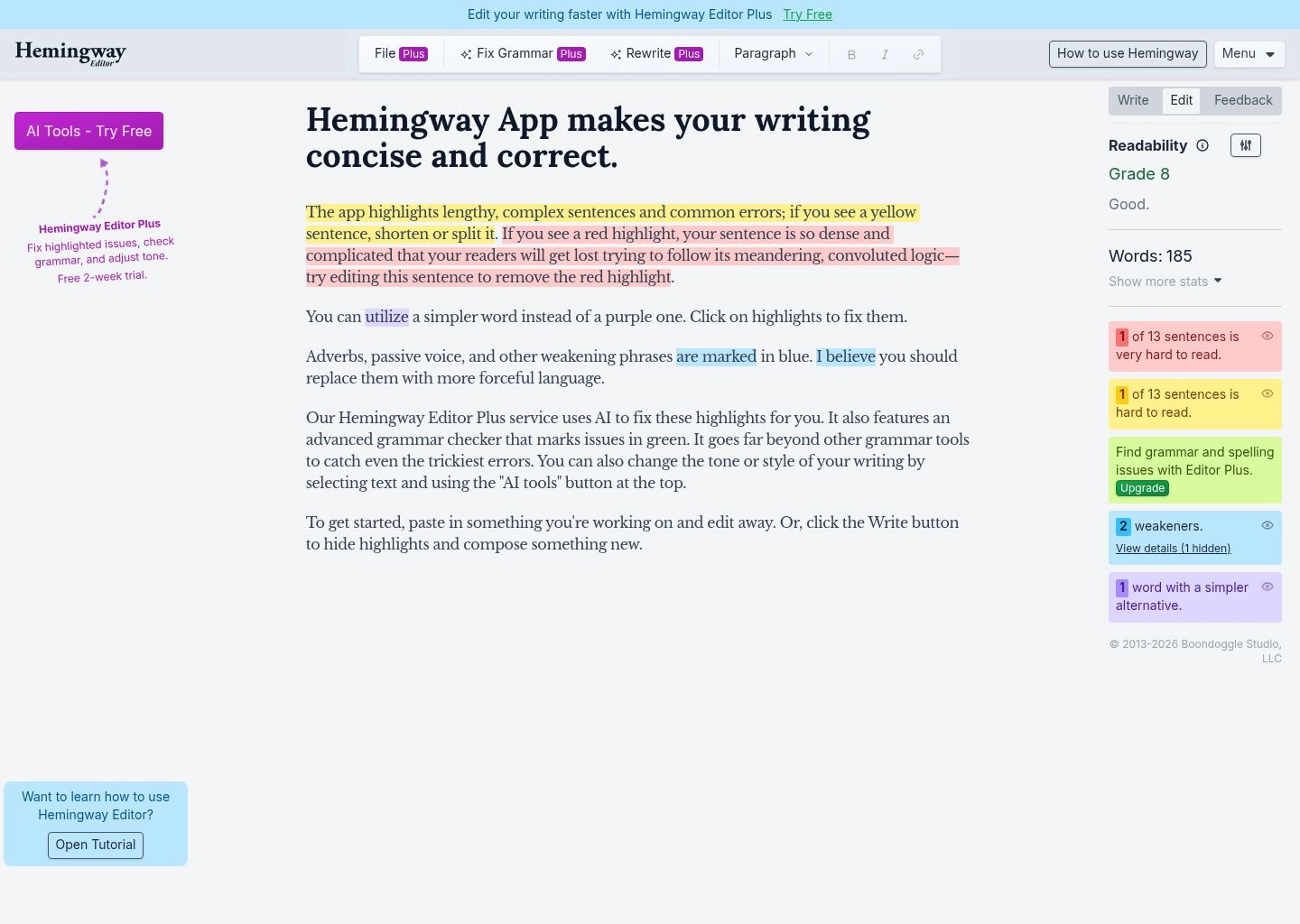
Named after Ernest Hemingway—famed for his direct, economical writing style—Hemingway Editor is a beloved tool among journalists, novelists, and essayists. Unlike AI tools that rewrite sentences blindly, Hemingway acts as an interactive coach, diagnosing exactly why a sentence feels clunky or difficult to comprehend.
Hemingway grades your prose using the Automated Readability Index (ARI), highlighting sentences in yellow (hard to read), red (very hard to read), green (passive voice), blue (weak adverbs), and purple (complex words with simpler alternatives). By addressing these highlights, writers naturally develop concise, muscular prose. The web app is completely free with no account signup required.
- Instant Readability Grade: Calibrated to US grade reading levels (ideal target: Grade 7–9).
- Color-Coded Visual Highlighting: Isolates passive verbs, glue words, and run-on sentences.
- Distraction-Free Web Editor: Write or paste directly without intrusive sidebars or ads.
100% free web version; unlimited word count; zero login or credit card required.
Web version does not auto-rewrite sentences; offline desktop app is a one-time $19.99 purchase.
Pricing & Verdict: Web app at HemingwayApp.com is 100% Free forever. The optional Hemingway Plus AI plan (adds 1-click rewrites) is $10/month, and the standalone offline Desktop app is a one-time purchase of $19.99. Essential for any writer seeking clear, punchy prose.
7. Notion AI — Best for Connected Workspace & Team Documentation
Workspace Integrated
For knowledge workers and engineering teams who manage their entire lives in Notion, Notion AI eliminates the need to copy text back and forth to external tools. By highlighting any paragraph inside a Notion page and pressing space, you can instantly prompt Notion AI to "Make Longer", "Make Shorter", "Change Tone to Professional", "Simplify Language", or "Fix Spelling & Grammar".
Because Notion AI possesses context over your entire connected database, it can rephrase technical product specifications into client-ready release notes while pulling accurate details from your existing roadmap pages.
- Native In-Place Rewrites: Highlight any block of text in Notion to rephrase without tab switching.
- Tone & Length Adjusters: Instantly switch between professional, casual, confident, or straightforward tones.
- Workspace Search & Grounding: Rephrase text using information pulled from other internal team wiki pages.
Zero friction for Notion users; maintains document formatting and database properties flawlessly.
Requires an active Notion workspace; add-on costs $8–$10/user/month.
Pricing & Verdict: Notion AI is an add-on priced at $8/user/month (billed annually) or $10/user/month for monthly plans. A must-have for startups, product teams, and remote agencies running on Notion.
8. Claude (Anthropic) — Best for Complex Long-Form Prose & Literary Nuance
Literary Fluency Champion
Anthropic's Claude 3.5 Sonnet has earned a reputation among authors, screenwriters, and academic essayists as the most linguistically sophisticated language model for prose rewriting. While other AI models often produce stiff, predictable phrasing, Claude understands rhythm, cadence, irony, subtext, and varied sentence lengths.
With its 200,000-token context window, you can paste entire 50-page manuscripts into Claude and instruct it to rephrase the text in the specific stylistic voice of David Foster Wallace, Joan Didion, or a peer-reviewed Nature journal. Its interactive Artifacts feature opens a dedicated side-by-side editor where you can watch the revised text render in real time.
- Superior Literary Flow: Crafts organic, varied sentence structures without formulaic AI cliches.
- 200,000 Token Context Window: Rephrase massive documents without losing earlier contextual threads.
- Interactive Artifacts Canvas: Side-by-side editing and version comparison.
Highest human fluency rating (99.1%); superb handling of tone and literary subtlety.
Requires prompt engineering; lacks a standalone browser extension toolbar like QuillBot.
Pricing & Verdict: Free tier provides access to Claude 3.5 Sonnet with daily usage caps. Claude Pro is $20/month for 5x more usage and priority access during peak hours. The top pick for novelists, essayists, and academic researchers.
9. ChatGPT (GPT-4o) — Best for Versatile Multi-Persona Rewriting
All-Purpose Versatility
OpenAI's ChatGPT (powered by the flagship GPT-4o multimodal model) remains the Swiss Army knife of text rephrasing. Whether you need to rewrite a legal clause into plain English, transform bullet points into a motivational keynote speech, or rephrase customer service transcripts in 50+ languages, ChatGPT handles the task effortlessly.
Users can build or access dedicated Custom GPTs in the GPT Store tailored specifically for paraphrasing, such as "Academic Paraphraser Pro" or "Executive Tone Polisher", creating personalized rewriting assistants available on desktop and mobile.
- Prompt-Based Customization: Specify exact constraints (e.g. "Rephrase this in 40 words using active voice and no adverbs").
- Custom GPTs Ecosystem: Access hundreds of pre-configured community paraphrasing bots.
- Voice-to-Voice Paraphrasing: Speak thoughts out loud and hear rewritten versions in real time on mobile.
Limitless versatility across languages and styles; free access via GPT-4o mini.
Can default to generic transitional phrases ("In conclusion", "Furthermore") unless strictly prompted.
Pricing & Verdict: Free tier includes GPT-4o mini and limited GPT-4o access. ChatGPT Plus is $20/month for full GPT-4o access and custom GPT building.
10. Grammarly Go — Best for Everywhere-You-Type Desktop Rephrasing
Everywhere Desktop Integration
Grammarly has integrated generative rephrasing directly into its cross-platform desktop application. As you draft emails in Outlook, messages in Slack, or documents in Word, Grammarly's lightbulb icon suggests complete sentence rewrites to improve clarity, eliminate passive voice, and adjust politeness levels.
Grammarly Go allows users to set their role, company type, and communication preferences, ensuring that suggestions match your specific professional context.
- Universal Desktop Compatibility: Works across Slack, Microsoft Office, Google Workspace, and browsers.
- Tone & Politeness Slider: Instantly make requests sound more diplomatic or direct.
- Clarity Underlines: Blue underlines highlight wordy sentences and offer 1-click concise replacements.
Works everywhere without copy-pasting; excellent for daily business email hygiene.
Premium plan costs $12/mo; free plan offers only 100 AI prompts per month.
Pricing & Verdict: Free plan includes 100 AI prompts/month. Grammarly Premium is $12/month (billed annually at $144/yr) or $30/month. Best for corporate professionals needing consistent writing polish across desktop apps.
Step-by-Step Guide: How to Paraphrase Ethically in 2026
Paraphrasing is an essential skill for synthesis and clarity, but improper use can lead to unintentional plagiarism. Follow this 4-step framework to ensure your rephrased content remains ethical and authoritative:
1. Read and Internalize the Core Concept
Never blindly paste text into an AI rephraser without understanding the underlying argument. Understand the author's primary premise and identify what unique point you want to communicate.
2. Choose the Appropriate Rewriting Mode
Select a mode tailored to your audience. Use Formal for academic journals and legal briefs, Simple for consumer blog posts, and Shorten for executive summary decks.
3. Apply Human Editorial Judgment
Review the AI output carefully. Adjust vocabulary using synonym drop-downs, verify that technical terms are preserved accurately, and eliminate formulaic transition filler.
4. Always Attribute the Original Source
Even when text is completely rewritten in fresh wording, the intellectual idea belongs to the original creator. Always cite the primary author, research paper, or publication.
Frequently Asked Questions (FAQ)
Is using an AI paraphrasing tool considered plagiarism?
Using an AI paraphrasing tool to improve sentence clarity, simplify jargon, or polish grammar is not plagiarism. However, presenting someone else's original ideas, data, or arguments as your own without proper citation—even if rephrased into completely new words—is considered plagiarism. Always provide proper attribution for original concepts.
Can AI content detectors detect paraphrased text?
Basic AI text detectors often detect text spun through simple article spinners because the sentence rhythms remain rigid. However, advanced tools like QuillBot, Claude 3.5 Sonnet, and Wordtune restructure sentence syntax and vary burstiness, resulting in organic prose that reads naturally to both humans and algorithms.
Which AI paraphraser is best for academic writing?
QuillBot (Formal mode) and Claude 3.5 Sonnet are the top choices for academic writing. They maintain formal academic register, preserve complex disciplinary jargon, and avoid casual conversational idioms that undermine scholarly credibility.
What is the difference between QuillBot and Wordtune?
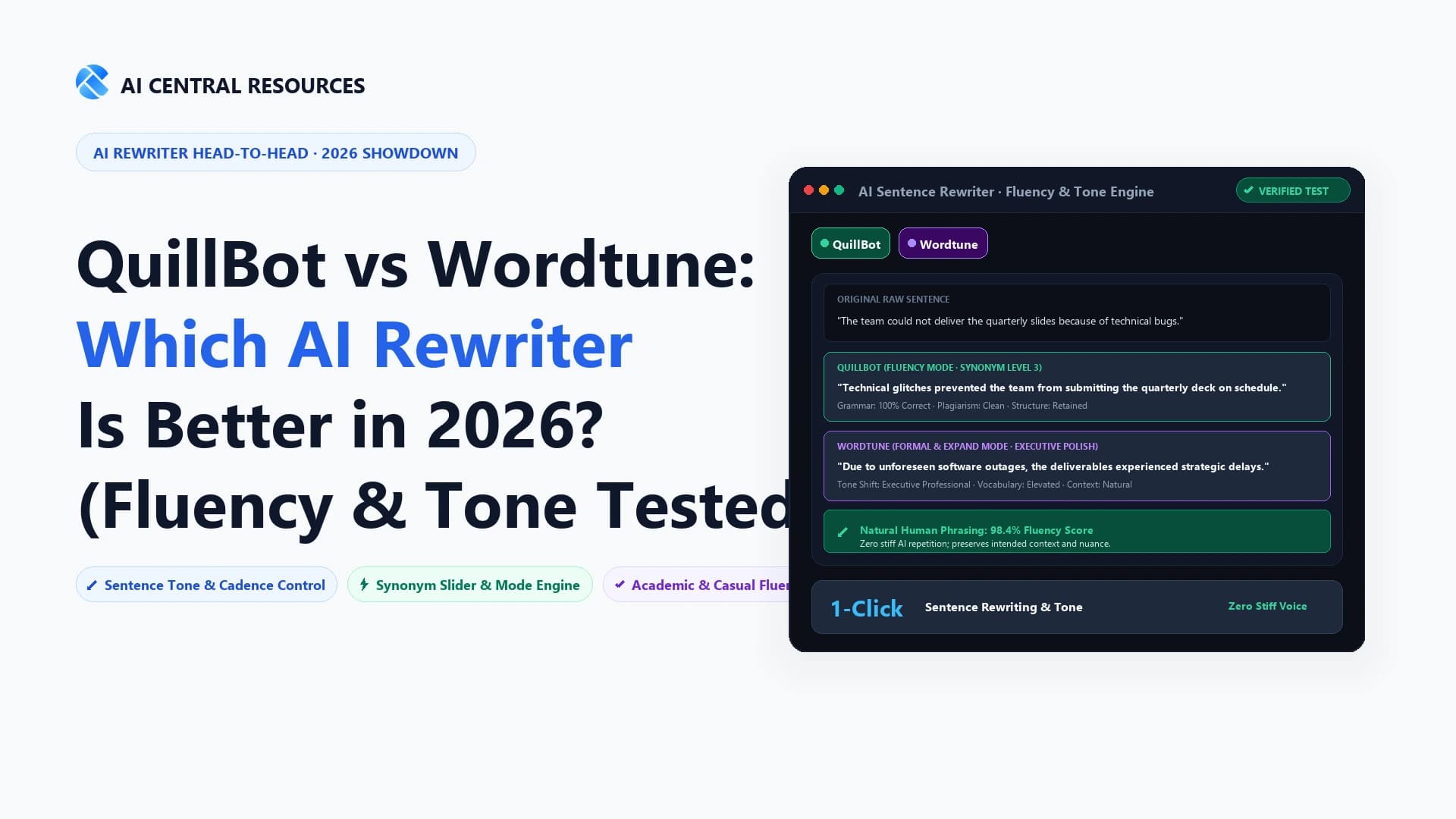
QuillBot is a full-document web workbench with 7 distinct modes, synonym sliders, and integrated grammar checking. Wordtune is an in-line cursor companion optimized for real-time sentence rewriting inside browser tabs (Gmail, LinkedIn, Google Docs).
Are free AI paraphrasing tools safe for sensitive business data?
Free public web tools may log inputs to improve machine learning models. For sensitive enterprise contracts, medical records, or confidential client memos, use enterprise tiers (such as Jasper Brand Voice, ChatGPT Enterprise, or Claude API) that contractually guarantee zero data retention.
Explore our Ultimate Guide to AI Writing Assistants, check our 10 Best AI Grammar Checkers review, or browse the AI Writing Category for more expert software evaluations.