
On-Model
Scale fashion ecommerce imagery with flat-lay to model, packshots, model swaps and garment recoloring.
Gallery
3 items

About On-Model
I assessed On-Model using its official product, solutions and pricing pages. The product is unusually specific about catalogue operations: flat-lay to model, packshot generation, garment recoloring, model swap, identity creation and detail repair. Its pricing page also publishes credit costs by operation and resolution, which makes it easier to estimate production volume than tools that only expose a generic credit bucket. The strongest operational features are reusable identities, saved visual templates, batch processing and a REST API. Those matter more to a catalogue team than a long list of one-off image effects. The limitations are also clear: free images carry a watermark, 4K and model upload are paid-tier features, and the current solutions page still labels shopper-facing virtual try-on and look-to-video as in development. Garment accuracy should still be checked before publishing. On-Model is a sensible shortlist candidate for brands processing recurring SKU drops and wanting a consistent visual style. The free plan is a practical quality check; small shops that only need occasional lifestyle product backgrounds may prefer a simpler general product-photo editor. This is a documentation-based review, not a hands-on batch benchmark.

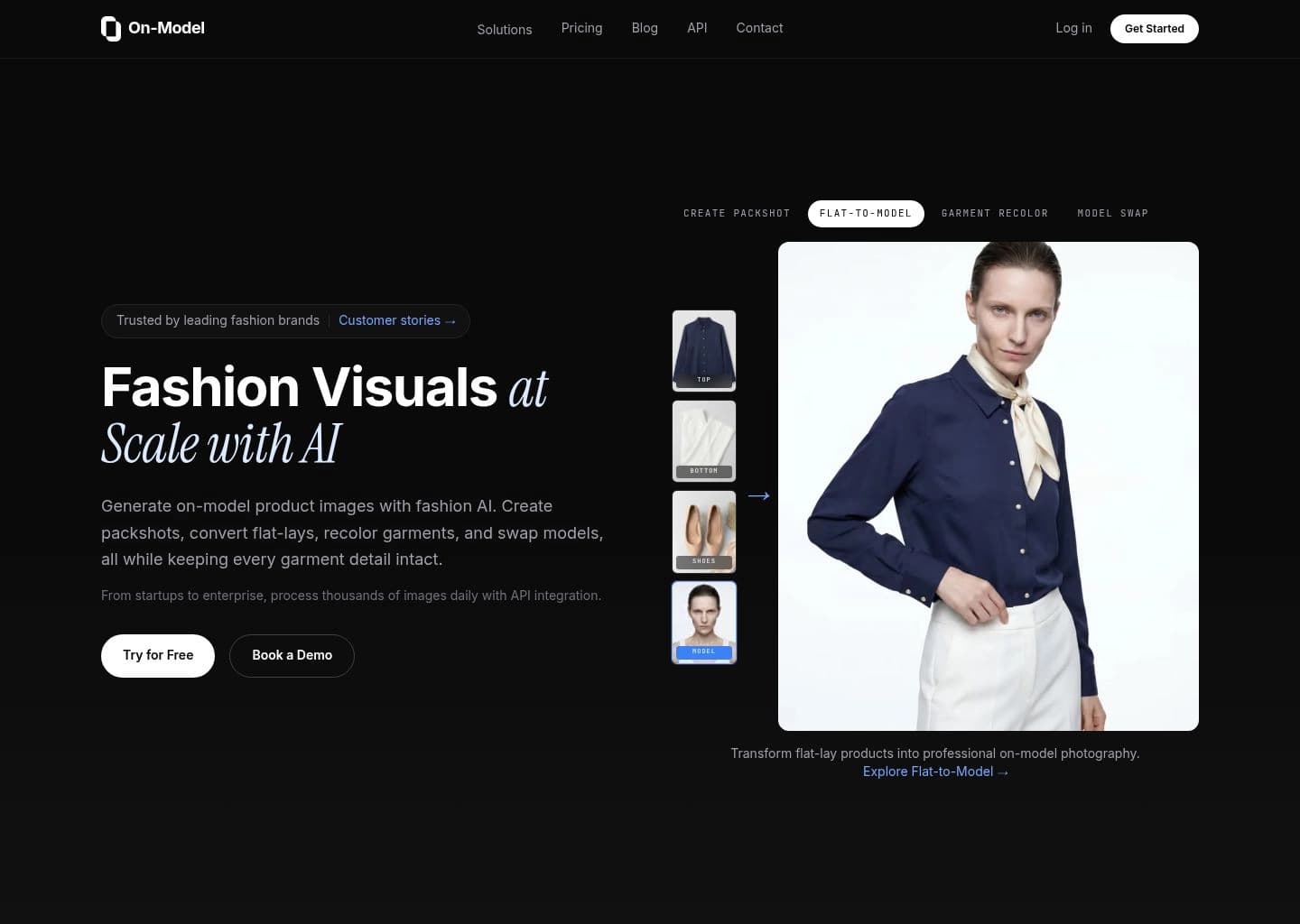
On-Model is a fashion ecommerce image-production platform from PiktID. It converts flat-lay garment photos into realistic on-model imagery, creates clean product packshots, swaps models in existing product photos and recolors garments while aiming to preserve the original fabric, print and construction details.
Its workflow is designed for catalogue production: teams can create reusable model identities and visual templates, upload product folders for batch jobs, and connect through a REST API. Outputs are available up to 4K on eligible plans, with team collaboration and managed review options on Pro and enterprise tiers.
On-Model is aimed at apparel brands, ecommerce operators and agencies processing many SKUs. Its free tier is useful for testing, while higher-volume teams should compare credit usage and the limits of each plan before moving an entire catalogue.
Key Features
- Flat-lay and ghost-mannequin to on-model fashion imagery
- Packshot creation in multiple ecommerce-ready styles
- Model swap for existing product photos
- Garment recoloring with fabric-detail preservation
- Reusable AI model identities and brand presets
- Bulk folder processing for large product catalogues
- REST API and SDK integrations
- Up to 4K image output on eligible plans
Pros
- Free plan provides a meaningful monthly image allowance
- Fashion-specific workflows focus on catalogue accuracy
- Reusable identities and templates help keep collections consistent
- Batch processing and API support suit larger ecommerce operations
Cons
- Free outputs are watermarked and limited to 1080p
- Higher-resolution and model-swap workflows consume more credits
- The published Basic and Pro prices are annual-billing equivalents
- Virtual try-on for shoppers and video generation are listed as in development on the solutions page
Pricing & Plans
On-Model has a free-forever plan with 75 credits per month, enough for up to 25 images, 10 AI models and watermarked 1080p outputs. The official pricing page states that all paid plans include a 14-day free trial.
The Basic plan is €17/month billed annually for 120 credits. Pro is €89/month billed annually for 800 credits, 50+ models, up to 4K output, collaboration, managed review and API access. Enterprise pricing is custom, with unlimited credits and images, custom integrations and dedicated account management.
One-time credit top-ups are also available, and operation costs vary by task and output resolution: packshots and flat-to-model start at 3 credits per image, while model swap starts at 5 credits. Confirm the live plan selector for monthly billing and current regional prices.
Claim Verified Creator Badge
Are you the founder of On-Model? Display this listing's verified badge on your website to show your customers that your product has been vetted and listed on AI Central Resources.
<a href="https://www.aicentralresources.com/tool/on-model" target="_blank" rel="noopener">
  <img src="https://www.aicentralresources.com/badges/featured-badge-dark.svg" alt="Featured on AICentralResources" width="200" height="54" style="border: none;" />
</a>
* Place this HTML snippet in your website's footer, landing page, or press section. This creates a search-friendly backlink directly to your verification page.
Frequently Asked Questions
It helps fashion brands create or adapt digital product imagery using AI, with workflows such as on-model photography, model changes, virtual try-on or product-image editing depending on the platform.
Check the vendor's current commercial-use licence and plan restrictions. Always review generated garment details before publishing product-page images.
Bulk processing and API support vary by plan and provider. Check the feature list for SKU batch limits, supported formats and integration requirements.
Compare the credit cost per finished image at the resolution you need, not just the monthly subscription price. Include retries, top-ups and API fees in your estimate.
Run representative products through the tool, including detailed prints, logos, dark fabrics, complex folds and multiple garment types. Compare output accuracy and model consistency against the original photos.
Similar AI Tools to On-Model
View all alternatives of On-Model
The New Black AI
Create AI fashion models, product visuals, try-ons, videos and tech packs in one fashion studio.

FASHN.ai
Generate on-model fashion photos, virtual try-ons and product visuals with a fashion-focused AI app and API.

VModel AI
Access fashion try-on, clothing-change and other AI models through a pay-as-you-go API platform.

Lalaland AI (Browzwear)
Lalaland's AI fashion model technology now sits within Browzwear's enterprise AI model library.

Botika
AI fashion models that turn flat lays into on-model photos and videos

WearView
AI fashion model generator — studio-quality on-model photos in 30 seconds, 90% less than a photoshoot