
Khroma
Free AI color palette generator that learns your taste and creates endless personalized palettes for designers
Gallery
4 items



About Khroma
Testing Khroma's personalized color engine revealed a delightfully fast workflow: after training on 50 selected colors, its neural network generated infinite harmonious palettes, gradients, and typography pairings tailored to my taste. Searching palettes by hue or accessibility contrast is instant. It focuses exclusively on color curation and lacks automated export into design tokens like Tailwind CSS variables. Being 100% free with no account barrier, it is an indispensable bookmark for every UI/UX designer and branding specialist.
Khroma is a free AI color palette generator that learns your personal color aesthetic and generates infinite personalized palettes tailored to your design taste. Unlike generic color tools that suggest palettes from a fixed database, Khroma trains a neural network specifically on your preferences: you select 50 colors you love from a large grid, and Khroma uses those choices to model your aesthetic and generate palettes you'll actually find usable and attractive.
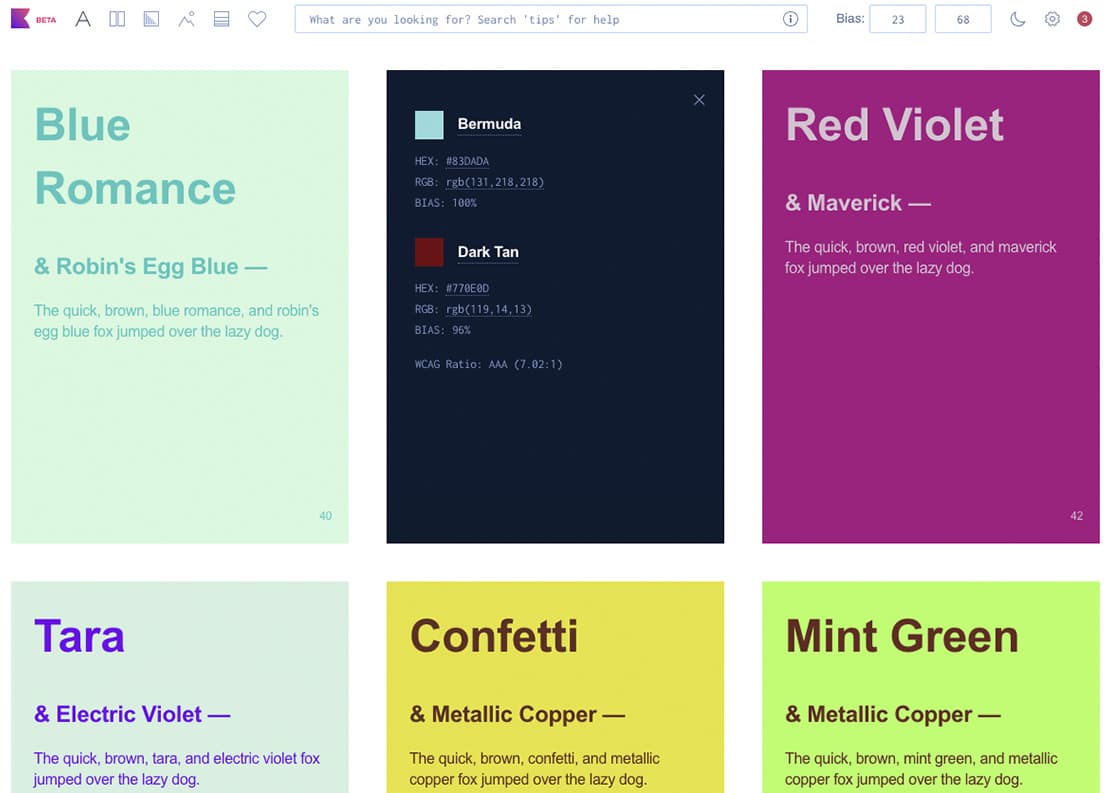
The Khroma experience is split into four generation modes: Color Pairs (two-color combinations with typography preview), Palettes (4-6 color sets shown on branded layouts), Gradients (smooth transitions between your preferred hues), and Custom (preview your palette on different design mockups). Every generated palette shows hex codes, RGB values, and contrast ratio accessibility scores, making it immediately actionable in design tools. Liked palettes can be saved to a personal collection and exported for use in Figma, Adobe, or CSS.
Khroma is completely free with no paid tier, making it the only professional AI tool in this list that costs nothing to use indefinitely. Created by Adam Grabowski, Khroma is particularly popular among graphic designers, brand strategists, and web designers who need a starting point for color system development. It fills a specific and underserved gap: most AI design tools focus on image generation or layout, while Khroma is exclusively and deeply focused on the color selection workflow that sits upstream of every other design decision.
Key Features
- Personal AI model training — select 50 colors you love from a large grid and Khroma trains a neural network on your specific color aesthetic to generate personalized palettes
- Four generation modes — Color Pairs, Palettes (4-6 colors), Gradients, and Custom mockup previews, each showing your palette applied to different design contexts
- Typography preview — color pairs are shown with real typography combinations to help designers evaluate readability and visual hierarchy simultaneously
- Accessibility scoring — every generated pair shows WCAG contrast ratios to confirm text legibility meets accessibility guidelines
- Hex, RGB, and HSL values — every color is displayed with full technical specifications ready to copy into Figma, Adobe tools, or CSS
- Palette saving and collections — bookmark liked palettes to your personal Khroma collection for later reference and export
- Unlimited generation — generate as many palettes as needed with no usage limits, credit system, or generation caps
- Retrain at any time — update your 50-color selection to shift your AI model toward a different aesthetic as your design preferences evolve
Pros
- Completely free forever with no paid tier, no ads, and no usage limits — one of the most generous free AI design tools in the market
- Personal AI model produces palettes that feel genuinely tuned to your taste rather than generic algorithmic suggestions
- Accessibility contrast scoring is built in — eliminates a separate step of checking WCAG compliance on chosen color combinations
- Works as an upstream tool for any design workflow — Figma, Sketch, Adobe, CSS, or Tailwind — colors are just hex codes that copy anywhere
- Zero friction to start — no account creation, credit card, or download required; visit the site and begin selecting colors immediately
- Created specifically for designers — the typography and mockup previews show colors in realistic design contexts rather than abstract swatches
Cons
- Requires selecting 50 initial colors before generating — a 5-10 minute setup investment before the AI model becomes useful
- No export to specific design tool formats — palettes export as hex codes only, not Figma styles, Adobe Swatch files, or CSS custom properties
- No team or organization features — each user trains an individual model with no sharing or collaboration on brand palettes
- Color generation is limited to the modes provided — no prompt-based color generation from descriptions like 'sunset ocean' or 'tech startup teal'
- The AI model improves only when you retrain from scratch — there's no incremental feedback loop like thumbs up/down on individual palettes
- No integration with any design tool — requires manual hex code copying into Figma, Illustrator, or other tools
Pricing & Plans
100% Free Forever ($0, personalized AI color palette generator, unlimited palettes, no card required)
Claim Verified Creator Badge
Are you the founder of Khroma? Display this listing's verified badge on your website to show your customers that your product has been vetted and listed on AI Central Resources.
<a href="https://www.aicentralresources.com/tool/khroma" target="_blank" rel="noopener">
  <img src="https://www.aicentralresources.com/badges/featured-badge-dark.svg" alt="Featured on AICentralResources" width="200" height="54" style="border: none;" />
</a>
* Place this HTML snippet in your website's footer, landing page, or press section. This creates a search-friendly backlink directly to your verification page.
Connect with Khroma
Frequently Asked Questions
Khroma is a free AI color tool that trains a neural network on your personal color preferences. You select 50 colors you like from a large grid, Khroma builds an AI model of your aesthetic, and then generates infinite color pairs, palettes, gradients, and mockup previews that match your taste. The result is personalized palettes rather than generic algorithmic suggestions.
Yes, completely. Khroma has no paid tier, no subscription, no credits, and no ads. It is 100% free forever. The creator built it as a gift to the design community and has maintained it free since its launch.
Most designers report that Khroma's suggestions feel genuinely personalized after the initial 50-color training. The AI learns not just specific colors but the broader aesthetic pattern in your preferences (warm vs cool, saturated vs muted, analogous vs complementary). The more deliberately you select your initial 50 colors, the more accurate the generated palettes will be.
Yes. Color palettes are not copyrightable, and Khroma imposes no restrictions on commercial use of any palette generated. You can use Khroma-generated palettes in any client work, commercial product, or published design without attribution or fees.
Coolors and Adobe Color generate palettes from algorithms or color theory rules. Khroma generates palettes from a model trained on your specific preferences. Coolors is faster to start (no training required); Khroma produces more personalized results after the initial setup. Adobe Color integrates into Creative Cloud; Khroma is standalone and platform-agnostic.
Similar AI Tools to Khroma
View all alternatives of Khroma
Canva AI
Your all-in-one AI assistant for creative design and content generation

Figma AI
The industry-standard design platform — now with AI that designs, prototypes, and codes alongside your team

Kittl
AI-powered graphic design for logos, merch, and print — with professional typography and multi-model AI generation

Microsoft Designer
Free AI-powered design tool from Microsoft — create graphics, images, and social posts with DALL-E and Copilot built in

Framer AI
AI website builder that goes from prompt to live published site in minutes — no code, no separate hosting

Recraft
AI design tool that generates native SVG vectors — brand-consistent icons, illustrations, and images at scale